Best Kwikset Smart Locks for Ultimate Home Security
You get top-tier security with the Kwikset Halo Wi-Fi Smart Lock in Matte Black, featuring ANSI/BHMA Grade 2 certification, SmartKey protection against picking and bumping, and built-in 2.4 GHz Wi-Fi for remote access and real-time alerts. It supports up to 250 user codes, geofencing, and integrates with Alexa and Google Assistant. Battery life lasts 6 to 12 months, and installation takes minutes with a screwdriver. More details follow on other models and key comparisons.
We are supported by our audience. When you purchase through links on our site, we may earn an affiliate commission, at no extra cost for you. Learn more. Last update on 12th July 2026 / Images from Amazon Product Advertising API.
Notable Insights
- Kwikset Halo offers built-in Wi-Fi and remote access via app for real-time control and monitoring without a hub.
- All models feature SmartKey Security to resist picking, bumping, and drilling, allowing DIY re-keying in seconds.
- Halo supports up to 250 access codes and integrates with Alexa and Google Assistant for voice control.
- Powerbolt 250 and SmartCode 955 include intrusion alerts, tamper alarms, and vacation mode for enhanced security.
- BHMA Grade 2 certified locks endure 100,000+ cycles and offer superior forced entry resistance for main entry doors.
Kwikset Halo Wi-Fi Smart Lock (Matte Black)
If you want a smart lock that connects directly to Wi-Fi without needing a separate hub, the Kwikset Halo Wi-Fi Smart Lock in matte black is a strong choice for homeowners who value convenience and real-time control. I can lock or open my door from anywhere using the app, and geofencing automatically opens it when I arrive. The backlit keypad holds up to 250 codes, ideal for sharing temporary or permanent access. It alerts me if someone tampers with the lock, and auto-lock boosts security. I use voice commands through Alexa or Google Home. It fits most standard doors, installs easily, and comes with solid warranties.
Best For: Homeowners seeking a hub-free Wi-Fi smart lock with remote access, voice control, and robust access management for family, guests, or service providers.
Pros:
- Connects directly to Wi-Fi without a hub and allows remote lock/unlock and geofencing via the Kwikset app
- Supports up to 250 unique access codes with flexible sharing options and real-time intrusion alerts
- Compatible with Alexa and Google Home for voice control and integrates with smart home automations
Cons:
- Requires frequent battery changes due to Wi-Fi and touchscreen usage
- App interface can be slow or unresponsive at times
- Limited to standard door thicknesses and may not fit all door types without adjustments
Kwikset Powerbolt 250 Keypad Deadbolt (Satin Nickel)
The Kwikset Powerbolt 250 Keypad Deadbolt in Satin Nickel stands out for homeowners who want reliable, keyless entry without sacrificing control or security. I like its bright LED keypad, which turns on with a tap, so I can enter codes easily at night. It supports up to 25 permanent codes and 5 temporary ones, plus a programming code to manage access. After 3 wrong attempts, it triggers an alarm and locks out the keypad for one minute. I can set auto-lock from 30 seconds to 10 minutes, or use Vacation Mode to disable the keypad remotely. SmartKey technology lets me re-key it in seconds. It runs on 4 AA batteries, lasts over a year, and installs with just a screwdriver.
Best For: Homeowners seeking secure, keyless entry with customizable access and smart features for convenience and peace of mind.
Pros:
- Bright LED keypad enables easy code entry in low-light conditions
- Supports up to 25 permanent and 5 one-time use codes for flexible access management
- SmartKey Security allows quick re-keying without professional help and resists advanced break-in techniques
Cons:
- Requires 4 AA batteries (not included), adding to initial setup cost
- Keypad lockout after 3 failed attempts may inconvenience legitimate users
- No smart home integration or remote access via app, limiting automation capabilities
Kwikset Halo Wi-Fi Smart Lock Satin Nickel

I rely on the Kwikset Halo Wi-Fi Smart Lock in Satin Nickel when I want full remote control without needing a separate hub, making it ideal for homeowners who value seamless, standalone smart access. I can lock, open, and monitor activity from anywhere using the Kwikset app, and I appreciate real-time alerts for tampering or invalid codes. The backlit keypad holds up to 250 codes, and I easily assign temporary or permanent access. It works with Alexa and Google for voice control, and geofencing auto-opens the door as I approach. Auto-lock boosts security, and installation takes minutes with just a screwdriver. It fits most doors, and I trust the lifetime mechanical warranty.
Best For: Homeowners seeking a reliable, hub-free Wi-Fi smart lock with remote access, voice control, and easy installation for seamless keyless entry and enhanced security.
Pros:
- Wi-Fi enabled with no hub required, allowing full remote control and real-time notifications via the Kwikset app
- Supports up to 250 customizable access codes and flexible access scheduling for family and guests
- Integrates with Alexa and Google Assistant for voice control and includes geofencing and auto-lock features for added convenience and security
Cons:
- Limited to doors with standard thickness (1-3/8 to 1-3/4 inches), which may not fit all door types
- 1-year warranty on electronics may be short compared to competitors offering longer coverage
- Potential dependency on home Wi-Fi stability, as remote features may be affected during outages
Kwikset Halo Wi-Fi Smart Lock (Satin Nickel)
You’ll find the Kwikset Halo Wi-Fi Smart Lock (Satin Nickel) especially well-suited if you want a hub-free smart lock with reliable remote access and strong security features. I use its Wi-Fi connectivity to lock and open the door from anywhere through the Kwikset app, which also sends real-time alerts for tampering or failed code attempts. The backlit keypad supports 250 unique codes, and geofencing opens the door as I approach. It works with Alexa and Google Assistant for voice control. Auto-lock engages after I leave, and Grade AAA certification confirms its durability. I installed it myself in minutes, and it fits most standard doors.
Best For: Homeowners seeking a reliable, hub-free smart lock with remote access, strong security, and seamless smart home integration.
Pros:
- Wi-Fi enabled for remote control and real-time alerts without requiring a hub
- Supports up to 250 unique access codes with backlit keypad and geofencing for keyless convenience
- Integrates with Alexa and Google Assistant for voice control and automation
Cons:
- Limited to 1-year electronics warranty, which is shorter than some competitors
- No support for Apple HomeKit or Bluetooth-only mode
- Requires strong Wi-Fi signal for consistent remote performance
Kwikset SmartCode 955 Electronic Lever (Satin Nickel)
While many smart locks cater to tech enthusiasts, the Kwikset SmartCode 955 Electronic Lever (Satin Nickel) stands out for homeowners who prioritize long-term reliability and straightforward keyless access without frequent battery changes. I rely on its bright LED keypad for easy entry at night, and one 9V battery powers it for at least three years. It’s built tough, tested to 500,000 cycles and BHMA Grade 2 certified. I can assign up to 30 user codes, enable auto-lock, or use passage mode when needed. SmartKey Security lets me re-key it in seconds, and an intrusion alert kicks in after three wrong attempts, boosting peace of mind.
Best For: Homeowners seeking reliable, long-term keyless entry with minimal maintenance and strong security features.
Pros:
- Bright LED keypad enables easy use in low-light conditions
- Long battery life (up to 3 years on one 9V battery) reduces maintenance
- BHMA Grade 2 certified and tested to 500,000 cycles for durability and security
Cons:
- No Wi-Fi or remote access, limiting smart home integration
- Keypad only supports up to 30 user codes, which may not suffice for larger households
- Satin nickel finish may show fingerprints and require frequent cleaning
Kwikset Halo Wi-Fi Smart Lock (Venetian Bronze)
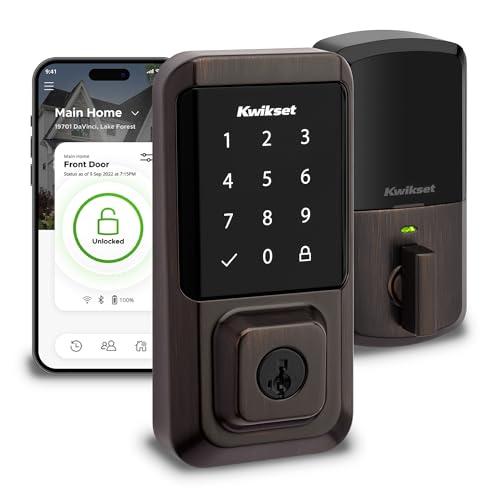
The Kwikset Halo Wi-Fi Smart Lock in Venetian Bronze stands out for homeowners who want reliable, hub-free smart access without sacrificing physical security. I love that it connects directly to Wi-Fi, so I can lock and open the door from anywhere using the Kwikset app. It supports up to 250 unique codes, and I can share temporary or scheduled access with guests. It works with Alexa and Google Assistant for voice control, and I’ve set up automations for added convenience. The lock is ANSI Grade 1 certified, ensuring top-tier strength, and it sends alerts if someone tries to tamper with it. I set mine to auto-lock after I enter, which gives me peace of mind, and installation took me under 15 minutes with just a screwdriver. It fits standard door thicknesses and adjustable backsets, and I appreciate Kwikset’s lifetime mechanical warranty and one-year electronics coverage, which shows confidence in their product.
Best For: Homeowners seeking a secure, Wi-Fi-enabled smart lock with hub-free remote access, voice control compatibility, and easy self-installation.
Pros:
- Wi-Fi connectivity allows remote lock/unlock and real-time notifications without requiring a separate hub
- Supports up to 250 user codes with flexible access sharing and geofencing for automatic unlocking
- ANSI Grade 1 certified for maximum security with intrusion alerts and customizable auto-lock features
Cons:
- Limited to Amazon Alexa and Google Home integration, lacking support for Apple HomeKit or other ecosystems
- Electronic components covered by only a 1-year warranty, which may be short for a smart device
- Venetian Bronze finish may show fingerprints or smudges, requiring frequent cleaning for appearance
Kwikset Halo Wi-Fi Smart Lock

A Wi-Fi-equipped homeowner who values seamless remote access without relying on extra hardware will find the Kwikset Halo Wi-Fi Smart Lock a strong choice. I appreciate that it connects directly to my 2.4 GHz Wi-Fi, letting me lock, open, and monitor activity from anywhere using the Kwikset app. The backlit keypad supports 250 codes, and geofencing auto-unlocks as I approach. It works with Alexa and Google Assistant for voice control and automations. Grade AAA security, intrusion alerts, and auto-lock boost safety. Installation is straightforward with just a screwdriver, fits most doors, and includes a lifetime mechanical warranty-solid, reliable, and well-built.
Best For: Homeowners who want a reliable, hub-free smart lock with robust remote access, strong security features, and seamless integration into Wi-Fi and smart home ecosystems.
Pros:
- Built-in Wi-Fi connectivity eliminates the need for a separate hub and enables remote control via the Kwikset app
- Supports up to 250 unique access codes and advanced features like geofencing, auto-lock, and real-time intrusion alerts
- Integrates with Amazon Alexa and Google Assistant for voice control and home automation
Cons:
- Requires a 2.4 GHz Wi-Fi network, which may limit compatibility with newer dual-band routers
- No support for Apple HomeKit or Bluetooth backup connectivity
- Electronic components are covered by only a 1-year warranty, despite the lifetime mechanical warranty
Kwikset Powerbolt 250 Keypad Deadbolt Lock

If you want reliable, keyless home security without the hassle of constant maintenance or professional installation, the Kwikset Powerbolt 250 Keypad Deadbolt Lock is an excellent choice-especially for homeowners who value both convenience and control. I appreciate its 10-button keypad, which supports 25 permanent and 5 temporary codes, plus a programming code to manage access. The auto-lock feature secures the door at intervals I set, and Vacation Mode disables the keypad remotely. SmartKey technology lets me re-key it in seconds using any KW1 key. With LED lighting, 4 AA batteries lasting a year, and tool-free setup using the BILT app, installing and using it feels straightforward and practical.
Best For: Homeowners seeking reliable, keyless entry with easy self-installation and flexible access control for family and guests.
Pros:
- Supports up to 25 permanent and 5 one-time guest codes with customizable programming for convenient access management
- SmartKey Security allows quick re-keying in seconds without a locksmith, enhancing long-term security
- Auto-lock, Vacation Mode, and tamper-resistant intrusion alert provide robust, hands-free protection
Cons:
- Requires 4 AA batteries (not included) and lacks low-battery reminders in some user reports
- Keypad may be prone to wear over time with frequent use, potentially affecting responsiveness
- Limited smart home integration compared to Wi-Fi-enabled smart locks
Kwikset HomeConnect Smart Lock Satin Nickel

Wondering who benefits most from the Kwikset HomeConnect Smart Lock in Satin Nickel? If you want reliable, keyless entry with strong security, this lock’s for you. I appreciate its Z-Wave Long Range connectivity-it works seamlessly with Ring Alarm and SmartThings when paired with a hub. The BHMA Grade 2 rating means it’s durable and resistant to tampering, and SmartKey tech lets me re-key it in seconds. I get 250 user codes, a back-lit keypad, and auto-lock settings from 30 seconds to 10 minutes. It runs on 4 AA batteries, lasting about a year. Installation was quick with just a screwdriver, fitting standard doors easily.
Best For: Homeowners seeking a durable, smart keyless entry solution with strong security features and seamless integration into Z-Wave smart home systems like Ring Alarm and SmartThings.
Pros:
- BHMA Grade 2 certification and Kwikset SmartKey technology provide robust, tamper-resistant security
- Supports Z-Wave Long Range and SmartStart for reliable, easy hub pairing and whole-home connectivity
- Offers 250 customizable user codes, back-lit keypad, and adjustable auto-lock scheduling for convenience
Cons:
- Requires a separate Z-Wave hub for full smart functionality, not included with purchase
- Auto-lock feature may be inconvenient for households with frequent comings and goings
- Limited to Satin Nickel finish and traditional style, less ideal for modern or minimalist decor preferences
Kwikset SmartCode 270 Keyless Deadbolt Lock

You’ll want the Kwikset SmartCode 270 Keyless Deadbolt Lock if you need reliable, no-key access without sacrificing security-especially if you manage entry for family, guests, or renters. I like that it supports 50 user codes and 10 one-time codes, so I can grant temporary access without hassle. Its Grade 2 BHMA certification means it’s built stronger than most standard locks, and SmartKey Security lets me re-key it in seconds. The auto-lock feature engages after 30 seconds to 10 minutes, and after three wrong attempts, it triggers an alarm and locks the keypad. I appreciate the LED lighting for night entry, and the 12-month battery life runs on common AA batteries. Installation is simple with just a screwdriver, and the BILT app guides me step by step.
Best For: Homeowners, property managers, or hosts who want secure, keyless entry with flexible access control for family, guests, or renters.
Pros:
- Supports up to 50 user codes and 10 one-time codes for convenient, customizable access
- Grade 2 BHMA certification and SmartKey Security offer enhanced durability and protection against break-ins
- Easy installation with step-by-step BILT app guidance and common AA batteries for long battery life
Cons:
- Does not include batteries, requiring an additional purchase
- One-time codes may not be easily trackable without manual record-keeping
- Auto-lock intervals are not customizable beyond preset options
Factors to Consider When Choosing a Kwikset Smart Lock
You’ll want to check if the Kwikset smart lock connects via Wi-Fi or needs a hub, since that affects remote access and setup cost. Make sure it works with your existing smart home system, like Alexa or Google Home, and supports multiple access codes so you can grant temporary or permanent entry securely. Look for models with ANSI/BHMA Grade 2 certification, strong battery life-usually 6 to 12 months-and easy code management through a reliable app.
Wi-Fi Connectivity Options
While some smart locks require a separate hub for remote access, Kwikset models with built-in Wi-Fi connect directly to your 2.4 GHz home network, letting you lock and open the door from anywhere using a smartphone app. You’ll get real-time notifications for every lock event, including alerts if someone tries an invalid code or tampers with the lock. With geofencing, the door can open automatically as you approach, making entry seamless. Wi-Fi models also support voice commands through assistants, giving you hands-free control. Just make sure your home Wi-Fi is stable-consistent connectivity is key for remote access and timely alerts. These features work best when your router supports 2.4 GHz bandwidth, so check your network before buying. Overall, built-in Wi-Fi simplifies setup and boosts convenience without extra hardware.
Smart Home Compatibility
When selecting a Kwikset smart lock, one of the most important factors to take into account is how well it integrates with your existing smart home ecosystem. You’ll want a model with built-in Wi-Fi, so you can control it remotely via an app without needing a separate hub. Make sure it works with your voice assistant, like Alexa or Google Assistant, so you can lock doors or check status using just your voice. Look for geofencing support, which automatically locks or open the door based on your phone’s location. Some models sync with broader security systems, triggering actions like arming alarms or turning on lights when you lock up. Choose a lock that uses strong encryption to keep your data safe from hacking. These features give you convenience and security, but check compatibility with your current devices before buying.
Access Code Management
How do you manage who enters your home-and when? Kwikset smart locks give you full control with support for up to 250 unique access codes, so you can assign individual codes to family, friends, or service providers. You can create permanent, scheduled, or temporary codes, ensuring people only enter when they should. One-time use codes add security for short visits, like house cleaners or guests. A dedicated programming code lets you manage these settings without opening the door. Need added privacy while away? Use Vacation Mode to disable the keypad remotely and block all code access. These features make it easy to monitor and adjust entry without rekeying locks. With flexible options and consistent performance, Kwikset simplifies daily access management while keeping your home secure.
Security Certification Levels
Since security certifications reflect a lock’s ability to withstand real-world threats, choosing a Kwikset smart lock with the right rating guarantees lasting protection. You’ll want to look for Grade AAA mechanical ratings, the highest available, indicating top-tier durability and attack resistance. Kwikset models with BHMA Grade 2 certification have passed 100,000 operational cycles and meet strict strength standards, making them ideal for main entry doors. They’re tested against forced entry, cylinder attacks, and drilling, so you know they’ll hold up under pressure. Grade 3 locks, while functional, only require 50,000 cycles and offer basic security-better suited for interior use. Higher grades mean better tamper resistance and long-term reliability, especially in high-traffic or vulnerable areas. Always check for certified performance data before deciding, since it gives you clear, measurable insight into what the lock can handle.
Battery Life Performance
A single 9V battery can power certain Kwikset smart lock models for up to three years under normal use, while models using four AA alkaline batteries typically last at least 12 months. You’ll appreciate how energy-efficient designs maintain reliable performance, even with daily use of keyless entry and auto-lock. Your actual battery life may vary based on how often you use the keypad, how frequently the lights activate, and the surrounding temperature. Most models include low-battery indicators, so you’ll get alerts well before power runs out-this helps prevent accidental lockouts. Plan to replace batteries proactively when the warning appears. You’ll find that 9V models reduce long-term maintenance, while AA models offer easier battery access for some users. Choose based on your preference for replacement frequency and battery availability.
Installation Ease And Speed
You can install most Kwikset smart locks in under 30 minutes using just a screwdriver, making setup straightforward even if you’re not experienced with home security hardware. You won’t need special tools or a professional, since the process is designed to be tool-free and user-friendly. Most models fit standard doors 1-3/8 to 1-3/4 inches thick, so you likely won’t have to modify your door. Adjustable backsets from 2-1/8 to 2-3/4 inches let you align the lock properly without custom parts. Step-by-step visual or interactive guides, including 3D animated instructions, help you follow each stage accurately. These clear directions reduce errors and speed up installation. You’ll appreciate how Kwikset balances simplicity with precision, making self-installation reliable and efficient. No wiring or drilling means less hassle and lower risk of mistakes.
Auto-Lock Customization
When securing your home with a Kwikset smart lock, configuring the auto-lock feature lets you choose how soon the door locks after closing, with most models offering preset intervals like 30 seconds, 1 minute, 3 minutes, 5 minutes, or 10 minutes. You can enable or disable this feature based on your household’s routine, giving you control over security and convenience. The auto-lock function guarantees your door locks consistently, even if someone forgets, which strengthens protection over time. Some models let you adjust or toggle auto-lock remotely using a mobile app, so you can respond to changing situations in real time. You’ll want to pick a timing interval that gives everyone enough time to enter or exit safely, especially in homes with kids or pets. Choosing the right auto-lock settings improves both safety and daily flow, making it a practical and effective feature to customize.
Finish And Design Choice
Beyond setting your lock to secure automatically, picking the right finish and design plays a key role in both function and visual harmony. Choose a finish that matches your current door hardware and resists wear, since some are rated for lifetime durability. Matte finishes hide fingerprints better than glossy ones, so they stay cleaner with less upkeep. Pick a design-round, rectangular, or lever-style-that fits your style and works easily for everyone in your home. If you often use the lock at night, go for one with a backlit keypad so the buttons are easy to see. Make sure the model fits standard door thicknesses from 1-3/8 to 1-3/4 inches and allows backset adjustment between 2-1/8 and 2-3/4 inches. This guarantees a proper, secure fit on most doors.
Frequently Asked Questions
Is Kwikset Halo Compatible With Apple Homekit?
Yes, the Kwikset Halo is compatible with Apple HomeKit. You can set it up using the Home app, control it remotely, and use Siri voice commands. It requires a Wi-Fi connection through the Kwikset Hub or compatible bridge. The lock supports encryption and secure access, giving you reliable integration with your Apple ecosystem while maintaining strong home security standards.
Can I Install Kwikset Locks Myself Without a Technician?
You can install Kwikset smart locks yourself without a technician, and most users complete setup in 20–30 minutes using basic tools. The package includes clear instructions, a mounting template, and all necessary hardware. You’ll need a screwdriver and possibly a drill for initial prep. Kwikset designs these locks for DIY installation with standard door prep, though thicker doors or misaligned strike plates may need minor adjustments. Video guides and customer support are available if issues arise.
Does Kwikset Offer a Lifetime Warranty on Smart Locks?
Yes, Kwikset does offer a lifetime warranty on their smart locks, but it’s limited to the mechanical and electronic functions under normal use. You’ll need to register your lock online within 90 days. The warranty covers defects, not damage from misuse or unauthorized repairs. It doesn’t include finish or appearance parts. Always keep your receipt and registration proof. Check specific model terms, as coverage details vary slightly.
How Often Do Kwikset Smart Lock Batteries Need Replacement?
You’ll usually replace your Kwikset smart lock batteries every 6 to 12 months, depending on usage and battery quality. Alkaline batteries last longer under normal conditions, while frequent use or extreme temperatures can shorten life. The lock alerts you with low-battery warnings, giving you time to act. Using rechargeable batteries isn’t recommended, as voltage inconsistencies may cause malfunctions. Plan to check battery status quarterly for reliability.
Can I Grant Temporary Access Codes With Kwikset Locks?
Yes, you can grant temporary access codes with Kwikset smart locks. You create these codes through the Kwikset app or compatible smart home system. Set specific start and end times for each code, ideal for guests, service workers, or deliveries. The lock logs each use, so you see who enters and when. Temporary codes enhance security by limiting access. Most models support multiple codes, but check specs-some require a hub or subscription for full features.