Best Keypad Deadbolts That Keep Your Home Secure and Smart
You want a keypad deadbolt that’s both secure and smart, so consider models like the Schl age Encode or Yale Assure Lock 2-they offer built-in Wi-Fi, remote access, and real-time alerts without a hub. For strong security, look for BHMA Grade 1 or 2 ratings, anti-peep codes, and auto-lock features. The Philips Wi-Fi Smart Lock adds fingerprint and voice control, while the Aqara U400 supports ultra-precise UWB activation with compatible Apple devices. Battery life typically lasts 6–12 months. Each option balances convenience, durability, and connectivity to fit different needs-and there’s more to explore based on your setup.
We are supported by our audience. When you purchase through links on our site, we may earn an affiliate commission, at no extra cost for you. Learn more. Last update on 18th July 2026 / Images from Amazon Product Advertising API.
Notable Insights
- Smart keypad deadbolts like the Schlage Encode and Yale Assure Lock 2 offer built-in Wi-Fi for remote access and real-time alerts without a hub.
- Models with BHMA Grade 1 or 2 ratings, such as Schlage BE365 and Kwikset Powerbolt 250, provide enhanced resistance to forced entry and tampering.
- Illuminated keypads and anti-peep features prevent unauthorized access and enable easy use in low-light conditions.
- Auto-lock functions engage the deadbolt automatically within 10–180 seconds after door closure, with customizable delays across most smart and enhanced models.
- Temporary and one-time PINs allow secure, time-limited guest access, with remote code management available in Wi-Fi-enabled smart locks.
TEEHO TE001 Keyless Entry Door Lock

If you want a keypad deadbolt that balances ease of use with solid security, the TEEHO TE001 is one of the best choices for homeowners who value both convenience and reliable access control. I rely on its 20 permanent codes and one auto-deleting temporary PIN for guest access. It locks automatically between 10 to 99 seconds, or I press any key for 2 seconds to lock it instantly. Made of aluminum alloy with an IP54 rating, it resists weather and tampering. The red low-battery light appears at 15%, and batteries last up to a year. I installed it in minutes with a screwdriver on my standard 54mm door. It includes a 2-year warranty, phone support, and 24/7 email help.
Best For: Homeowners seeking a secure, easy-to-install keyless entry lock with reliable automation and flexible access control for family and guests.
Pros:
- Supports 20 permanent codes and one temporary, auto-deleting PIN for convenient guest access
- Offers automatic locking (10–99 seconds) and one-touch manual auto-lock for enhanced security
- Durable aluminum alloy build with IP54 weather resistance and anti-peeping code protection
Cons:
- Not compatible with 38mm door holes, limiting installation on non-standard doors
- Requires 4 AA batteries (not included), with no option for wired or rechargeable power
- Phone support limited to weekdays (Mon–Fri, 9 AM–5 PM PST)
TEEHO TE001 Keyless Entry Door Lock

The TEEHO TE001 Keyless Entry Door Lock is a solid choice for households needing flexible access control without traditional keys. I appreciate that it supports 20 permanent codes and lets me generate one-time guest PINs that delete after use. Its anti-peep feature keeps codes private. I can set auto-lock between 10 and 99 seconds, or activate it manually with a 2-second hold. Built from aluminum alloy with a solid cylinder and IP54 rating, it’s durable and weather-resistant. It runs on 4 AA batteries, lasting up to a year, with a red low-battery indicator. Installation takes minutes using a screwdriver, fits standard 54mm bore holes, and comes with a 2-year warranty and reliable customer support.
Best For: Families and property owners seeking a durable, keyless entry solution with flexible access control and reliable guest management.
Pros:
- Supports 20 permanent codes and one-time temporary PINs for secure guest access
- Auto-lock feature with customizable timing and one-touch activation for convenience
- Durable aluminum alloy construction with IP54 rating for weather resistance
Cons:
- Not compatible with 38mm door bore holes, limiting installation flexibility
- Requires 4 AA batteries (not included), which may add to long-term maintenance
- Limited customer support availability-phone support only on weekdays during business hours (PST)
TEEHO TE001 Keyless Entry Door Lock
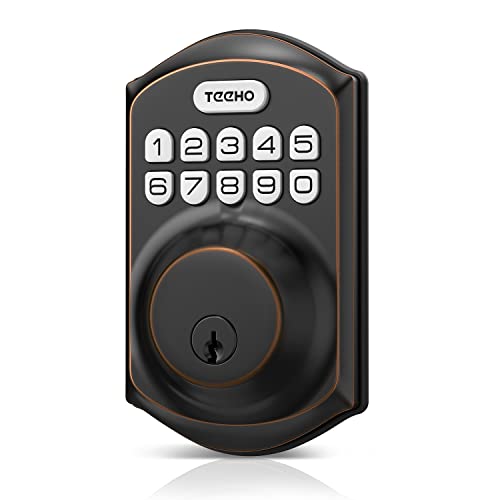
You’ll find the TEEHO TE001 Keyless Entry Door Lock best suits households wanting reliable, code-based access without sacrificing ease of use or security. I’ve used it for months, and it supports 20 permanent codes plus one temporary, self-deleting PIN-great for guests. The auto-lock engages in 10–99 seconds, and I can lock it instantly with a two-second keypress. Built with aluminum alloy and an IP54 rating, it’s durable and weather-resistant. It runs on 4 AA batteries, lasting up to a year, with a red LED warning at 15%. Installation takes minutes with a screwdriver, fits standard 54mm doors, includes two keys, and is backed by a 2-year warranty and responsive support.
Best For: Homeowners seeking a secure, easy-to-install keyless entry lock with reliable access control and guest code functionality.
Pros:
- Supports 20 permanent user codes and one temporary, self-deleting PIN for flexible access management
- Auto-lock feature with customizable timing and one-touch locking for convenience and security
- Durable aluminum alloy construction with IP54 weather resistance and long 365-day battery life
Cons:
- Not compatible with doors having 38mm bore holes, limiting installation on non-standard doors
- Requires 4 AA batteries (not included), which may increase long-term ownership cost
- Red LED low-battery indicator only activates at 15%, potentially leaving little time to replace before power loss
Philips Wi-Fi Smart Door Lock with Fingerprint

I rely on the Philips Wi-Fi Smart Door Lock with Fingerprint when I need secure, hub-free access control that works for my whole household-and frequent visitors. It supports app, passcode, fingerprint, key, and voice control via Alexa or Google Assistant, storing up to 100 codes and multiple fingerprints. Built-in 2.4GHz Wi-Fi enables remote access and real-time alerts, though it requires a strong router connection within 65 feet. Auto-lock, away mode, and full activity tracking boost security. Installation fits standard doors and takes minutes with a screwdriver. It runs on 4 or 8 AA batteries and includes US phone and email support.
Best For: Homeowners seeking a versatile, hub-free smart lock with multiple access methods and remote control for families, guests, or renters.
Pros:
- Supports multiple unlock methods including app, fingerprint, voice control, passcode, and physical key
- Built-in 2.4GHz Wi-Fi enables remote access and real-time alerts without requiring a hub
- Stores up to 100 passcodes and multiple fingerprints with scheduling and sharing capabilities
Cons:
- Requires strong 2.4GHz Wi-Fi signal within 65 feet for consistent connectivity
- Lacks a door position sensor to detect if the door is fully closed
- No hub support limits integration with broader smart home ecosystems
Kwikset Powerbolt 250 Electronic Deadbolt (Satin Nickel)
For someone managing household access for a busy family or frequent guests, the Kwikset Powerbolt 250 Electronic Deadbolt in Satin Nickel stands out with its support for up to 25 permanent user codes and 5 one-time codes, giving me flexible, secure control without needing physical keys. The 10-button keypad lights up with a tap, making entry easy in the dark. It locks automatically at intervals I choose, from 30 seconds to 10 minutes, and Vacation Mode disables the keypad remotely, which helps when I’m away. After three wrong code attempts, the alarm sounds and the keypad locks out for a minute. I can re-key it to any KW1 key in seconds using SmartKey tech, no pro needed. It runs on four AA batteries, lasts up to a year, and installs with just a screwdriver-BILT’s 3D instructions guide me step by step.
Best For: Busy households or hosts who need flexible, keyless access control for family members and frequent guests.
Pros:
- Supports up to 25 permanent and 5 one-time use codes for versatile access management
- Auto-lock and Vacation Mode enhance security and convenience for active homes
- Easy DIY re-keying with SmartKey technology and straightforward installation using BILT 3D instructions
Cons:
- Requires 4 AA batteries (not included) and lacks a low-battery warning indicator
- Keypad disables for 1 minute after 3 failed attempts, which may inconvenience legitimate users
- No smart home integration or remote access via app or voice control
Schlage BE365 Camelot Keypad Deadbolt (CAM 619)

A reliable choice for homeowners seeking keyless convenience without sacrificing security, the Schlage BE365 Camelot Keypad Deadbolt (CAM 619) stands out with its Grade 2/AAA security rating and durable metal construction, making it well-suited for both residential and light commercial use. I appreciate its support for 19 user codes, including two pre-set for quick setup, and the keypad’s illuminated buttons work well in low light. It runs on a single 9V battery, lasting up to two years, with a low-battery warning to prevent lockouts. Installation is straightforward using just a screwdriver, and it fits most standard doors. I recommend checking your door’s backset and bore measurements first. It offers a lifetime warranty on mechanics and finish, plus a 3-year electronics guarantee, and operates reliably in extreme temperatures.
Best For: Homeowners and property managers seeking a secure, keyless entry solution with easy installation and reliable performance for residential or light commercial use.
Pros:
- Grade 2/AAA security rating and durable metal construction offer strong protection and tamper resistance
- Supports up to 19 customizable user codes with illuminated keypad for easy use in low light
- Long battery life (up to 2 years) with low-battery warning and straightforward, tool-free installation
Cons:
- Requires precise door measurements (backset, cross bore, thickness) which may limit compatibility with non-standard doors
- No smart home or remote access integration, limiting automation capabilities
- Indoor temperature rating cut off at 5°C may affect performance in very cold internal environments
Amazon Basics Keypad Deadbolt Door Lock

When choosing a reliable entry-level keypad deadbolt, the Amazon Basics Keypad Deadbolt Door Lock stands out for those who want straightforward keyless access without sacrificing backup entry options. I appreciate its touch-control keypad, which supports six user codes and temporary guest codes, giving you flexibility. It automatically locks 10 to 99 seconds after entry, boosting security. The lock fits standard doors 1-3/8 to 1-3/4 inches thick. I like that it offers both keypad and key entry, plus an interior thumb turn. It’s affordable, easy to install, and reliable, though it lacks smart home compatibility.
Best For: Budget-conscious homeowners seeking a simple, reliable keyless deadbolt with basic access control and traditional backup options.
Pros:
- Offers customizable user and temporary guest codes for flexible access
- Automatically locks after entry, enhancing home security
- Combines keypad convenience with exterior key and interior thumb turn for reliable dual-mode operation
Cons:
- No smart home integration or remote access capabilities
- Limited to six user codes, which may not suit larger households
- Requires manual battery replacement with no low-battery alerts in some user reports
Schlage Encode Smart WiFi Deadbolt Lock

Though many smart locks require separate hubs, the Schlage Encode stands out because it has built-in WiFi, making it an ideal choice for users who want remote access without extra hardware. I control and monitor it from anywhere using the Schlage Home app, and I can manage up to 100 unique access codes, which works well for families or rental setups. It integrates with Airbnb, supports Alexa and Google Home, and features one-touch locking, auto-lock, and a fingerprint-resistant touchscreen. The lock fits standard doors and includes a backup key. It runs on four AA batteries, lasts up to six months, and offers strong security with BHMA certification, encrypted connections, and a built-in alarm.
Best For: Homeowners, renters, and property managers seeking a reliable, hub-free smart lock with remote access, guest management, and strong security features.
Pros:
- Built-in WiFi enables remote control and monitoring via the Schlage Home app without requiring a separate hub
- Supports up to 100 unique access codes and integrates with Airbnb for automated guest access
- Certified by BHMA for maximum residential security, with encrypted connections and a built-in alarm for forced entry
Cons:
- Requires frequent battery replacements as it runs on AA batteries with up to six months life
- Limited smart home compatibility-only works with Alexa and Google Home, not Apple HomeKit
- No physical keypad backlight, which may make nighttime use difficult
Yale Assure Lock 2 Wi-Fi Smart Deadbolt

You’ll find the Yale Assure Lock 2 Wi-Fi Smart Deadbolt especially useful if you want key-free convenience without sacrificing security or ease of setup. I installed it myself in minutes using just a screwdriver, and it fits most standard U.S. doors. It connects directly to 2.4 GHz Wi-Fi, so I can lock and operate it from anywhere using the Yale Access App on my phone or Apple Watch. DoorSense confirms the door is closed before auto-locking, which I trust to keep things secure. Auto-Unlock lets me walk in without touching anything-perfect when my hands are full. I’ve shared access remotely and received real-time alerts, giving me full control. It works only in the U.S. and Canada, and requires no extra hub.
Best For: Homeowners seeking a key-free, Wi-Fi-connected smart deadbolt with easy installation and reliable auto-locking and remote access features.
Pros:
- Installs quickly with just a screwdriver and fits most standard U.S. doors
- Connects directly to 2.4 GHz Wi-Fi for full remote control via the Yale Access App on phone or Apple Watch
- Auto-Unlock and DoorSense technology enable hands-free entry and ensure the door is fully closed before locking
Cons:
- Compatible only with 2.4 GHz Wi-Fi networks, excluding 5 GHz support
- Limited to use in the U.S. and Canada
- Requires a smartphone and Yale Access App for full functionality, which may be a barrier for less tech-savvy users
Aqara UWB Smart Lock U400 (Black)

Who wouldn’t want a lock that opens as they approach, without lifting a finger? I rely on the Aqara UWB Smart Lock U400’s Ultra-Wideband tech to detect my presence, direction, and intent-activating access only when I’m near, not for strangers. It works seamlessly with Apple Home Key, fingerprints, passcodes, voice assistants, and the app, plus includes a physical key backup. I appreciate its Matter over Thread connectivity, which guarantees stable, low-power links to HomeKit, Alexa, Google, and SmartThings. The rechargeable battery lasts up to six months and charges via USB-C. It’s BHMA-certified, IP65-rated, and rekeyable. I use the Aqara app to set Auto Lock and Night Latch Mode. It integrates with Aqara doorbell cameras for remote video checks and access granting. The lock fits standard doors and includes all mounting parts. Just note: UWB unlocking needs compatible Apple devices.
Best For: Tech-savvy homeowners seeking a highly secure, hands-free smart lock with seamless Apple ecosystem integration and multi-platform smart home compatibility.
Pros:
- Utilizes UWB technology for accurate, intent-based hands-free unlocking and supports multiple access methods including Apple Home Key, fingerprint, and voice control
- Features Matter over Thread connectivity for reliable, low-power performance across HomeKit, Alexa, Google Assistant, and SmartThings ecosystems
- Offers robust security with BHMA certification, IP65 rating, rekeyable design, and integration with Aqara doorbell cameras for remote video verification
Cons:
- UWB hands-free unlocking limited to compatible Apple devices (iPhone 11+/Apple Watch Series 6+ on specific OS versions) and requires a Thread-enabled Home hub
- Higher cost associated with advanced UWB and Matter/Thread technology compared to standard smart locks
- Physical installation may be complex for users unfamiliar with smart lock setup despite included mounting hardware
Factors to Consider When Choosing a Keypad Deadbolt
You’ll want to compare keypad access methods, like PIN codes or smartphone pairing, to find what’s easiest for your household. Look at user code capacity, auto-lock settings, and security ratings, since these affect both convenience and protection. And don’t overlook battery life and power options-longer life means fewer changes and less risk of lockouts.
Keypad Access Methods
How do you guarantee convenient yet secure access for everyone who needs it? Choose a keypad deadbolt with features that balance usability and safety. Use models offering illuminated buttons or touch-sensitive surfaces so codes are easy to enter, even at night. Enable anti-peeping technology by entering random digits before or after your PIN to prevent shoulder surfing. Set auto-lock to engage the bolt automatically, typically between 10 and 180 seconds after closing the door, reducing the risk of leaving it unsecured. Opt for systems supporting temporary or one-time PINs, which expire after use or a set time, ideal for guests or service workers. These access methods improve control and convenience without compromising security. Prioritize these features to guarantee reliable, daily use and stronger home protection.
User Code Capacity
A keypad deadbolt with support for at least 25 permanent user codes gives you room to accommodate everyone in your household, along with regular visitors, without sacrificing security. Models offering fewer than 10 codes may fall short for larger families or those with frequent access needs. Look for locks that support both permanent and temporary codes, as these let you grant time-limited access for guests or service workers. One-time passcodes can be scheduled remotely and expire automatically, reducing risk. You can also delete outdated codes quickly, keeping access current and controlled. While higher code capacity enhances flexibility, make certain the system still maintains quick response and reliable performance. Balancing storage with ease of management means you get practical, long-term security without unnecessary complexity. Choose models that clearly list code limits and allow remote updates.
Auto Lock Settings
While forgetting to lock the door is a common concern, auto-lock settings help guarantee your home stays secure by automatically engaging the deadbolt after the door closes. You can usually set the delay between 10 and 180 seconds, or choose fixed intervals like 30 seconds, 1, 3, 5, or 10 minutes for added convenience. If you need the door locked right away, one-touch auto-lock lets you press and hold a keypad key for about 2 seconds to activate the bolt instantly. This feature assures your home stays protected, even when someone forgets to lock up. Most models let you disable or re-enable auto-lock anytime, so you can adjust based on your household’s needs. It’s a smart balance of security and flexibility that works quietly in the background, giving you peace of mind without extra effort.
Security Ratings And Build
Choose a keypad deadbolt with a BHMA Grade 1 or Grade 2 rating to guarantee it meets strict standards for resistance to forced entry, durability over 100,000 lock cycles, and overall performance. You’ll want durable materials like solid aluminum alloy or high-quality steel-they resist tampering, drilling, and weather damage. Look for models with hardened steel lock cylinders or anti-drill plates to defend against cylinder attacks. If your door’s exposed to the elements, pick one with an IP54 rating or higher to block dust and water. That means it’ll keep working even in rain or snow. Choose units with tamper-resistant features like anti-peep keypads to hide codes and alarms that trigger after failed attempts. These details boost security without slowing you down. A well-built lock not only deters break-ins but lasts longer under daily use. Check ratings and materials first-strong construction and verified performance matter most.
Battery Life And Power
You’ll want a keypad dead在玩家中 reliably powers through daily use without frequent battery changes. Most models run on four AA alkaline batteries and last up to a year under normal conditions, though heavy use or built-in Wi-Fi can cut that to six months. A few use a single 9V battery with similar performance. Look for low-battery warnings-like a red LED or beep-triggered when power drops below 15% to avoid lockouts. Some advanced locks feature rechargeable lithium-ion batteries offering six months per charge, with USB-C ports for easy charging without disassembly. While convenient, these models may demand more frequent top-ups than standard ones. Keep in mind that smart features, like Wi-Fi, greatly increase power needs. Plan for battery replacements or charging routines to maintain consistent operation. Choosing the right power option depends on your usage, tech preferences, and how often you want to manage power upkeep.
Installation Compatibility
A keypad deadbolt must fit your door’s dimensions and mounting specs to function properly, so check a few key measurements before buying. You need a door thickness between 1.375 and 2 inches (35mm to 50mm), as most models won’t fit outside this range. Match the backset-usually 2-3/8″ or 2-3/4″-to guarantee the bolt aligns with the strike plate. Confirm your door’s cross bore is 2-1/8″ (54mm), since some locks don’t adapt to older 38mm holes. Look for models that install with just a screwdriver, saving time and hassle. Also, make sure there’s enough clearance between the door edge and frame so the deadbolt can extend fully when locked. If it binds, the lock won’t secure properly. Double-checking these details prevents returns and guarantees reliable, long-term use.
Connectivity And Smart Features
How do you manage access to your home when you’re not there? Choose a keypad deadbolt with built-in Wi-Fi to control and monitor it remotely via smartphone, no matter your location. Bluetooth models are cheaper but require you to be nearby for most functions. Wi-Fi versions give real-time alerts and support geofencing, so your door locks automatically when you leave. Look for voice control compatibility with Alexa, Google Assistant, or Siri for hands-free use. Advanced models offer customizable auto-lock timers and smart routines. For long-term reliability across devices, pick locks with multi-protocol support like Matter over Thread-it guarantees smooth integration with various smart home systems. Wi-Fi and advanced features cost more, but they deliver convenience and flexibility. Prioritize your connectivity needs based on daily habits and existing smart home gear.
Weather Resistance And Durability
Electronic features like Wi-Fi connectivity and voice control add convenience, but a keypad deadbolt must also hold up to daily wear and outdoor conditions. You’ll want a lock with at least an IP54 rating, which protects against dust and water splashes from any direction. Choose models made from durable materials like aluminum alloy or high-grade metal to resist corrosion, wear, and forced entry. Look for weather-resistant seals and gaskets around the keypad and internal components-they keep moisture and debris out. Make sure the operating temperature range supports extremes, ideally from -35°C to 66°C, so it works reliably in harsh climates. A solid lock cylinder and tamper-resistant design add strength, helping the unit survive physical attacks and environmental stress. These features guarantee long-term reliability and performance, even in tough outdoor settings.
Frequently Asked Questions
Can I Install a Keypad Deadbolt on a Steel Door?
Yes, you can install a keypad deadbolt on a steel door, but you’ll need the right tools and accessories. Steel doors are tougher to drill through, so use a carbide or step bit for clean holes. Check the door’s thickness and internal structure-some have fillers or reinforcements that complicate installation. Follow the manufacturer’s specs, use mounting templates, and guarantee the strike plate aligns properly to avoid security gaps. Professional installation might save time and guarantee reliability.
Are Keypad Deadbolts Weather-Resistant for Outdoor Use?
Yes, you can install keypad deadbolts outdoors since most models are built to resist weather. You’ll find they’re rated for temperature extremes, rain, and UV exposure, especially if made with stainless steel or aluminum. Look for weatherproof seals around the keypad and housing. Check the IP rating-IP54 or higher guarantees dust and moisture resistance. Avoid prolonged direct water exposure, and consider an overhang if mounting on an exposed door.
Do Keypad Locks Work During a Power Outage?
Yes, you can rely on most keypad locks during a power outage since they run on batteries, not your home’s electrical system. You’ll keep access as long as the batteries aren’t dead-typically lasting 6 to 12 months. Many models alert you with beeps or lights when power is low. Keep spare batteries on hand, and test the lock monthly to guarantee consistent, uninterrupted operation under real-world conditions.
Can I Share Access Codes With Guests Remotely?
Yes, you can share access codes with guests remotely if your keypad deadbolt connects to Wi-Fi or integrates with a smart home system. Most models let you generate temporary or permanent codes via a mobile app, which you can send instantly. Some locks support scheduling, so codes only work at certain times. Check compatibility with platforms like Alexa or Google Home. Always choose models with encryption to keep your access data secure.
How Often Do Keypad Deadbolt Batteries Need Replacement?
You’ll typically replace keypad deadbolt batteries every 6 to 12 months, depending on usage and model. Lithium batteries last longer than alkaline ones, especially with frequent use or cold weather. Most models alert you with a warning light or sound when power is low. You should check battery status monthly and keep spares on hand. Pro models with Wi-Fi use more power, so expect more frequent changes.