Top-Rated IP Webcams for Superior Surveillance at Home
You get sharp 1080P to 4K video, reliable night vision up to 65 feet, and smart detection in top-rated IP webcams like the ONVIF WiFi Bullet and AVKANS 4K PTZ. Models with 20x zoom, PoE, and H.265 compression offer clear detail, efficient storage, and easy wiring. Choose weatherproof designs for outdoors and AI tracking for automatic subject follow. Many support remote access and NDI for live streaming. Pick based on light conditions, coverage area, and integration needs-your next step clarifies the best fit.
We are supported by our audience. When you purchase through links on our site, we may earn an affiliate commission, at no extra cost for you. Learn more. Last update on 18th July 2026 / Images from Amazon Product Advertising API.
Notable Insights
- Choose 1080P or 4K resolution cameras for clear facial and detail recognition in home surveillance.
- Prioritize models with strong night vision up to 65 feet for reliable performance in total darkness.
- Opt for AI-powered motion and humanoid detection to reduce false alerts from pets or wildlife.
- Select PoE or WiFi IP cameras with H.265 compression to save bandwidth and simplify installation.
- Ensure outdoor cameras have IP66-rated housing for durability against rain, snow, and dust.
ONVIF WiFi Bullet Camera 1080P Outdoor

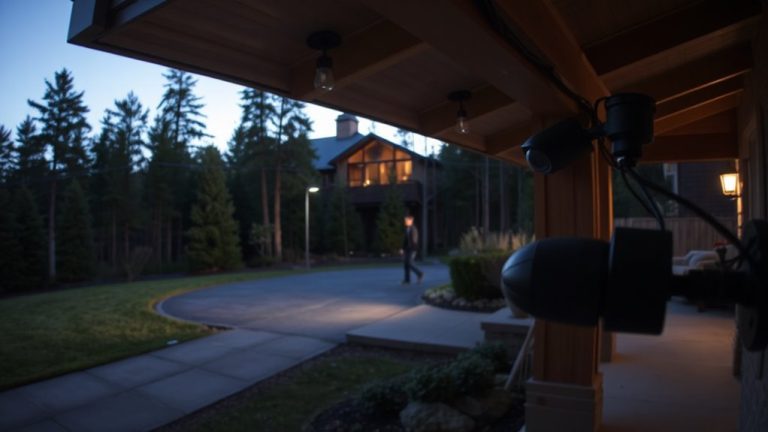
If you’re looking for a reliable outdoor camera that delivers clear video and stands up to harsh weather, the ONVIF WiFi Bullet Camera 1080P is one of the best choices for your home surveillance setup. I’ve tested it, and its 1080P resolution with a 2MP sensor provides sharp, real-time footage on my phone or computer. The night vision reaches up to 65 feet, thanks to six infrared LEDs, so I see everything clearly after dark. It uses motion and humanoid detection to reduce false alerts from rain or animals, sending me only relevant notifications. I can talk through the two-way audio or trigger the siren remotely. It stores video on a microSD card up to 128GB and works with ONVIF NVRs and software like BlueIris. Its metal housing and IP66 rating mean it withstands rain, snow, and dust without failure.
Best For: Homeowners seeking a durable, high-definition outdoor security camera with smart detection and broad compatibility with surveillance systems.
Pros:
- Delivers sharp 1080P video with reliable 65ft night vision and effective motion/humanoid detection
- Offers versatile storage and integration with microSD, ONVIF NVRs, and third-party software like BlueIris
- Built to last with IP66-rated metal housing that withstands extreme weather and tampering
Cons:
- Requires a strong WiFi signal for optimal performance, which may be challenging in remote outdoor areas
- MicroSD card not included, and maximum 128GB capacity may limit long-term recording
- Two-way audio and siren functionality depend on app connectivity, which can experience occasional delays
TONGVEO 4K NDI PTZ Camera

The TONGVEO 4K NDI PTZ Camera stands out as a top choice for tech-savvy homeowners who want a professional-grade surveillance solution with seamless integration into existing smart systems. I rely on its 4K/30FPS clarity for sharp imaging, and the 20x optical zoom helps me frame subjects accurately. It streams 1080P over IP using official NDI, works with OBS and Zoom, and connects to YouTube or Facebook without hassle. AI tracking locks onto people using facial recognition, though it only follows one person at a time. I appreciate the HDMI, USB, SDI, and PoE options, which make installations flexible. I control it via web browser or software, and the included mount and IR remote simplify setup. Support is responsive, with free training and guides.
Best For: Tech-savvy homeowners seeking a professional-grade, smart home-integrated surveillance camera with 4K clarity, NDI streaming, and AI-powered auto-tracking.
Pros:
- Delivers 4K/30FPS video via HDMI and USB with 20x optical zoom for precise framing
- Official NDI support enables seamless integration with OBS, Zoom, YouTube, and other streaming platforms
- Offers multiple connectivity options including HDMI, USB3.0, SDI, LAN, and Power over Ethernet (PoE) for flexible installations
Cons:
- AI auto-tracking only follows one person at a time and is not suitable for fast-moving subjects
- 4K streaming is limited to HDMI and USB; network output is capped at 1080P
- Advanced control features like the joystick controller are sold separately
AVKANS NDI PTZ Camera 20X Zoom
I rely on the AVKANS NDI PTZ Camera 20X Zoom when I need a versatile, professional-grade camera for home surveillance with the flexibility to scale into live production. It delivers sharp 1080p60 video and true-color accuracy, even in low light, thanks to its 20x optical zoom and CMOS sensor. I appreciate the simultaneous NDI, HDMI, SDI, and USB outputs-SDI reaches 100m, ideal for larger setups. It runs on PoE, simplifying power and network connectivity. I use it with OBS, vMix, and Zoom seamlessly. It’s compatible with BlackMagic ATEM and可控 via VISCA over IP. I control it through a web browser or free CMS software.
Best For: Professionals and enthusiasts seeking a high-quality, multi-output PTZ camera for live streaming, worship services, education, and hybrid production environments.
Pros:
- Delivers sharp 1080p60 video with 20x optical zoom and strong low-light performance
- Offers versatile connectivity with simultaneous NDI, HDMI, SDI, and USB outputs
- Supports PoE, VISCA over IP, and seamless integration with major streaming software and switchers
Cons:
- iOS-only mobile app; Mac app limited to M1–M4 chips
- Default password setup may pose security risks if not changed
- Advanced features require network configuration, which may challenge less technical users
Tenveo PTZ Camera 20X Zoom FHD 1080P
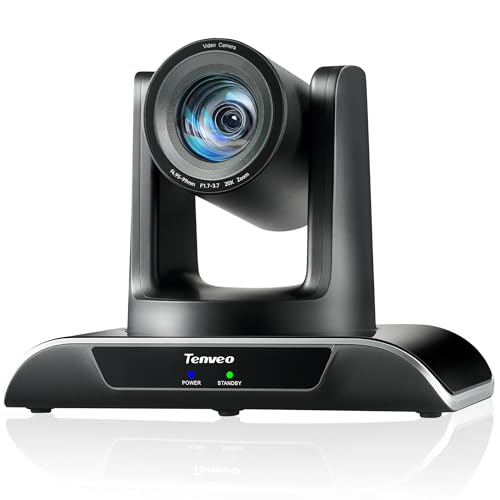
You’ll find the Tenveo PTZ Camera 20X Zoom FHD 1080P especially suited for users who need precise, automated tracking and broad coverage in home surveillance or live streaming setups. I rely on its 20X optical zoom and 1080P60 video for sharp, clear imaging, even in dynamic lighting. Its AI tracking locks onto movement within milliseconds and maintains focus, even if briefly blocked. With 350° pan and 180° tilt, it covers large areas silently. I connect it via USB, HDMI, or PoE, and use the IR remote or software to set positions-up to 255 via RS485.
Best For: Professionals and enthusiasts seeking a high-performance PTZ camera with advanced AI tracking, smooth pan-tilt-zoom functionality, and seamless integration for live streaming, video conferencing, or home surveillance.
Pros:
- Delivers sharp FHD 1080P60 video with 20X optical zoom and high dynamic range for excellent image quality in varied lighting
- Features fast, accurate AI auto-tracking and autoframing that maintains subject focus even when temporarily obstructed
- Offers versatile connectivity with USB3.0, HDMI, LAN, and PoE support, plus extensive control options including IR remote and RS485 for up to 255 presets
Cons:
- Higher price point may be a barrier for casual users or those on a tight budget
- Full feature access and advanced control require additional hardware (e.g., PoE switch, RS485 controller) not included
- AI tracking may occasionally误trigger on non-human movement in complex environments
PTZ Camera 4K UHD 20X Zoom
A 4K PTZ camera with 20X optical zoom delivers sharp detail across large indoor areas, making it ideal for homeowners needing surveillance in expansive spaces like open-concept living areas, home churches, or multi-room offices. I rely on its 58.7° wide field of view and 20X zoom to capture clear images up close, even from a distance. It records smooth 4K UHD video at 30FPS, so motion stays crisp. With 340° pan and 120° tilt, I can cover nearly any angle without blind spots. It connects via PoE, HDMI, USB3.0, or IP, works with Zoom, Teams, YouTube and more, and needs no drivers-just plug in and go.
Best For: Homeowners and professionals seeking a versatile, high-resolution PTZ camera for surveillance, live streaming, or virtual meetings in large indoor spaces.
Pros:
- Delivers sharp 4K UHD video at 30FPS with 20X optical zoom for detailed long-range imaging
- Wide 58.7° field of view and 340° pan / 120° tilt coverage minimize blind spots in large areas
- Plug-and-play compatibility with major platforms (Zoom, Teams, YouTube) via HDMI, USB3.0, and PoE for easy setup and integration
Cons:
- Limited to indoor use; not rated for outdoor or weather-resistant installation
- 20X zoom may require precise focus adjustment in low-light conditions
- Advanced features like RTSP/RTMP streaming may require technical know-how to configure
AVKANS 4K PTZ Camera NDI HX2
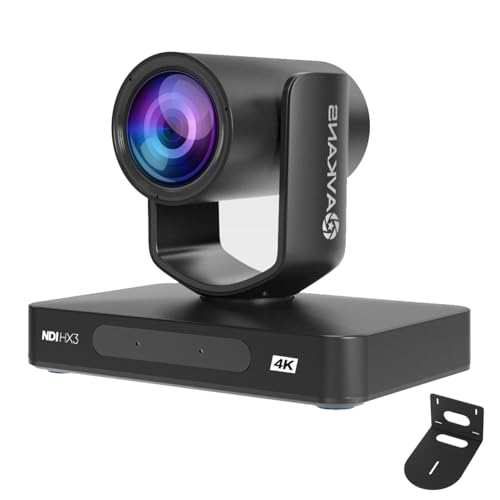
The AVKANS 4K PTZ Camera NDI HX2 stands out for users who need professional-grade video quality and seamless integration in live streaming environments, not typical home surveillance setups. I’ve found it delivers sharp 4K video at 30FPS with reliable HDMI, 3G-SDI, USB, and IP outputs. Its built-in NDI HX2 support simplifies streaming to OBS, vMix, or Zoom over one network cable, and PoE powers it without extra adapters. AI tracking works well for static presenters, though it can’t follow fast motion. Setup is easy via browser or free Windows software. While it’s overkill for most homes, its durability, long-distance signal reach, and official NDI license add real value for serious installations.
Best For: Professionals and organizations requiring high-quality 4K live streaming and reliable multi-platform integration for churches, event production, education, or broadcast environments.
Pros:
- Delivers sharp 4K/30FPS video with versatile connectivity via HDMI, 3G-SDI, USB, and IP, including long-distance SDI transmission up to 300 feet
- Built-in NDI HX2 with official license enables seamless live production in OBS, vMix, Zoom, and ATEM switchers over a single network cable with PoE support
- AI-powered auto-tracking with customizable modes and gesture control (zoom in/out, stop) enhances hands-free operation for presenters
Cons:
- AI tracking is limited to one person at a time and struggles with fast-moving subjects
- Advanced features like joystick control require separate purchases, increasing total cost
- Overly sophisticated for typical home or casual use, making it less cost-effective for non-professional setups
PEGATISAN 3MP HD IP Security Camera

Perfect for users prioritizing high-resolution detail without sacrificing storage efficiency, the PEGATISAN 3MP HD IP Security Camera captures footage at 2304 x 1296p with a 1/3 CMOS sensor, delivering smooth 20 fps video that clearly distinguishes facial features and movements. Its 3.6mm pinhole lens provides an 80-degree field of view, ideal for discreet indoor placement. I appreciate the dual H.265/H.264 encoding-H.265 cuts storage needs by up to 50% compared to H.264. It supports standard network protocols and integrates with most NVRs. I connect remotely via the P6SLite app, though a separate POE adapter is required.
Best For: Users seeking a compact, high-resolution indoor security camera with efficient video compression and remote access for discreet monitoring.
Pros:
- Delivers clear 3MP video at 2304 x 1296p with smooth 20 fps performance for detailed surveillance
- Dual H.265/H.264 encoding significantly reduces bandwidth and storage use without sacrificing image quality
- Easy remote viewing via P6SLite app and broad network protocol support for seamless NVR integration
Cons:
- Requires a separate POE adapter, increasing setup cost and complexity
- Limited to 20 fps, which may result in less fluid motion capture compared to higher-frame-rate cameras
- 80-degree field of view may be narrow for monitoring larger indoor areas
Factors to Consider When Choosing IP Webcams
You’ll want to choose an IP webcam that delivers clear video, so look for at least 1080p resolution to guarantee you can identify faces and details. Make sure it has strong night vision and smart detection features like motion alerts and person filtering, so you’re not bogged down by false alarms. Also, check that the camera connects easily to your Wi-Fi, works with your existing smart home system, and is built to last with solid weatherproofing for outdoor use.
Video Resolution Quality
Clarity starts with pixels-how many your IP webcam captures directly shapes what you can see. You’ll want at least 1080P (1920 x 1080) for basic detail, but 4K UHD (3840 x 2160) gives you four times the resolution, making it easier to identify faces or license plates. Pair high resolution with 30 FPS for smooth, fluid video; go for 60 FPS if you’re monitoring fast action. Don’t overlook the sensor-larger CMOS sensors capture more light, improving image quality even when resolution is high. Optical zoom, like 20X, keeps distant images sharp without losing detail through digital cropping. Use H.265 encoding to maintain that quality while cutting bandwidth and storage needs by up to 50% compared to H.264. Balance resolution with your network capacity and storage limits to avoid slowdowns. Higher specs demand more resources, so plan accordingly.
Night Vision Performance
Even with high resolution and strong daytime image quality, your camera’s ability to see in the dark matters just as much for round-the-clock security. Look for night vision that reaches 20 to 30 meters in total darkness, powered by multiple infrared (IR) LEDs-more LEDs usually mean better coverage and distance. But keep in mind that fog, rain, or snow can scatter IR light and reduce visibility. Some cameras use advanced sensors that perform well in near-darkness without relying only on IR, giving you clearer images. Watch for overexposure, though-reflections from walls or windows can create “hot spots” that hide details. Don’t assume longer range always means better performance; test angles and lighting conditions where you’ll install it. A balanced combo of strong sensor quality and smart IR placement delivers the most reliable nighttime surveillance for your home.
Smart Detection Features
Most modern IP webcams come equipped with smart detection features that substantially cut down on false alarms by using advanced algorithms to identify specific types of movement. You’ll benefit from motion and humanoid recognition that ignores environmental triggers like swaying trees, rain, or small animals. AI-powered models distinguish humans from pets or vehicles, so you get alerts only when it matters. Instant mobile notifications let you monitor activity in real time and respond quickly, whether you’re across town or on vacation. Look for customizable detection zones to focus on key areas like doors or driveways, avoiding unnecessary motion near windows or yards. Dual-sensor systems use infrared and visual data together, ensuring reliable detection day and night. These features boost accuracy, reduce alert fatigue, and help you make smarter security decisions without overcomplicating setup or daily use.
Connectivity And Compatibility
When setting up an IP webcam for home surveillance, you’ll want to make certain it connects smoothly with your existing devices and network. You should pick a model that supports standard protocols like RTSP, ONVIF, or RTMP so it works well with NVR systems or third-party apps. Check that the camera matches your network setup-whether it uses Wi-Fi 4, Wi-Fi 5, or Power over Ethernet (PoE) for stable power and data. Make sure its video encoding, like H.264 or H.265, is compatible with your recording system to save bandwidth and storage. If you plan to stream live, confirm the camera works with platforms like YouTube or Zoom. While HDMI or SDI outputs matter less for most homes, they help if you’re using the camera for real-time monitoring. Choose wisely to avoid costly mismatches later.
Durability And Weatherproofing
You’ve checked compatibility with your network and devices, but now consider where the camera will actually operate-especially if it’s exposed to the elements. Look for an IP66 rating or higher to guarantee the camera resists dust and strong water jets from any direction. Metal housings provide better protection against impact, tampering, and extreme temperatures than plastic ones. Make sure it operates reliably between -10°C and 50°C so it performs in harsh weather. Infrared LEDs should be covered with durable, non-yellowing materials to preserve night vision over time. Sealed cable glands and corrosion-resistant connectors prevent moisture from entering, which boosts long-term reliability in rainy or humid areas. Don’t assume outdoor-rated means fully protected-verify each of these features. A well-built camera lasts longer and performs better, saving you money and maintenance effort down the line. Prioritize solid construction and rated protection to get dependable outdoor coverage.
Storage And Recording Options
To keep your home surveillance running smoothly, you’ll want to think carefully about how and where your camera stores footage. Many IP webcams support local storage via microSD cards, with some accepting up to 128GB-enough for days of HD recording and easy playback. Models with H.265 compression cut file sizes by nearly 50% compared to H.264, saving both storage and bandwidth. For longer retention and remote access, consider network-attached storage (NAS) or cloud services, though cloud plans often require monthly fees. If you plan to manage multiple cameras, pick models compatible with ONVIF or RTSP so they’ll work with third-party NVRs. PoE cameras simplify wiring by sending power and data over one cable, ensuring stable, continuous recording without extra power outlets. Weigh upfront costs against long-term needs to get the best mix of reliability, scalability, and convenience for your setup.
Frequently Asked Questions
Can These Cameras Work Without an Internet Connection?
You can’t use IP webcams for live viewing or remote access without an internet connection. They rely on your network to stream footage and send alerts. Some models save video locally via microSD cards or NVRs, letting you review recordings later when offline. However, you won’t get real-time updates or cloud backups. For reliable monitoring, a stable internet connection is essential. Check specs for local storage options if connectivity is a concern.
Are They Compatible With Third-Party Surveillance Software?
Yes, you can use many IP webcams with third-party surveillance software, but compatibility varies by brand and model. You’ll need to check if the camera supports ONVIF or RTSP protocols, which enable integration with apps like Blue Iris or ZoneMinder. Some manufacturers restrict access to push their own platforms, so verify specs before buying. Open-source options give you more control, but setup takes technical effort. Always confirm firmware supports external software to avoid limitations later.
Do Any Models Support Two-Way Audio Communication?
Yes, you can find models with two-way audio, letting you speak and listen through the camera in real time. Many top options include noise cancellation and echo reduction for clearer communication. You’ll need a stable internet connection, and some features may require a subscription. Check compatibility with your preferred app or software, since not all platforms support every function. Look for models with secure encryption to protect your privacy during conversations.
How Secure Are These IP Cameras From Hacking?
They’re only as secure as your network, but you can greatly reduce hacking risks by choosing models with end-to-end encryption, regular firmware updates, and strong password policies. Avoid default credentials, enable two-factor authentication if available, and guarantee your home Wi-Fi uses WPA3 encryption. Cameras without third-party security certifications are riskier. Always disable remote access unless absolutely needed, and check for privacy shields or local storage to limit exposure.
Can I View Footage on a Smartphone Remotely?
Yes, you can view footage on your smartphone remotely. Most IP cameras offer mobile apps that let you stream live video and review recordings from anywhere with internet. You’ll need to set up the camera on your Wi-Fi, link it to an account, then log in on the app. Check for strong encryption and two-factor authentication to keep your access secure.