Best Smart Locks That Keep Your Home Secure and Stylish
You get strong security and modern style with smart locks like the Philips Wi-Fi and Yale Assure Lock 2, both offering Grade 3 or higher BHMA ratings, Wi-Fi connectivity, and sleek designs. These support app control, voice assistants, and up to 100 access codes, with Yale adding Apple Watch auto-lock. Fingerprint models like the eufy C220 activate in 0.5 seconds and store 50 prints. Most use 2.4 GHz Wi-Fi and last 6–12 months on standard batteries, with USB-C backup. Options vary in smart home compatibility-some work with Alexa and Google, but not HomeKit. You’ll find key features like auto-lock, temporary PINs, and activity logs across models, balancing convenience and protection. More details on top picks can help you choose the right fit for your door and lifestyle.
We are supported by our audience. When you purchase through links on our site, we may earn an affiliate commission, at no extra cost for you. Learn more. Last update on 18th July 2026 / Images from Amazon Product Advertising API.
Notable Insights
- Top smart locks offer multiple access methods like fingerprint, app, and voice control for convenience and security.
- Built-in Wi-Fi enables remote access, real-time alerts, and monitoring without needing a separate hub.
- BHMA Grade 3 or higher certification ensures strong durability and resistance against tampering or forced entry.
- Sleek designs with anti-peep keypads and auto-lock features combine style with enhanced privacy and security.
- Long battery life up to a year and USB-C emergency charging provide reliable, hassle-free operation.
Philips Wi-Fi Smart Door Lock

If you’re looking for a smart lock that supports multiple ways to open-like the Philips Wi-Fi Smart Door Lock-you’ll find it’s a solid choice for families, renters, or anyone managing frequent guest access. I use its app, passcode, fingerprint, voice control, and physical key options daily. It stores up to 100 codes and multiple fingerprints, which helps when sharing access. Built-in Wi-Fi means no hub, and I can lock or access remotely using my phone, as long as my router is within 65 feet. I get real-time alerts and use Alexa and Google Assistant to control it hands-free. I set auto-lock from 10 to 180 seconds for extra security. Away Mode disables all entries except the master code while I’m traveling, and I appreciate the full activity log for tracking access.
Best For: Families, renters, or property managers needing flexible access control with remote management and voice assistant compatibility.
Pros:
- Supports multiple unlocking methods including app, passcode, fingerprint, voice control, and physical key
- Built-in Wi-Fi enables remote access and real-time alerts without requiring a separate hub
- Offers auto-lock scheduling and Away Mode for enhanced security and convenience
Cons:
- Lacks a door position sensor to detect if the door is fully closed
- Wi-Fi connectivity limited to 2.4GHz networks only
- No included batteries or hub, and requires router within 65 feet for reliable performance
Wyze Auto-Lock Bolt v2 Smart Lock

The Wyze Auto-Lock Bolt v2 stands out as a reliable choice for homeowners seeking fast, secure access without sacrificing convenience or battery life. I access it in 0.5 seconds using its scratch-resistant tempered glass fingerprint sensor, which gets faster over time thanks to AI learning my touch pattern. It runs up to 8 months on 8 included AA batteries, and if power runs low, I can quickly charge it via USB-C. Built-in Wi-Fi lets me control and monitor the lock remotely through the Wyze App, and I can even access the door from a live feed if I’m expecting guests.
Best For: Homeowners seeking a secure, long-lasting smart lock with fast fingerprint access and remote control via Wi-Fi.
Pros:
- Unlock in 0.5 seconds with AI-powered fingerprint recognition that improves over time
- Long 8-month battery life with USB-C emergency power option for uninterrupted access
- Built-in Wi-Fi enables remote monitoring, app control, and integration with Wyze Video Doorbell
Cons:
- Requires 8 AA batteries, which may be inconvenient for some users despite long life
- Fingerprint sensor, while durable, may struggle in extreme weather conditions
- Limited compatibility with non-Wyze smart home ecosystems
eufy Security Smart Lock C30 WiFi Keypad

I’ve found the eufy Security Smart Lock C30 WiFi Keypad stands out best for users who want built-in Wi-Fi without needing a separate hub, letting them control the lock remotely from anywhere using the eufy Security app. It works with Alexa and Google Assistant, supports real-time alerts, and integrates with eufy doorbells. The keypad offers keyless entry, while a physical key acts as backup. Auto-lock and wrong-try protection boost security. It’s BHMA Grade 3 certified, IPX3 rated, and runs up to five months on four AA batteries. Installation takes about 15 minutes, fits most deadbolts, and requires no drilling.
Best For: Users seeking a hassle-free, hub-free smart lock with remote access, voice control, and seamless integration into existing eufy and broader smart home ecosystems.
Pros:
- Built-in Wi-Fi enables remote control and real-time notifications without a bridge
- Easy 15-minute installation with no drilling and compatibility with most standard deadbolts
- Supports voice control via Alexa and Google Assistant, plus integration with eufy doorbells
Cons:
- Battery life lasts up to 5 months, requiring frequent AA battery replacements
- No support for Apple HomeKit or Siri voice control
- Higher price point compared to basic smart locks without built-in Wi-Fi
eufy Smart Lock C220 with Fingerprint & Wi-Fi

You’ll find the eufy Smart Lock C220 with Fingerprint & Wi-Fi ideal if you want a standalone smart lock that combines fast, reliable access with built-in Wi-Fi and minimal setup. I appreciate its six access methods, including fingerprint recognition powered by self-learning AI, which adapts for better accuracy over time. It grants entry in under 1.5 seconds and runs up to 8 months on eight included AA batteries. Built-in Wi-Fi lets me control it remotely via the eufy Security app without a bridge, and it integrates with Alexa and Google. The polished aluminum design fits most U.S. and Canadian deadbolts, installs in about 15 minutes, and carries BHMA Grade 3 certification.
Best For: Homeowners seeking a reliable, easy-to-install smart lock with multiple access methods and built-in Wi-Fi for seamless remote control and smart home integration.
Pros:
- Offers six unlocking methods including fingerprint, app, keypad, and voice assistants for maximum convenience
- Built-in Wi-Fi enables remote access and real-time notifications without requiring a separate bridge
- Fast unlock time under 1.5 seconds with self-learning AI that improves fingerprint recognition over time
Cons:
- Battery life limited to up to 8 months, which may require frequent replacements depending on usage
- BHMA Grade 3 certification offers moderate security compared to higher-grade commercial locks
- No mention of offline backup options if Wi-Fi or app access is disrupted
TEEHO TE001 Keyless Entry Door Lock

While many smart locks cater to tech-heavy setups, the TEEHO TE001 stands out for users seeking a reliable, battery-powered keyless entry system without sacrificing security or ease of use. I appreciate its support for 20 permanent codes and one temporary PIN, which deletes after use-ideal for guests. It locks automatically in 10 to 99 seconds, or I can trigger one-touch locking with a 2-second keypress. Built from aluminum alloy with an anti-peep keypad and IP54 rating, it withstands weather and tampering. Four AA batteries last up to a year, and a red light alerts me at 15% charge. Installation takes minutes with a screwdriver on standard 54mm doors, and I’m covered by a 2-year warranty with lifetime support, phone help Mon–Fri, and 24/7 email assistance.
Best For: Homeowners seeking a simple, secure, and battery-efficient keyless entry lock with guest access and reliable automation.
Pros:
- Supports 20 permanent user codes and a one-time temporary PIN that deletes after use, ideal for guest access
- Features one-touch auto-lock and customizable automatic locking from 10 to 99 seconds for convenience and security
- Durable aluminum alloy construction with IP54 weather resistance and anti-peeping keypad for enhanced durability and privacy
Cons:
- Not compatible with doors that have a 38mm borehole, limiting installation options
- Requires 4 AA batteries (not included), which may add to initial setup cost
- Limited to basic keyless functionality without smart home integration or remote access features
Philips Smart Lock with Keyless Entry
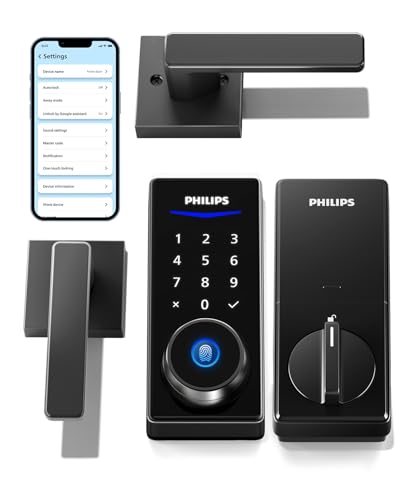
The Philips Smart Lock with Keyless Entry stands out for homeowners seeking a reliable, multi-modal smart lock that combines strong security with straightforward installation. I appreciate its four access methods-fingerprint, PIN, physical key, and app-offering flexibility for families and guests. It stores up to 50 fingerprints and 100 permanent PINs, plus unlimited one-time codes, which I find ideal for temporary access. With Bluetooth, I can gain entry nearby, and adding the optional Wi-Fi gateway lets me control it remotely, check entry logs, and use voice commands via Alexa or Google. The auto-lock feature secures my door automatically when closed, no sensor needed. I do note that the gateway isn’t included, so budget for that separately. Installation was simple with my screwdriver, and it fits standard door thicknesses. Customer support is reachable by phone or email, which gives me peace of mind. Overall, it’s a solid, data-driven choice for dependable smart access.
Best For: Homeowners seeking a secure, easy-to-install smart lock with multiple access options and flexible guest management.
Pros:
- Offers four reliable unlocking methods: fingerprint, PIN, physical key, and smartphone app
- Supports up to 50 fingerprints and 100 permanent PINs, plus unlimited one-time PINs for temporary access
- Auto-lock feature engages when door is closed, enhancing security without requiring additional sensors
Cons:
- Wi-Fi gateway required for remote access and voice control is sold separately
- Bluetooth-only range limits smartphone control to about 8–10 meters without the gateway
- Limited customer service hours for phone support (Mon–Fri 8AM–8PM, Sat 9AM–5PM PST)
Schlage Encode Smart WiFi Deadbolt Lock (Matte Black)

Although many smart locks require a hub for remote access, the Schlage Encode Smart WiFi Deadbolt connects directly to your home’s 2.4 GHz WiFi network, making it a strong choice for homeowners who want reliable, hub-free control. I appreciate how it lets me lock, open, and monitor access from anywhere using the Schlage Home or Key by Amazon app. It works seamlessly with Alexa and Google Assistant for voice commands, and integrates with Airbnb for temporary guest codes. With support for up to 100 custom codes, encrypted WiFi, and BHMA’s highest security ratings, it’s both secure and convenient. Installation takes minutes with just a screwdriver, and the matte black finish resists fingerprints while fitting most standard doors.
Best For: Homeowners seeking a reliable, hub-free smart lock with strong security, voice control compatibility, and easy app-based remote access.
Pros:
- Built-in WiFi allows direct 2.4 GHz network connection without requiring a separate hub
- Supports up to 100 customizable access codes and integrates with Airbnb for temporary guest access
- Certified with BHMA’s highest ratings for security, durability, and finish, with fingerprint-resistant matte black design
Cons:
- Requires 2.4 GHz WiFi network (not compatible with 5 GHz) which may limit connectivity for some users
- No physical key override, relying solely on touchscreen, app, or voice access
- Limited to use with Schlage Home or Key by Amazon apps, reducing third-party ecosystem flexibility
TEEHO TE001 Keyless Entry Door Lock

If you need a simple, reliable smart lock for everyday home use without the hassle of complicated setup, the TEEHO TE001 Keyless Entry Door Lock stands out as a practical choice. I like that it supports 20 permanent codes and generates one-time guest PINs, which delete automatically. Its anti-peeping feature helps hide your code, and the auto-lock activates with a 2-second keypress, locking between 10 and 99 seconds after entry. Made of aluminum alloy with an IP54 rating, it resists weather and wear. It runs on 4 AA batteries, lasting up to a year, with a red low-battery light at 15%. Installation takes minutes with a screwdriver, fits standard 54mm bores, and comes with a 2-year warranty plus lifetime support, including weekday phone help and 24/7 email.
Best For: Homeowners seeking a straightforward, durable keyless entry solution with reliable access control and minimal setup.
Pros:
- Supports 20 permanent codes and one-time guest PINs that auto-delete for secure, flexible access
- Anti-peeping technology and auto-lock function enhance security and convenience
- Easy installation, long battery life, and IP54-rated weather resistance ensure durability and reliability
Cons:
- Requires standard 54mm bore hole; not compatible with 38mm holes
- No mention of smart home integration or remote access features
- Batteries not included, and low-battery warnings only begin at 15% capacity
Yale Assure Lock 2 Wi-Fi Smart Deadbolt

You’ll find the Yale Assure Lock 2 Wi-Fi Smart Deadbolt especially useful if you want reliable, key-free access without relying on a hub. I installed it myself in under 20 minutes using just a screwdriver, and it fits most standard U.S. doors. It connects directly to 2.4 GHz Wi-Fi, so I can lock or open the door from anywhere using the Yale Access App on my phone or Apple Watch. DoorSense technology confirms the door is closed, then auto-locks it-no second-guessing. When I’m carrying groceries, the Auto-Unlock feature works seamlessly, opening the lock as I approach. I’ve shared temporary access with guests and received real-time entry alerts, all without extra hardware.
Best For: Homeowners seeking a hub-free, keyless smart lock with easy DIY installation and hands-free access via Wi-Fi and Apple Watch or phone app.
Pros:
- Installs in minutes with just a screwdriver and fits most standard U.S. doors
- Auto-locks when DoorSense confirms door is closed, enhancing security without effort
- Offers multiple access methods including keypad, app, voice assistants, and Auto-Unlock for convenience
Cons:
- Requires 2.4 GHz Wi-Fi only, limiting compatibility with dual-band routers
- Functionality is currently limited to the U.S. and Canada
- Auto-Unlock may occasionally misfire or delay if phone signal is weak
Philips WiFi Keypad Door Lock with Handle

The Philips WiFi Keypad Door Lock with Handle stands out for users who want a hub-free smart lock with full remote access and robust access options, all in one integrated handle unit. I connect it directly to 2.4GHz WiFi, so no extra hub is needed, and I control locking, access, and monitoring through the Philips Home Access App. It supports voice commands via Alexa and Google Assistant, plus fast fingerprint scanning for multiple users. I can create various PIN types-permanent, temporary, or recurring-for guests or cleaners. Auto-lock activates between 0 and 180 seconds. It fits standard doors and installs with just a screwdriver, running on 8 AA batteries.
Best For: Homeowners seeking a hub-free smart lock with integrated handle, remote app control, and multiple access methods including voice, fingerprint, and customizable PIN codes.
Pros:
- Connects directly to 2.4GHz WiFi without requiring a hub for full remote access and monitoring
- Offers versatile access options: fingerprint recognition, voice control with Alexa and Google Assistant, and flexible PIN code types
- Easy tool-free installation with just a screwdriver and supports auto-lock with customizable timing
Cons:
- Requires 8 AA alkaline batteries (not included), which may increase long-term maintenance
- No 5GHz WiFi support, limiting connectivity to 2.4GHz networks only
- Limited customer support availability by phone (Mon–Sat, PST hours), with after-hours options only via email
Factors to Consider When Choosing Smart Locks
You’ll want to take into account connectivity options like Wi-Fi, Bluetooth, or Z-Wave, since they affect remote access and compatibility with smart home systems. Think about the power source, installation ease, and security features-these impact reliability, setup time, and protection against tampering. Plus, the access methods, such as keypads, apps, or biometrics, give you flexibility but come with trade-offs in cost and convenience.
Connectivity Options
How do you guarantee your smart lock stays responsive and reliable when you’re at home or miles away? Choose a model with built-in Wi-Fi for direct remote access and real-time notifications without needing a separate hub. These locks let you lock, open, and monitor entry from anywhere using your smartphone, provided you have a stable internet connection. Keep in mind: many models only support 2.4 GHz Wi-Fi, so check your router’s compatibility. For shorter ranges, Bluetooth is energy-efficient and enables hands-free auto-open within 8 to 10 meters-perfect when you’re near the door. For best performance, install the lock within 65 feet of your router to maintain a strong signal. Wi-Fi models provide encrypted, instant alerts for maximum security and convenience, while Bluetooth variants save power but limit remote control. Pick based on your daily routine and home layout.
Power Source
Smart locks rely on batteries for power, with most models using standard AA or AAA alkaline cells that last anywhere from 5 months to more than a year depending on how often you use them and which features are active. You’ll want to take into account how frequent remote access, voice control, or real-time alerts affect battery life, since constant wireless signals increase drain. Many locks include low battery warnings via app alerts, lights, or sounds, so you’re never caught off guard. Some models offer energy-saving features like motion-activated wake-up or Bluetooth instead of Wi-Fi to help extend performance. If your batteries die, don’t panic-most units support emergency power through USB-C ports or a 9V battery terminal, letting you quickly regain access. Plan for regular replacements and keep spares on hand, especially if you rely heavily on connected features.
Installation Ease
A straightforward installation process makes upgrading to a smart lock a practical DIY project for most homeowners. You’ll typically need just a screwdriver, and most models fit doors between 1.375 and 2 inches thick. Installation takes 15 to 30 minutes, with many locks designed for tool-free assembly and compatibility with standard 2-1/8-inch bore holes. If your door has a backset of 2-3/8 inches or 2-3/4 inches, you’re all set-no extra modifications needed. Some smart locks retrofit directly over your existing deadbolt, saving time and effort. Look for models with Snap ‘n Stay or similar mounting systems; they hold components securely during setup, so you won’t struggle to align parts or need extra hands. These features streamline the process, reduce frustration, and guarantee a snug, functional fit on most standard residential doors.
Security Features
Security matters when choosing a smart lock, and verified performance is key. Look for BHMA Grade 3 or higher certification-it confirms the lock resists forced entry, tampering, and wear. Pick models with wrong-try protection to block intruders from guessing codes; they lock out after a few failed attempts. Choose IPX3-rated or higher weather resistance so your lock works in rain, snow, and temps from -22°F to 158°F. Opt for encrypted Wi-Fi or Bluetooth to prevent hacking and keep remote access and alerts secure. Use anti-peep keypads that let you enter random digits before your actual code-this stops shoulder surfing. These features aren’t extras; they’re essentials for real protection. Prioritize tested durability, digital security, and privacy safeguards when comparing options. They guarantee your smart lock keeps your home safe, no matter the conditions.
Access Methods
When choosing how you’ll open your door, consider which access methods fit your lifestyle and provide reliable convenience. You can use PIN codes, fingerprints, smartphone apps, physical keys, or voice commands with smart assistants. Fingerprint sensors release in just 0.5 seconds and often improve with use thanks to AI. Keypads may include anti-peep features, letting you enter random numbers before or after your PIN to block onlookers. You can generate temporary codes for guests that expire after one use or a set time, adding security for short visits. Some locks support scheduled PINs that only work during specific hours, ideal for cleaners or renters. Most models combine several methods, so pick one that balances ease and control. Always guarantee fallback options like a physical key or backup power exist. Prioritize locks with proven response times and user adaptability for long-term reliability.
Frequently Asked Questions
Can Smart Locks Work During a Power Outage?
Yes, you can count on most smart locks during a power outage since they run on batteries, not household electricity. You’ll still open the door with your phone, code, or key. Some models even alert you when power’s out or battery’s low. Just replace batteries as recommended-usually every 6 to 12 months-so you’re never locked out. Always keep a physical key nearby, just in case.
Are Smart Locks Vulnerable to Hacking?
Yes, smart locks can be hacked, but it’s rare when you use them correctly. You reduce risk by choosing models with encryption, regular updates, and secure Bluetooth or Zigbee protocols. Avoid Wi-Fi-only locks, as they’re more exposed. You also need strong passwords and two-factor authentication. Wired connections are safer than wireless. Battery-powered units still work during blackouts and often include physical keys for emergencies. Always check independent security certifications.
Do Smart Locks Require a Hub to Function?
No, you don’t always need a hub for smart locks to work. Many models connect directly to your Wi-Fi or Bluetooth, letting you control them from your phone without extra hardware. Some advanced systems, like those using Zigbee or Z-Wave, do require a hub for remote access and automation. Hubs add reliability and broader integration but increase cost and setup complexity. Choose based on your tech needs and home network. Always check compatibility before buying.
Can I Still Use a Key With a Smart Lock?
Yes, you can still use a key with most smart locks. Manufacturers include traditional keyways for emergencies or power outages. You’ll get physical keys, just like with standard locks. Some models, like deadbolt-based smart locks, let you override digital access anytime. Others offer keypads or apps but keep the exterior keyhole. Always check specs-key access varies. Models without keys may leave you stranded. Choose one with a key backup for reliability and peace of mind.
How Long Do Smart Lock Batteries Typically Last?
You typically get 6 to 12 months of battery life from a smart lock, depending on usage and model. You’ll replace batteries more often if you use it frequently or have weak signal strength. Most send low-battery alerts to your phone, so you won’t get locked out. Lithium batteries last longer than alkaline. Always keep spares, and consider models with backup power options like a 9V terminal.