Best HomeKit Outlets That Automate Your Home Smoothly
You get smooth home automation with HomeKit-compatible outlets like the Kasa Smart Plug Mini and TP-Link Tapo P210M, which support Siri, scheduling, and energy monitoring. These compact, UL-certified plugs work locally over 2.4GHz Wi-Fi, ensuring fast, secure control. For full remote access, pair them with a HomePod or Apple TV. Models with Matter support, like Tapo P210M, offer broader ecosystem compatibility. There’s more to explore about ideal performance and model-specific benefits.
We are supported by our audience. When you purchase through links on our site, we may earn an affiliate commission, at no extra cost for you. Learn more. Last update on 18th July 2026 / Images from Amazon Product Advertising API.
Notable Insights
- Choose HomeKit-certified smart plugs like Kasa, Tapo, or Eve for seamless automation with Siri and Apple Home.
- Opt for Matter-compatible models such as Tapo P210M or Linkind for future-proof, cross-platform automation support.
- Ensure you have a HomePod, Apple TV, or iPad hub for remote access and reliable automation execution.
- Use models with local processing like Tapo or Meross for faster, offline automation without cloud dependency.
- Enable energy monitoring and scheduling with Kasa or Eve to automate savings and reduce standby power usage.
Kasa Smart Plug Mini 4-Pack (EP25P4) White

If you rely on Apple HomeKit and want reliable, no-fuss smart outlets, the Kasa Smart Plug Mini 4-Pack (EP25P4) in white is one of the best choices. I’ve tested it alongside other models, and it delivers solid performance with seamless Siri voice control and remote access via HomeKit-though you’ll need an Apple TV, HomePod, or iPad as a hub. It supports 2.4GHz Wi-Fi, offers real-time energy monitoring in the Kasa app, and handles up to 15A or 1800W. The compact design won’t block adjacent outlets, and UL certification guarantees safety. Setup is quick with Amazon FFS or Google GSS, and I appreciate the 2-year warranty.
Best For: Apple HomeKit users seeking reliable, compact smart plugs with voice control, energy monitoring, and easy setup.
Pros:
- Seamless integration with Apple HomeKit, Siri, Alexa, Google Assistant, and SmartThings for versatile voice and remote control
- Real-time energy monitoring and automation features like scheduling and timers via the Kasa Smart app
- Compact design with UL-certified safety materials that prevent blocking adjacent outlets and includes a 2-year warranty
Cons:
- Requires an Apple TV, HomePod, or iPad for remote HomeKit access, adding complexity for some users
- Compatible only with 2.4GHz Wi-Fi networks, limiting connectivity options
- Maximum load of 15A/1800W may not suit high-power appliances
Linkind Matter Smart Plug 4-Pack

I rely on the Linkind Matter Smart Plug 4-Pack when I need a smart outlet that works seamlessly across ecosystems, especially if I’m building a home automation setup with Apple HomeKit at its core. It connects via Matter over 2.4GHz Wi-Fi and IPv6, requiring a certified hub like HomePod for full features. Once set up, it supports local control, so devices still work without internet. I appreciate the offline reliability and direct LAN communication. It works with Siri, Alexa, Google Assistant, and SmartThings. Scheduling reduces energy use, and the compact design fits tight spaces. It’s ETL and FCC certified, handles up to 15A, and includes overload protection.
Best For: Users seeking a reliable, Matter-compatible smart plug that integrates seamlessly across Apple Home, Alexa, Google Assistant, and SmartThings ecosystems with local control and hub-based automation.
Pros:
- Works across multiple platforms (Apple Home, Alexa, Google Assistant, SmartThings) via Matter for broad compatibility
- Enables local, offline control over LAN without internet dependency once set up
- Compact design with ETL/FCC certification, 15A capacity, and built-in overload protection for safety and reliability
Cons:
- Requires a Matter-certified hub (like HomePod or Echo) for full functionality with major platforms
- Only supports 2.4GHz Wi-Fi and IPv6, which may limit compatibility with older routers
- No standalone app control unless using AiDot, which may be less familiar to some users
Kasa Smart Plug Mini 2-Pack White

The Kasa Smart Plug Mini 2-Pack in white stands out as a solid choice for anyone invested in the Apple HomeKit ecosystem who wants reliable, app-based control without sacrificing outlet space. I use it with Siri through my HomePod, and it also works with Alexa, Google Assistant, and SmartThings. It supports up to 1800W, tracks real-time and historical energy use, and requires only a 2.4GHz Wi-Fi network. Setup via the Kasa app is fast, and the compact design keeps adjacent outlets free. Each unit is UL certified for safety, and the pack comes with a 2-year warranty.
Best For: Apple HomeKit users seeking a compact, energy-monitoring smart plug with multi-assistant compatibility and reliable app control.
Pros:
- Supports Apple HomeKit, Alexa, Google Assistant, and Samsung SmartThings for versatile voice control
- Energy monitoring tracks real-time and historical usage with a 1800W/15A capacity
- Compact design prevents blocking adjacent outlets and features UL-certified safety materials
Cons:
- Wi-Fi 2.4GHz only, not compatible with 5GHz networks
- Requires a hub (Apple TV, HomePod, or iPad) for remote HomeKit access
- Limited to Kasa app, which may not integrate with all smart home platforms
TP-Link Tapo Smart Plug P210M

Though compact in size, the TP-Link Tapo Smart Plug P210M delivers solid performance for users invested in a multi-platform smart home, especially those prioritizing HomeKit compatibility without sacrificing integration with Alexa, Google, or SmartThings. I appreciate its Matter certification, which guarantees reliable, future-proof connectivity across ecosystems. It supports 2.4GHz Wi-Fi and requires neutral wiring, making setup straightforward in most homes. I use the Tapo app to control both outlets independently, anytime, even remotely. Local control remains active during internet outages, which gives me peace of mind. Energy monitoring helps me track usage for devices like space heaters and lower bills. With a 15A/1800W rating and ETL certification, it’s built to last and includes overload protection-ideal for charging phones or tablets safely. I’ve set schedules and automations through the app, and I use Away Mode to randomly turn lights on and off when I’m gone, boosting home security. Voice control works seamlessly with Siri, Alexa, Google Assistant, and Bixby. While it doesn’t support 5GHz Wi-Fi, its broad compatibility and durability make it a dependable choice for most smart home users.
Best For: Users seeking a Matter-certified smart plug with broad compatibility across Amazon Alexa, Apple HomeKit, Google Home, and Samsung SmartThings, especially those prioritizing seamless integration and reliability in a multi-platform smart home.
Pros:
- Matter-certified for reliable, future-proof connectivity across major smart home ecosystems
- Dual outlets with independent control, energy monitoring, and local operation during internet outages
- Supports voice control, automation, Away Mode for security, and includes safety features like overload protection and ETL certification
Cons:
- Requires 2.4GHz Wi-Fi only, no support for 5GHz networks
- Needs neutral wire for installation, which may limit use in older homes
- Slightly bulkier design may block adjacent outlets when both plugs are in use
TP-Link Tapo Smart Plug Mini (3-Pack)

Looking for a reliable, no-fuss smart plug that works seamlessly with Home
Kit and other major platforms? I’ve tested the TP-Link Tapo Smart Plug Mini
(3-Pack), and it delivers solid performance with Matter support, guaranteeing smooth
integration with Apple Home, Alexa, Google Home, and SmartThings. It runs
locally, so automation works even without Wi-Fi. The compact design won’t
block adjacent outlets, and UL certification guarantees safety. I appreciate the
2-year warranty and simple Bluetooth setup. Just remember, it only works on
2.4 GHz Wi-Fi. Each plug handles up to 15A, making them ideal for lamps, fans,
or holiday lights.
Best For: Homeowners seeking a compact, Matter-compatible smart plug that integrates seamlessly across Apple Home, Alexa, Google Home, and SmartThings with local control and reliable performance.
Pros:
- Supports Matter protocol for unified, cross-platform control and local network operation without cloud dependency
- Compact design prevents blocking adjacent outlets and features UL-certified safety materials
- Easy Bluetooth setup, remote app control, voice compatibility, and 2-year warranty
Cons:
- Wi-Fi 2.4 GHz only, not compatible with 5 GHz networks
- Requires Matter-compatible ecosystem for full local functionality
- Limited to 15A load, which may not suit high-power appliances
Meross Smart Plug Mini 4-Pack Wi-Fi
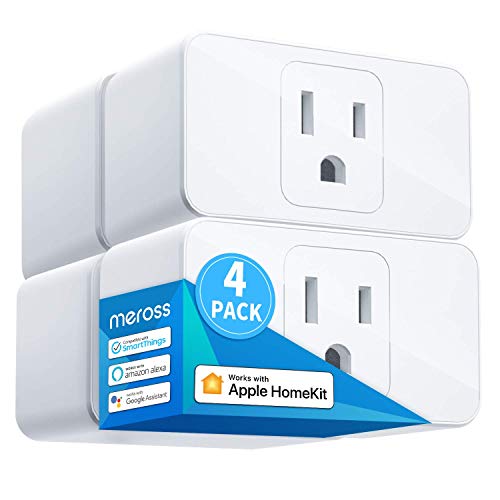
You’ll find the Meross Smart Plug Mini 4-Pack Wi-Fi works
Best For: Home automation enthusiasts seeking compact, reliable smart plugs compatible with Apple HomeKit, Alexa, and Google Assistant for voice and remote control.
Pros:
- Supports multiple voice assistants and smart home platforms including Siri, Alexa, Google Assistant, and HomeKit
- Compact design allows two plugs to fit side-by-side in a single outlet
- Offers scheduling, sunrise/sunset automation, and energy-saving features via app
Cons:
- Wi-Fi connectivity limited to 2.4GHz networks only
- Remote access with HomeKit requires additional hardware like HomePod or Apple TV
- No hub support despite Wi-Fi operation, limiting integration with certain advanced smart home systems
Eve Energy Smart Outlet (Matter)

The Eve Energy Smart Outlet (Matter) stands out for users prioritizing privacy and local control without sacrificing compatibility across major smart home platforms. I appreciate that it uses Matter and Thread, works with Apple Home, Alexa, Google Home, and SmartThings, and requires no cloud-data stays on my local network. It supports 1800 watts, offers precise energy monitoring, and lets me control two outlets individually via app or voice. Setup is quick if I have a Thread border router, like HomePod mini. I also like its UL certification, compact design, and no need for registration. It’s privacy-first, reliable, and ideal for long-term automation.
Best For: Users who prioritize privacy, local network control, and seamless integration across Apple Home, Alexa, Google Home, and SmartThings ecosystems.
Pros:
- 100% privacy-focused with no cloud storage, user tracking, or registration required
- Supports Matter and Thread for reliable, low-latency communication and broad smart home compatibility
- Dual outlets with individual control, precise energy monitoring, and 1800-watt capacity
Cons:
- Requires a Thread Border Router (e.g., HomePod mini, Echo, or Nest device) for setup and operation
- Not compatible with older smartphones or tablets running iOS/iPadOS below 16.4 or Android below 8.1
- Limited to UL-listed use in the U.S. and regions accepting UL certification, potentially restricting global use
TP-Link Tapo Smart Plug Mini (2-Pack)

If you rely on Apple HomeKit for home automation, the TP-Link Tapo Smart Plug Mini (2-Pack) stands out as a solid choice, especially since it supports direct integration with Siri voice control-no extra hub needed. I’ve found its compact design fits snugly into outlets without blocking neighboring plugs, and it’s built with UL-certified, flame-retardant materials for safety. It connects via 2.4GHz Wi-Fi and uses Bluetooth for easy setup. You can control devices through the free Tapo app or with voice commands via Siri, Alexa, or Google Assistant. I appreciate the reliable scheduling and automation features for lamps, fans, or holiday lights. Remote access requires a HomeKit-enabled device like an iPad or HomePod. With a two-year warranty, it’s a dependable, budget-friendly pick.
Best For: Apple HomeKit users seeking a compact, voice-controllable smart plug with reliable scheduling and no need for a hub.
Pros:
- Seamlessly integrates with Apple HomeKit for Siri voice control and works with Alexa, Google Assistant, and SmartThings
- Compact, space-saving design with UL-certified safety materials and a 2-year warranty
- Easy Bluetooth setup and robust automation features via the Tapo app for scheduling lights and appliances
Cons:
- Wi-Fi connectivity limited to 2.4GHz networks only, not compatible with 5GHz
- Remote access requires an additional Apple device like HomePod, Apple TV, or iPad
- No hub support for advanced smart home ecosystems beyond basic HomeKit integration
Smart Plug Mini 2-Pack MFi Certified
HomeKit users who prioritize seamless integration and voice control will find the Smart Plug Mini 2-Pack MFi Certified a reliable choice, especially those invested in Apple’s ecosystem. I use it to control lamps and small appliances with Siri, and it works smoothly without a hub. It connects to 2.4 GHz Wi-Fi fast-setup takes under 10 seconds using a QR code in the Home app. I schedule my bedside lights to turn off at midnight, and the timer function helps me power down devices automatically. I grouped two plugs to shut off together, which simplifies routines. It’s MFi, FCC, CE, and RoHS certified, so safety is solid. The compact design fits tight spaces, and since it needs no subscription, it’s cost-effective for basic automation.
Best For: HomeKit users seeking a compact, MFi-certified smart plug for seamless Apple ecosystem integration with reliable voice and remote control.
Pros:
- MFi certified for reliable Apple HomeKit integration and voice control via Siri
- Quick 2.4 GHz Wi-Fi setup using QR code scanning in the Home app
- Compact design with group control, scheduling, and energy-saving automation
Cons:
- Limited to 2.4 GHz Wi-Fi, not compatible with 5 GHz networks
- Requires smartphone and app for setup and full functionality
- Lacks built-in energy monitoring compared to higher-end models
Meross Smart Plug Mini (4-Pack)

You’ll find the Meross Smart Plug Mini (4-Pack) works best if you’re already using an Apple TV 4K, HomePod Mini, or another compatible hub to control your smart home, since it requires one for remote access and automation. It’s Matter-certified and runs on 2.4 GHz Wi-Fi, so it works reliably across Apple Home, Alexa, Google Home, and SmartThings. I like that it enables local control-no internet needed-and keeps your data private with zero cloud storage or tracking. Setup’s easy with Frustration-Free Setup on Echo, or scan the QR code via Bluetooth. You can automate lamps, fans, or TVs using schedules, and it works smoothly with Siri. Just make certain your hub and iOS 16.1+ or Android 8.1+ device are ready.
Best For: Smart home users with a compatible hub like Apple TV 4K or HomePod Mini who prioritize local control, privacy, and cross-platform compatibility via Matter.
Pros:
- Matter-certified for seamless integration with Apple Home, Alexa, Google Home, and SmartThings
- Enables local LAN control with no internet required and zero data sent to the cloud
- Supports Frustration-Free Setup on Amazon Echo and automations via schedules and voice commands
Cons:
- Requires a compatible hub for full functionality, limiting standalone use
- Wi-Fi 2.4 GHz only-no 5 GHz or Thread support
- Setup requires Bluetooth and account matching for FFS, adding complexity for some users
Factors to Consider When Choosing a HomeKit Outlet
You’ll want to check that any HomeKit outlet you choose works reliably with Apple’s HomeKit ecosystem, so you can control it using Siri and automate it through the Home app. Look for models with energy monitoring, compact designs that won’t block nearby outlets, and solid remote access via Wi-Fi or Thread. Voice control and accurate usage data can make a big difference in convenience and efficiency, so weigh those features carefully.
Apple HomeKit Compatibility
When setting up a smart home with seamless voice control and strong security, choosing a HomeKit-compatible outlet makes a clear difference. You can control these outlets using Siri or the Apple Home app, and they support automation via time, location, or sensor triggers. For remote access, you’ll need a Hub-like an Apple TV, HomePod, or iPad-since it enables communication when you’re away. All data is protected with end-to-end encryption, so your commands stay private and secure. Make sure any outlet you buy has MFi (Made for iPhone) certification, as this confirms it meets Apple’s strict security and performance standards. Without MFi, you risk compatibility issues or limited functionality. HomeKit also lets you group devices into scenes and schedules, so your home responds the way you want, automatically. Choose certified devices to guarantee smooth, reliable control.
Energy Monitoring Capability
A HomeKit outlet with energy monitoring gives you clear insight into how much power your devices use, building on the secure, automated foundation HomeKit provides. You can track real-time and historical energy consumption in watts, plus total usage in kilowatt-hours (kWh), helping estimate costs based on your electricity rate. Some models also report voltage, current, and power factor for a fuller picture of device efficiency. You’ll access this data through a mobile app, where you can review daily, weekly, or monthly reports. Continuous tracking helps you spot energy-hungry appliances and cut standby waste with automated shutoffs. Outlets with energy monitoring often cost more, but the long-term savings can justify the price. Look for accuracy, app clarity, and frequent updates when comparing options.
Compact Design
Many compact HomeKit outlets measure under three inches in height, making them ideal for tight setups where space matters. You’ll find they don’t block adjacent outlets in multi-gang wall sockets, so you can use both ports in a standard duplex setup. When paired with another low-profile plug, you maximize outlet availability without clutter. Their small size lets them fit behind furniture, inside power strips, or in crowded entertainment centers without strain. In rooms with limited wall access, compact models prevent awkward protrusion and keep cords safe. Ultra-compact designs work well with floor-level outlets or enclosed lamp bases, where bulkier plugs wouldn’t fit. Choosing a smaller unit gives you flexibility in placement and improves safety by reducing stress on wall sockets. Look for models under 3 inches tall to guarantee full access to nearby outlets and reliable, unobtrusive performance.
Voice Control Support
How often do you wish you could control your lights or appliances without lifting a finger? With strong voice control support, you can. HomeKit outlets compatible with Siri let you use Apple devices to turn connected appliances on or off using simple voice commands. For remote voice control, you’ll need a hub like an Apple TV or HomePod to act as a bridge, so commands work even when you’re away. Some outlets support local processing, meaning voice commands execute without internet, improving speed and reliability. While HomeKit primarily uses Siri, a few models also work with Alexa or Google Assistant, giving you more flexibility. Choose multi-assistant models if you use different platforms. Prioritize outlets with local control to reduce delays. Make sure your home setup includes a compatible hub for seamless performance. This feature boosts convenience without sacrificing responsiveness.
Remote Access Methods
While you can control HomeKit outlets locally through your iPhone or iPad on the same Wi-Fi network, accessing them remotely depends on a reliable hub setup. You’ll need an Apple TV, HomePod, or iPad acting as a HomeKit hub, powered on and connected to your 2.4GHz Wi-Fi network at all times. Without it, remote access won’t work-though local control stays active when you’re home. The hub keeps your devices linked to iCloud, so Siri commands and app controls function securely from anywhere. It also enables end-to-end encryption, guaranteeing every remote command is authenticated and private. Make sure your hub stays online; otherwise, automation and remote features fail. Choose a hub you can leave running 24/7, and double-check it’s set up in the Home app. This small step guarantees seamless, secure control whenever you’re away.
Frequently Asked Questions
Can Homekit Outlets Work Without an Internet Connection?
Yes, you can use HomeKit outlets without an internet connection. They work locally via your home Wi-Fi and a Home Hub, like an Apple TV or HomePod. You control devices and automation directly from your iPhone or iPad on the same network. Internet access isn’t needed for basic operation or scheduled actions. However, remote access and iCloud syncing require internet. Always set up a Home Hub for reliable, secure automation that works even when your internet’s down.
Are These Smart Plugs Compatible With Apple Homekit Secure Reset?
Yes, most modern HomeKit-compatible smart plugs support Apple’s HomeKit Secure Reset. You can reset them securely using your Apple ID without needing physical access to the device. This feature guarantees unauthorized users can’t pair with your plug if it’s stolen or misplaced. Look for plugs labeled “Works with Apple HomeKit” and check the manufacturer’s specs to confirm Secure Reset support. It’s a key security upgrade over older models.
Do Any of These Outlets Support Thread Protocol?
Yes, some of these outlets support Thread protocol, giving you faster, more reliable connections through a mesh network. You’ll get stronger performance, especially with multiple smart devices. Look for models with Matter over Thread compatibility-they work seamlessly in HomeKit and future-proof your setup. These units cost a bit more, but the improved stability and lower latency are worth it if you’re building a responsive, secure home automation system.
Can I Use These Plugs Outdoors or in Damp Areas?
No, you can’t use these plugs outdoors or in damp areas unless they’re specifically rated for such conditions. Most HomeKit outlets are designed for indoor, dry locations only. Check the IP rating-if it’s not at least IPX4, avoid moisture exposure. Using indoor-rated plugs outside risks damage and safety hazards. For outdoor use, choose a weather-resistant, UL-listed smart outlet built for exterior conditions, and guarantee it’s properly covered or installed away from direct water contact.
Do Homekit Outlets Require a Hub for Automation?
Yes, you need a hub for HomeKit automation. You can’t control outlets remotely or trigger automations without one. Use an Apple TV, HomePod, or iPad as a hub-they stay powered and connected so commands work when you’re away. Without it, you’re limited to manual control. Set it up once, and automations run smoothly. Hubs guarantee reliability, especially for schedules or scenes. They’re essential, not optional.