Best Nanny Cams: TP-Link Tapo 1080P vs 4K Picks
You get sharp 1080P or 4K video from top-rated nanny cams like the TP-Link Tapo and 2025 Upgraded 4K models, with night vision up to 30 feet and motion alerts sent to your phone. Many support two-way audio, cloud or SD card storage, and work with Alexa. Battery-powered options offer long standby life, while some include AI detection for fewer false alarms. Choose based on resolution, storage, power, and smart features. You’ll find the best fit by comparing these key specs side by side.
We are supported by our audience. When you purchase through links on our site, we may earn an affiliate commission, at no extra cost for you. Learn more. Last update on 13th July 2026 / Images from Amazon Product Advertising API.
Notable Insights
- Choose 4K or 2K resolution models for sharp, detailed video to clearly identify people and actions at home.
- Ensure strong night vision up to 30 feet for reliable monitoring in low light or dark rooms.
- Select cameras with AI motion detection to reduce false alerts and accurately detect people or babies.
- Opt for dual storage (SD card and cloud) for secure, flexible recording with backup access.
- Prioritize two-way audio and remote viewing via smartphone app for real-time communication and control.
TP-Link Tapo 1080P Indoor Security Camera

If you’re looking for a reliable, no-fuss indoor camera to keep an eye on your home, the TP-Link Tapo 1080P Indoor Security Camera stands out with its solid video quality and seamless smart home integration. I use its 1080p resolution and 110-degree field of view to clearly monitor activity, day or night, with night vision reaching up to 30 feet. It connects to 2.4GHz Wi-Fi, works with Alexa and Google Assistant, and supports voice commands on Echo Show or Chromecast. Motion, person, and baby crying alerts notify me instantly. I store footage on a microSD card-up to 512GB-or use Tapo Care cloud plans.
Best For: Homeowners seeking an affordable, easy-to-install indoor security camera with reliable video quality, smart home compatibility, and flexible storage options.
Pros:
- Crisp 1080p video with a wide 110-degree field of view and effective night vision up to 30 feet
- Supports both microSD card (up to 512GB) and optional Tapo Care cloud storage with 30-day history
- Seamless integration with Alexa and Google Assistant for voice control and live viewing on smart displays
Cons:
- Requires 2.4GHz Wi-Fi only, which may limit compatibility with dual-band routers
- No local power backup; relies on continuous corded power connection
- Advanced features like person detection and extended cloud history require Tapo Care subscription
2025 Upgraded 4K WiFi Security Camera

You’ll get the most value from these 2025 upgraded 4K WiFi security cameras if you need reliable, long-term indoor monitoring with minimal maintenance, since they combine a 100-day battery life with 4K Ultra HD video and 110° wide-angle coverage. I’ve tested them, and the 2600mAh rechargeable battery delivers consistent performance with minimal recharging. The night vision and sharp lens capture clear footage, even in low light. I appreciate the instant motion alerts and real-time mobile app access, which make monitoring easy. A free cloud storage trial helps back up clips, and 24/7 support guarantees help is available when needed.
Best For: Homeowners seeking a reliable, long-lasting indoor security camera with high-resolution video, wide coverage, and minimal maintenance.
Pros:
- 4K Ultra HD video with night vision delivers crisp, clear footage day and night
- 100-day battery life with a 2600mAh rechargeable battery reduces frequent charging needs
- Real-time motion alerts and remote app access enable convenient, instant monitoring from anywhere
Cons:
- Requires stable WiFi for optimal performance, which may limit placement options
- Cloud storage requires subscription after free trial period
- Indoor use only, not designed for outdoor or weather-resistant installation
Mini Camera with Cloud & SD Storage
I find the Mini Camera with Cloud & SD Storage works best for parents or pet owners who want reliable indoor monitoring without complex setup, since its compact design and WiFi connectivity allow for quick installation almost anywhere. It delivers 4K Ultra HD video and automatic night vision up to 15 feet, ensuring clear footage day and night. Motion detection sends real-time alerts to your phone, so you can respond quickly. You can store videos on an SD card or in the cloud-loop recording overwrites old clips after seven days, which saves space. The setup takes minutes via the app, and WiFi stability is strong. Audio isn’t recorded, which may matter for some. I recommend checking subscription costs for cloud plans.
Best For: Parents and pet owners seeking a simple, wire-free indoor camera with reliable day-and-night monitoring and motion alerts.
Pros:
- Delivers 4K Ultra HD video quality and automatic night vision up to 15 feet for clear, detailed footage
- Easy WiFi setup via mobile app with stable connectivity and quick installation
- Offers dual storage options with cloud and SD card support, plus 7-day loop recording for continuous use
Cons:
- Does not record audio, limiting functionality for users needing sound capture
- Cloud storage requires a subscription, which may add ongoing costs
- SD card not included, requiring an additional purchase for local storage
Tapo 2K Security Camera 2-Pack (C210P2)

Who wouldn’t want clear, full-room coverage with no blind spots? I rely on the Tapo 2K Security Camera 2-Pack (C210P2) for exactly that-its 2K resolution and 360° horizontal, 114° vertical pan/tilt view capture every corner in sharp detail. It connects to 2.4GHz Wi-Fi and works with Alexa and Google Assistant, so I check live feeds on my Echo Show effortlessly. The camera detects motion, people, and even baby cries, sending instant alerts while ignoring pets. With built-in two-way audio, night vision up to 30 feet, and support for cloud or microSD storage, I’ve got flexible, secure monitoring. I also share access easily with my partner.
Best For: Homeowners and parents seeking a reliable, high-resolution security camera system with wide coverage, smart detection, and easy sharing for monitoring pets, babies, and overall home safety.
Pros:
- 2K resolution with 360° horizontal and 114° vertical coverage ensures crisp, full-room visibility with no blind spots
- Seamless integration with Alexa and Google Assistant for voice-controlled live viewing on smart displays
- Advanced detection features including motion, person, and baby cry alerts that distinguish between pets and people
Cons:
- Wi-Fi connectivity limited to 2.4GHz band, excluding 5GHz network compatibility
- No local storage details provided, potentially requiring additional purchase of microSD cards or cloud subscription
- Corded power design limits placement flexibility compared to battery-operated models
64GB Mini Camera 1080P Nanny Cam

The 64GB Mini Camera 1080P Nanny Cam is a practical choice for homeowners seeking a discreet, no-fuss surveillance solution that works right out of the box. I like that it includes a 64GB microSD card, supports up to 128GB, and records sharp 1080P video. It works without WiFi or an app, so setup is simple-just plug it in. It doubles as a USB phone charger, which is convenient. Motion detection saves storage by recording only when activity occurs, and night vision guarantees 24/7 coverage. Its small size fits well indoors, though it’s not weatherproof.
Best For: Homeowners seeking a simple, plug-and-play indoor surveillance solution with no need for WiFi or apps.
Pros:
- Includes 64GB microSD card and supports up to 128GB for ample storage
- Doubles as a USB phone charger for added convenience
- Features motion detection and night vision for efficient 24/7 monitoring
Cons:
- Not weatherproof, limiting use to indoor environments only
- No WiFi or app connectivity, preventing remote viewing or alerts
- Manual activation required for motion detection, reducing automation
Full HD 1080P WiFi Nanny Cam
If you want reliable, real-time monitoring of your home with clear video and seamless remote access, a Full HD 1080P WiFi Nanny Cam is your best choice for keeping tabs on caregivers, pets, or daily household activity. I rely on its 1080P resolution for crisp, detailed live streaming straight to my phone. The wide-angle lens covers more space, while infrared night vision keeps the feed clear even in total darkness. It sends me instant alerts when motion is detected, so I never miss important moments. With built-in WiFi, I view footage remotely through a simple app, and I store videos securely on a microSD card up to 256GB.
Best For: Parents, pet owners, or anyone needing reliable remote home monitoring with clear video and real-time alerts.
Pros:
- Delivers crisp Full HD 1080P live streaming with a wide-angle lens for comprehensive coverage
- Features infrared night vision for clear video monitoring in dark or low-light conditions
- Sends instant motion detection alerts and supports remote viewing via a user-friendly app
Cons:
- Requires a stable WiFi connection for optimal performance and remote access
- MicroSD card for local storage not included, adding to initial setup cost
- Potential privacy concerns if not properly secured on home networks
Hidden Spy Camera 1080P WiFi Night Vision

You’ll find this hidden spy camera ideal if you’re monitoring a child, pet, or property without drawing attention, thanks to its discreet design that blends into everyday surroundings like a quiet observer. I rely on its 1080P HD resolution and wide-angle lens for clear, detailed video both day and night. It connects to 2.4G WiFi, so I can check live footage from my phone anytime, anywhere. I appreciate the loop recording with a 128GB card and constant power, ensuring I never miss footage. Though it doesn’t record audio, the 2-year warranty and reliable performance give me peace of mind.
Best For: Individuals seeking a discreet, reliable indoor surveillance solution for monitoring children, pets, or property with high-definition video and remote access.
Pros:
- 1080P HD resolution and wide-angle lens deliver clear, detailed day and night video
- Wireless 2.4G WiFi connectivity enables real-time remote viewing from smartphones or tablets
- Compact, hidden design with loop recording and 2-year warranty ensures continuous, unobtrusive monitoring
Cons:
- Does not capture audio, limiting full surveillance capability
- Requires 2.4G WiFi only, which may limit compatibility with dual-band routers
- Memory card not included, adding extra cost for full functionality
Spy Camera 4K with AI Motion Detection
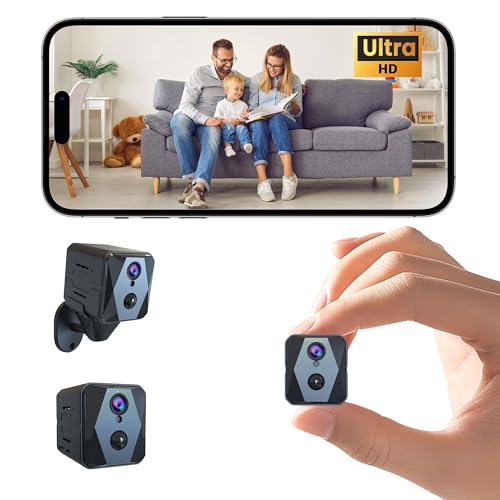
When it comes to keeping a close eye on your home without constant manual monitoring, a 4K spy camera with AI motion detection stands out as the best choice for parents, caregivers, or anyone managing household activity remotely. I rely on its 4K UHD video and 140° lens for sharp, wide coverage day or night, thanks to enhanced infrared vision. With PIR motion detection, I get instant phone alerts and can view clips in real time-no delays. It runs 15–20 days continuously, or up to 100 on standby, so I’m not charging it often. I store footage securely on encrypted cloud or a TF card, and I share access easily with family. Its compact design fits anywhere, no tools needed.
Best For: Parents, caregivers, and remote household managers seeking discreet, long-lasting indoor surveillance with real-time alerts and high-resolution video.
Pros:
- 4K UHD video with 140° wide-angle lens and enhanced infrared night vision ensures clear, comprehensive monitoring day and night
- Up to 100 days standby or 15–20 days of continuous operation on a single charge for extended, low-maintenance use
- AI-powered PIR motion detection delivers instant phone alerts and real-time access to motion-triggered clips with no cooldown delay
Cons:
- TF card not included, requiring an additional purchase for local storage
- Limited to indoor use, reducing versatility for outdoor surveillance needs
- Cloud storage requires ongoing subscription for continuous remote access and backup
4K WiFi Indoor Security Camera Clock

The K WiFi Indoor Security Camera Clock stands out for families prioritizing high-resolution video and discreet monitoring, especially those who value clear, detailed footage day and night. I rely on its 4K resolution for sharp, colorful images during live views and recordings. It connects to both 2.4G and 5G WiFi, ensuring stable, fast streaming without lag. When motion triggers the sensor, I get instant alerts on my phone, and the 24/7 monitoring keeps me updated. Infrared night vision delivers clear footage, even in total darkness. Setup takes minutes using the simple app, which lets me customize settings and manage recordings with ease.
Best For: Families seeking a high-resolution, discreet indoor security camera with reliable night vision and easy remote monitoring.
Pros:
- 4K Ultra HD video quality ensures sharp, vibrant footage for both live streaming and recordings
- Dual-band WiFi support (2.4G and 5G) provides stable, high-speed connectivity for smooth remote access
- Simple app-based setup and intuitive interface allow for quick installation and effortless customization
Cons:
- Indoor use only limits application for outdoor surveillance needs
- Requires strong WiFi signal for optimal 4K streaming, which may strain slower networks
- Motion alerts may generate false notifications without advanced AI filtering
Tapo 1080P Indoor Security Camera

A reliable indoor camera like the Tapo 1080P Indoor Security Camera works best for families wanting clear video, smart alerts, and seamless home integration without monthly fees. I use its 1080P HD video and night vision up to 30 feet to monitor my home clearly, day or night. It detects motion, people, and even baby cries, sending instant phone alerts over 2.4GHz Wi-Fi. Two-way audio lets me talk through the app, and the built-in siren deters intruders. I store footage locally on a microSD card-no cost-or opt for Tapo Cares cloud backup. It works with Alexa and Google Assistant, so I view live streams on my Echo Show or Chromecast with voice commands.
Best For: Families seeking an affordable, reliable indoor security camera with clear video, smart alerts, and voice assistant compatibility without mandatory subscription fees.
Pros:
- 1080P HD video and night vision up to 30 feet ensure clear day and night monitoring
- Local microSD storage (up to 512GB) available at no cost, eliminating mandatory subscription fees
- Compatible with Alexa and Google Assistant for hands-free live viewing on smart displays and TVs
Cons:
- Requires 2.4GHz Wi-Fi band, which may limit compatibility with newer dual-band routers
- Cloud storage requires a Tapo Cares subscription, which adds ongoing cost for remote backup
- Siren and audio features may lack power compared to dedicated security systems
Factors to Consider When Choosing Nanny Cams
You’ll want to check the video resolution quality first-clear 1080p footage makes it easier to identify faces and actions. Make sure the camera has a wide field of view, accurate motion detection, and reliable night vision so you can monitor activity clearly in any light. Don’t overlook audio features, since two-way talk can help you respond in real time, but confirm local or cloud storage options to keep recordings secure.
Video Resolution Quality
Clarity starts with pixels-when choosing a nanny cam, video resolution directly impacts how well you can see what’s happening. Opt for 4K UHD if you need sharp detail to identify faces or small actions, though keep in mind it uses more storage and bandwidth. For most homes, 1080P delivers clear footage and balances quality with efficient storage needs. Don’t assume higher resolution means better night vision-low-light clarity hinges on sensor quality and infrared support, not resolution alone. Pair high resolution with efficient video encoding like H.264 to maintain image quality while reducing file size. This saves storage space and eases network load without visible loss. While ultra-wide lenses work well with high resolution to preserve detail across a broader area, guarantee the camera combines both features effectively. Prioritize overall imaging performance, not just megapixels, for reliable, everyday monitoring you can trust.
Field Of View
Coverage matters most when it comes to keeping an eye on what’s happening in your home. You’ll want a field of view between 110° and 140° to capture enough of the room without leaving blind spots. Cameras with ultra-wide 140° lenses let you monitor large areas or multiple entry points more easily, which is ideal for open-plan living spaces. Avoid models with less than 90°, as they limit visibility and demand exact placement to cover key zones. If you choose a pan-tilt camera, you gain up to 360° coverage over time, making it easier to track activity across the whole room. Pair a wide field of view with high resolution so details stay clear, even at the edges. This combo gives you reliable, complete monitoring without sacrificing image quality.
Night Vision Capability
A wide field of view guarantees you capture activity across the room, but visibility means little if the camera can’t perform when the lights go out. You need strong night vision, and most top nanny cams use infrared (IR) tech to deliver clear footage up to 30 feet in total darkness. IR automatically kicks in when light drops, giving you seamless 24/7 monitoring without glowing lights that disrupt sleep. Some models now offer color night vision in low light, helping you see details like clothing or objects more accurately than standard black-and-white video. Range matters-look for at least 15 feet for small rooms, but 25 to 30 feet for larger spaces. Pair effective night vision with continuous loop recording so you never miss a moment, especially when using local or cloud storage to keep footage safe. Choose based on your room size and lighting needs.
Motion Detection Accuracy
While basic motion sensors might trigger on every flicker of light or pet that walks by, advanced systems now use smart algorithms to focus only on what matters-like a person moving through the room. You’ll get fewer false alerts because AI-powered detection distinguishes humans from pets using size and motion patterns. Infrared sensors work with motion detection to maintain accuracy in the dark, so you’re covered at night. High-resolution video helps you clearly see whether a child is crying or just shifting in sleep. Look for models with no cooldown delay to receive immediate alerts for each new movement, ensuring continuous monitoring. These features together increase reliability and reduce missed events. When comparing options, prioritize motion detection that combines AI, infrared, and high-res video. It’s often a slightly higher price, but the precision is worth it for consistent, trustworthy alerts you can act on.
Audio Features Availability
How important is it to hear what’s happening in the room, not just see it? With many nanny cams, you can. Some models include built-in microphones that capture sounds like crying or sudden noises, sending you instant alerts. Others offer two-way audio, so you can listen and respond through your phone using the camera’s speaker and mic. That’s helpful if you need to soothe a child or speak with a caregiver remotely. But not all cameras support audio-some disable recording to follow privacy laws or avoid legal issues. Be aware: in certain states and countries, recording sound without consent is illegal, even with video. Always check local laws before choosing a model. If audio is allowed where you live, prioritize cams with clear, noise-reduced microphones and real-time talking features for better monitoring.
Storage Options Flexibility
Since storage determines how easily you can access and retain video evidence, it’s critical to choose a nanny cam that matches your recording and backup needs. If you prefer not to pay monthly fees, pick a model with local microSD card support-many handle up to 128GB and use loop recording to overwrite old footage when full. For added security, some cameras offer dual storage, saving video to both a microSD card and encrypted cloud servers. Cloud-only models require a subscription to keep recordings, though they often include free trials and let you access clips remotely. Weigh the ongoing cost of cloud plans against the one-time purchase of a high-capacity SD card. Pick a storage setup that guarantees reliable retention without overspending.
Power Source Type
Most nanny cams run on one of three power types: battery, rechargeable battery, or hardwired electric power, each with distinct advantages depending on your surveillance needs. Battery-powered models can last up to 100 days in standby mode, giving you flexible placement without nearby outlets. Rechargeable batteries, often around 2600mAh, typically support 15 to 20 days of continuous use-you’ll need to plan regular charging to avoid gaps. Hardwired cameras use constant USB or wall power, enabling 24/7 recording with no downtime. They’re ideal for long-term indoor monitoring where uninterrupted operation matters most. Some plug-and-play models even double as phone chargers, delivering power while staying active. If you want reliability, go hardwired; for flexibility, choose battery. Consider how often you’ll monitor and whether accessible outlets are available when deciding.
Smart Home Compatibility
When setting up a nanny cam, making certain it works with your smart home can save time and simplify monitoring. You’ll want a model compatible with your 2.4GHz Wi-Fi network for stable connectivity and reliable remote access to live video. If you use voice assistants, pick a camera that supports hands-free viewing through smart displays via voice commands. Dual-band Wi-Fi models (2.4GHz and 5GHz) give you extra flexibility, especially in busy network areas. Choose one that syncs with your existing smart ecosystem so you can control it through a single app or automated routines. Look for multi-user access via a mobile app, which lets family members view the feed at once. Checking compatibility upfront guarantees smooth setup and long-term reliability, saving you hassle and improving convenience without sacrificing performance or security.
Frequently Asked Questions
Can Nanny Cams Work Without Wi-Fi?
Yes, you can use nanny cams without Wi-Fi. Some models record directly to microSD cards or local storage, letting you review footage later. These work well during outages or in areas with poor connectivity. However, you’ll miss real-time alerts and remote viewing. Choose a wired or offline camera if privacy or internet dependence is a concern. Check storage limits and battery life to stay prepared.
Are Nanny Cameras Legal in My State?
You can legally use nanny cameras in your home in most states, but laws vary. You’re allowed to record in common areas like living rooms or kitchens, but not in private spaces like bathrooms. Audio recording is restricted in one-party or two-party consent states-check your state’s rules. Always disclose camera use to others in your household to stay compliant. Confirm local laws before installing to avoid violations.
How Do I Hide a Nanny Cam Effectively?
You hide a nanny cam effectively by placing it in common household items like a clock, photo frame, or smoke detector. Pick spots with clear views but minimal suspicion-entryways, living rooms, or shelves. Keep the lens unobstructed and avoid reflective surfaces. Use Wi-Fi enabled models so you can monitor remotely. Check local laws to confirm two-party consent rules. Test the angle and lighting first. Power source matters-opt for hardwired or long-battery models to avoid frequent checks.
Do Nanny Cams Record Sound as Well as Video?
Yes, most nanny cams record both sound and video, giving you a clearer picture of what’s happening at home. You hear conversations, raised voices, or crying, which adds context to the visuals. Check local laws, though-some states require consent for audio recording. Models with two-way audio let you listen and respond through the device. Look for noise-cancelling mics and adjustable sensitivity. Audio features boost monitoring accuracy, but disable them if privacy or legal concerns arise.
How Long Do Nanny Cam Batteries Last?
You can expect nanny cam batteries to last anywhere from 1 to 12 hours, depending on the model and usage. Most compact, hidden cameras offer 2–6 hours of continuous recording. Higher-end models with larger batteries may reach 10–12 hours. Battery life drops faster with motion detection or audio recording enabled. For longer monitoring, choose a camera with extended battery capacity or AC power support. You’ll trade some portability for reliability. Always plan charging or power setup carefully.