Best Smart Home Systems That Actually Work Together Seamlessly
You get seamless smart home integration when your devices share protocols like Matter, Thread, or Zigbee. Use hubs like the Amazon Echo Show 15 or Echo Hub 8” for centralized control, and pair them with Alexa-compatible alarms, smart plugs, and sensors. Choose 2.4GHz Wi-Fi devices and verify local processing for reliability during outages. Prioritize models with physical privacy controls and scalable sensor support to fit your space. Consistent standards mean fewer headaches-discover how the top systems compare in real-world performance.
We are supported by our audience. When you purchase through links on our site, we may earn an affiliate commission, at no extra cost for you. Learn more. Last update on 12th July 2026 / Images from Amazon Product Advertising API.
Notable Insights
- Choose devices supporting Matter, Zigbee, or Thread for reliable, cross-brand interoperability and seamless integration.
- Prioritize systems with native hub support like Echo Show or Echo Hub to eliminate compatibility issues.
- Ensure all devices use 2.4 GHz Wi-Fi and are certified for Alexa, Google, or Apple Home compatibility.
- Opt for local control features that enable operation during internet outages via LAN or on-device processing.
- Use starter kits like Alexa Smart Home Bundle for unified control of lights, plugs, and sensors out of the box.
Amazon Echo Show 15 (Newest Model)

Who wouldn’t want a central hub that combines a high-resolution display, smart home control, and entertainment in one device? I use the Amazon Echo Show 15 daily, and its 15.6-inch Full HD screen delivers sharp visuals in both landscape and portrait modes. It integrates seamlessly with Zigbee, Matter, and Thread devices, acting as a reliable smart home hub. The built-in Fire TV gives me instant access to streaming apps, while the camera has a physical shutter for privacy. I appreciate the customizable widgets for weather, calendars, and to-do lists. It supports multi-room audio, Wi-Fi 6E, and Amazon Sidewalk for broader coverage. I mounted mine on the wall using the included template. I control lights, locks, and cameras right from the screen. The audio is clear, though not as loud as dedicated speakers. I use voice commands and the Fire TV remote interchangeably. At nearly 5 pounds, it feels solid, not flimsy. I like that it receives regular software updates. I recommend it if you already use Alexa. It works best in Wi-Fi-rich homes. The $250 price tag is fair for the features. I don’t use Mac OS X, but if you do, know that hands-free voice control isn’t supported there.
Best For: Families or smart home enthusiasts seeking a versatile, wall-mountable smart display with built-in Fire TV and robust smart home hub capabilities.
Pros:
- Large 15.6-inch Full HD display with portrait and landscape support, ideal for media, video calls, and daily organization
- Built-in Zigbee, Matter, and Thread hub with Wi-Fi 6E and Amazon Sidewalk for extensive smart home compatibility and connectivity
- Customizable widgets, multi-room audio support, and Fire TV integration make it a powerful central home hub
Cons:
- Audio output is clear but not as powerful as dedicated speakers, limiting immersive entertainment experiences
- Nearly 5-pound weight and wall-mount design may not suit all environments or users wanting portability
- Hands-free voice control not supported on Mac OS X, which can be a limitation for some users
Ring Alarm 14-Piece Security Kit (Alexa Compatible)

I’ve found the Ring Alarm 14-Piece Security Kit works best for medium-sized homes, specifically those with 2 to 4 bedrooms, because it includes enough components to cover common entry points without requiring immediate expansion. The kit comes with a Base Station, two Keypads, eight Contact Sensors, two Motion Detectors, and a Range Extender. Contact Sensors monitor doors and windows, while Motion Detectors track movement. I use the Keypad daily-it’s intuitive for arming and disarming. It works with Alexa when paired with a Ring Protect subscription. I get mobile alerts through the Ring app and can control everything remotely. A Ring Protect Plan also enables 24/7 Professional Monitoring and keeps the system online during Wi-Fi outages.
Best For: Homeowners of 2-4 bedroom houses seeking a scalable, Alexa-compatible security system with easy remote management and professional monitoring options.
Pros:
- Includes comprehensive components like contact sensors, motion detectors, and keypads suitable for medium-sized homes
- Seamless integration with Alexa and full remote control via the Ring app with mobile notifications
- Maintains connectivity during Wi-Fi outages and supports 24/7 professional monitoring with Ring Protect subscription
Cons:
- Professional monitoring and Alexa voice control require a paid Ring Protect subscription
- Limited expandability out of the box; additional sensors must be purchased separately
- Mobile app dependency for full system customization and remote access may inconvenience some users
Amazon Echo Hub 8” Smart Home Panel

The Amazon Echo Hub 8” Smart Home Panel is an ideal choice for anyone building a voice-integrated, centrally controlled smart home with broad device compatibility. I use it to manage lights, locks, cameras, and thermostats with voice or touch, thanks to built-in support for Alexa, WiFi, Zigbee, Thread, Matter, and Sidewalk. I customized the dashboard to control key devices quickly and view camera feeds. It mounts on walls or tabletops, hides cords, and installs easily near any outlet. I appreciate the mic off button and recycled materials. I connect external speakers for music. It doesn’t require a subscription, but some features need the Alexa app.
Best For: Homeowners seeking a centralized, voice-enabled smart home control panel with extensive device compatibility and flexible installation options.
Pros:
- Supports a wide range of smart home protocols including WiFi, Zigbee, Thread, Matter, and Sidewalk for seamless integration
- Customizable dashboard with touchscreen and voice control for quick access to devices, cameras, and routines
- Eco-friendly design with 27% recycled materials and privacy features like a physical mic off button
Cons:
- Power-over-Ethernet and mounting accessories sold separately, increasing total cost
- Some features require the Alexa app, limiting standalone functionality
- No built-in speaker, requiring external audio setup for sound output
Amazon Echo Show 8 with Spatial Audio

For anyone building a reliable, voice-first smart home with seamless device integration, the Amazon Echo Show 8 with Spatial Audio stands out as a top choice. I use its 8-inch HD screen daily for clear visuals, while spatial audio fills the room with balanced sound. The 13 MP camera delivers sharp video calls with auto-framing and noise reduction, making conversations feel natural. It works as a central hub, connecting directly to Zigbee, Matter, and Thread devices-no extra hub needed. I control lights, cameras, and routines by voice or touch. Privacy matters too; I can mute the mic in the Alexa app. Made with 29% recycled materials and responsibly sourced packaging, it’s a practical, sustainable pick that just works.
Best For: Those seeking a voice-first smart home hub with immersive audiovisual features and seamless device integration.
Pros:
- Integrated smart home hub supports Zigbee, Matter, and Thread for direct device pairing without extra hardware
- High-quality 13 MP camera with auto-framing and noise reduction enhances video calling experience
- Made with 29% recycled materials and eco-friendly packaging, combining sustainability with strong performance
Cons:
- Limited screen size may not suit users preferring larger displays for media consumption
- Spatial audio, while immersive, may not match high-end dedicated speakers
- Privacy concerns may persist despite mute options and Amazon’s no-data-sale policy
WiFi Door Alarm System with Alexa App Alert

A reliable choice for renters or homeowners wanting a flexible, no-contract security setup is this 8-piece WiFi door alarm system that pairs with Alexa for real-time app alerts. I use it on my 2.4GHz network since it doesn’t support 5GHz. The kit includes an alarm siren, five door/window sensors, and two remotes, and I can expand it up to 20 sensors. Installation is wireless and tool-free, though the siren needs AC power with an 8-hour backup battery. I control everything through the app-arming, disarming, or switching between Home, Away, and Disarm modes-and I get instant phone alerts when a door opens.
Best For: Renters and homeowners seeking a flexible, no-contract smart security system with Alexa integration and DIY wireless installation.
Pros:
- Easy tool-free setup with wireless components that won’t damage walls
- Supports real-time smartphone alerts and voice control via Alexa and Google Assistant
- Expandable up to 20 sensors for customized home coverage
Cons:
- Only compatible with 2.4GHz Wi-Fi networks, no 5GHz support
- Alarm siren requires constant AC power, limiting placement options
- Limited to app-based control without professional monitoring options
Smart Home Starter Kit for Alexa

Alexa’s Smart Home Starter Kit stands out for anyone building a voice-controlled home from the ground up, especially those already invested in Amazon’s ecosystem. It includes an Echo Hub, one Smart Plug, and four Amazon Basics Smart Bulbs, all designed for seamless Alexa+ integration. Setup is quick and guided, so I get everything running fast. The Echo Hub centralizes control, letting me manage lights, locks, thermostats, and more through one interface. I can schedule bulbs to mimic occupancy, boosting security. It also works with Ring cameras and thousands of Alexa-compatible devices. Voice routines let me control multiple devices at once using natural phrases, making daily automation intuitive and efficient.
Best For: Those new to smart homes or invested in Amazon’s ecosystem seeking an easy-to-use, voice-integrated system with core smart devices.
Pros:
- Includes essential smart home components (hub, plug, bulbs) for immediate functionality
- Centralized control via Echo Hub with seamless Alexa+ integration
- Supports voice routines, remote scheduling, and security features like occupancy simulation
Cons:
- Limited to Alexa-compatible devices, reducing cross-platform flexibility
- Starter kit may require additional purchases for whole-home coverage
- Smart Bulbs are Amazon Basics branded, which may offer lower brightness or color range vs. premium brands
Ring Alarm 8-Piece Kit (Newest Model)

If you’re securing a small home without overspending, the Ring Alarm 8-Piece Kit (Newest Model) gives you essential protection with room to expand. I’ve found it works well for 1-2 bedroom spaces, including a base station, keypad, four contact sensors, a motion detector, and a range extender. The sensors detect door and window openings, while the motion detector monitors movement. I can arm or disarm the system from the keypad or remotely using the Ring app. With a Ring Protect Plan, I get mobile alerts, 24/7 professional monitoring, and backup during Wi-Fi outages. I also control it with Alexa and expand with extra sensors as needed.
Best For: Small homeowners or renters in 1-2 bedroom spaces seeking an affordable, expandable, and smart home-integrated security system.
Pros:
- Easy DIY installation with essential components included for immediate use
- Seamless mobile app control and remote arming/disarming with real-time notifications
- Expandable with additional sensors and compatible with Alexa for voice control
Cons:
- Requires a Ring Protect Plan subscription for professional monitoring and key backup features
- Limited coverage out of the box for larger homes or multi-level layouts
- Performance depends on stable Wi-Fi, though backup is available only with subscription
PGST Wireless Home Alarm System (103-F)

Want extensive home security without ongoing fees? I’ve tested the PGST Wireless Home Alarm System (103-F), and it delivers. This 24-piece kit includes door sensors, a motion detector, siren, remotes, and app control-no wiring or drilling needed. It’s a one-time purchase with no monthly charges, offering 24/7 monitoring. I control it remotely via the Smart Life app, arm or disarm it with Alexa, and get instant alerts. The 120dB siren deters intruders effectively. It supports up to 99 sensors and 5 remotes, ideal for larger spaces. Just note: it runs on standard Wi-Fi, not 5G.
Best For: Homeowners seeking a comprehensive, no-monthly-fee security system with DIY installation and smart home integration.
Pros:
- All-in-one 24-piece wireless kit with app control, voice integration (Alexa), and real-time smartphone alerts for full remote access
- One-time purchase with no recurring fees, providing 24/7 security monitoring without subscriptions
- Scalable to support up to 99 sensors and 5 remotes, ideal for large homes or expanded coverage
Cons:
- Requires standard Wi-Fi (2.4 GHz only), not compatible with 5G networks
- Dependent on third-party Smart Life app for setup and operation, which may raise privacy or reliability concerns
- 120dB siren, while effective, may be overly loud for small spaces or sensitive environments
Linkind Matter Smart Plug 4-Pack

The Linkind Matter Smart Plug 4-Pack stands out for users who prioritize seamless integration across multiple smart home platforms and value local, reliable control without depending on the cloud. I use it with Apple Home, Alexa, and Google Assistant through my HomePod and Echo Dot, and it works smoothly. Setup was simple, requiring no extra apps once I paired it via my hub. It keeps working during internet outages thanks to local LAN control. I schedule my lamps and humidifier to turn off automatically, saving energy. The plugs handle up to 1800W, are ETL-certified, and include overload protection. They only work on 2.4GHz Wi-Fi and need a Matter hub for full voice and remote access.
Best For: Smart home enthusiasts seeking reliable, hub-based multi-platform integration with local control and energy-saving automation across Apple Home, Alexa, Google Assistant, and SmartThings.
Pros:
- Seamlessly integrates with major smart home platforms via Matter, enabling unified control without multiple apps
- Supports local LAN communication for uninterrupted operation during internet outages
- Offers scheduling, auto-shutdown, and energy monitoring for improved efficiency and safety
Cons:
- Requires a Matter-certified hub for full functionality, adding to setup cost and complexity
- Limited to 2.4GHz Wi-Fi networks, excluding compatibility with 5GHz or dual-band-only systems
- No standalone cloud-based remote access without a hub, reducing flexibility for some users
Amazon Echo Show 5 (Newest Model)
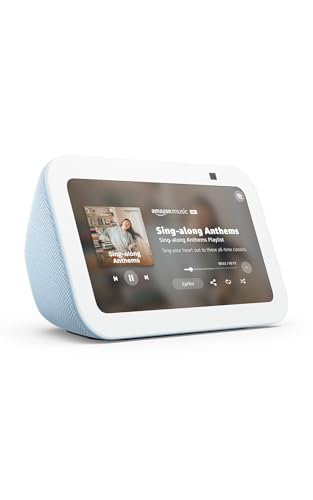
I find the Amazon Echo Show 5 (Newest Model) especially useful for anyone already invested in the Alexa ecosystem or using Amazon services like Prime Video and Amazon Music. Its 5.5” screen displays news, weather, and media clearly, while the built-in 2 MP camera supports video calls, home monitoring, and Ring doorbell integration. Audio is surprisingly rich for its size, with improved bass and vocal clarity. You can control lights, thermostats, and view security cameras remotely. Privacy features include a mic/camera off button and physical shutter. The device uses recycled materials, and packaging is fully recyclable. Prime members get unlimited photo storage.
Best For: Users deeply integrated into the Amazon and Alexa ecosystem who value compact smart display functionality with strong privacy and sustainability features.
Pros:
- Crisp 5.5” display and enhanced audio deliver a rich multimedia experience for its size
- Seamless smart home integration with support for video calls, security cameras, and voice controls
- Strong privacy protections including physical camera shutter and mic/camera off button, plus eco-friendly recycled materials and packaging
Cons:
- Smaller screen limits viewing experience compared to larger Echo Show models
- Camera resolution (2 MP) is modest compared to higher-end smart displays
- Full photo storage benefits require an Amazon Prime membership
Factors to Consider When Choosing a Smart Home System
You’ll want to check device compatibility first, since not all smart home systems work with every brand or gadget you already own. Make sure the system is easy to install and supports voice control through assistants like Alexa, Google, or Siri for hands-free convenience. Look for expandability and strong privacy features too, so you can add devices over time without sacrificing security.
Device Compatibility
When selecting a smart home system, device compatibility plays a critical role in guaranteeing smooth operation across your connected products, so check that each device supports widely adopted communication protocols like Zigbee, Thread, or Matter-these standards help devices from different brands work together reliably. Make sure your devices operate on the correct Wi-Fi band, since many only work on 2.4GHz and won’t connect to 5GHz networks. Confirm whether a hub or bridge is needed, as some products require one to link with voice assistants or apps. Verify compatibility with platforms like Alexa, Google Assistant, or Siri, and guarantee the manufacturer provides regular firmware updates to maintain support. Look for systems with backward and forward compatibility so older devices keep working as you add new ones, giving you flexibility and long-term value without forced upgrades or unexpected costs.
Ease Of Installation
A smart home system should be easy to set up without requiring technical expertise, and many now support DIY installation with wireless components that go live in minutes. You can install battery-powered sensors and plug-and-play hubs without tools or wiring, making them perfect if you rent or avoid permanent changes. Adhesive pads, wall brackets, or stand-alone placement give you flexible options for positioning. Most devices use QR codes or guided app setups to connect over Wi-Fi or Bluetooth, simplifying pairing. Systems using Matter or Zigbee reduce compatibility hiccups by allowing devices to communicate reliably. You won’t need an electrician-just follow the app’s step-by-step instructions. Look for brands that label setup as “under 10 minutes” per device. Avoid kits needing drilling or hardwiring unless you’re prepared for added effort. Choose solutions designed for simplicity so you spend less time installing and more time using.
Voice Control Integration
Once installed, your smart home system should respond to you as naturally as a conversation, which is where voice control integration becomes a key factor in daily use. You can operate devices hands-free, which adds convenience and helps those with mobility or vision challenges. Look for systems with built-in voice assistants that understand natural language, so you can set routines like “Good morning” to adjust lights, thermostat, and speakers at once. Choose platforms compatible with major voice services so you can control your home from phones, speakers, or wearables. For faster responses and reliability during internet outages, pick devices that support local voice processing. Security matters too-opt for systems with on-device processing, voice confirmation, and clear privacy settings. These features protect your data while letting you control your home confidently, smoothly, and securely across everyday situations.
Expandability Options
Smart home flexibility starts with expandability, and your system should grow as your needs do. Choose a platform that supports at least 20 sensors or more, so you can add coverage to new rooms or outdoor areas over time. Look for compatibility with various sensor types-like motion, door/window, water, and environmental detectors-so you can monitor different threats reliably. Pick systems that allow multiple remote controls or keypads, giving you easy access from various spots in your home. Make sure it keeps working during internet outages by offering local control or backup connectivity. Avoid setups requiring full upgrades for expansion-opt for platforms that add devices without replacing the hub. This saves money and effort long-term, ensuring smooth, cost-effective growth as your smart home evolves.
Privacy Features
While protecting your home, your smart devices shouldn’t compromise your personal privacy. Look for systems with physical camera shutters and microphone-off buttons so you can actively block audio and video access. End-to-end encryption guarantees only you can view your camera feeds, keeping footage safe from third parties. Real-time indicators, like LED lights or alerts, show when mics or cameras are on, giving you immediate awareness. Use voice recording deletion tools to erase stored audio automatically or on demand, reducing unnecessary data retention. Privacy dashboards let you manage permissions, check device activity, and delete personal data all in one place. These features give you control, transparency, and stronger protection. Pick systems offering these options to balance convenience with real privacy. They’re practical, effective, and built into reputable platforms without extra fees.
Frequently Asked Questions
Can I Use These Systems Without an Alexa Device?
Yes, you can use these systems without an Alexa device. Most integrate with Google Assistant, Apple HomeKit, or their own hubs. You control them via smartphone apps, voice commands, or automation routines. Some require a central hub for full functionality. Check compatibility with your preferred ecosystem. Avoid Alexa if you prefer privacy or use other platforms. Always confirm device certifications, like Matter support, for seamless operation across brands, ensuring reliability and future-proofing.
Do All Devices Work With Non-Amazon Smart Home Platforms?
You can’t assume all devices work with non-Amazon platforms, but many do. You’ll find most smart home gadgets support Google Home, Apple HomeKit, or Samsung SmartThings. Always check compatibility before buying. Some brands lock features behind their own apps or Amazon. You’ll save time and money by picking devices labeled “Works with” your chosen platform. Built-in hubs or Matter support improve cross-platform reliability, giving you more flexibility without Alexa.
Are There Monthly Fees for the Ring Alarm Systems?
You don’t need to pay monthly fees for the Ring Alarm to work, but you’ll miss key features without a subscription. The base system sends alerts to your phone, but for professional monitoring, video storage, and emergency response, Ring Protect Plus costs $20–$30 monthly. Self-monitoring is free, though it limits automation and cloud benefits. Weigh ongoing costs against your security needs, especially if integrating with other smart devices later.
Is Professional Installation Required for Any of These Kits?
No, you don’t need professional installation for any of these kits-you can set them up yourself. Most include detailed instructions and work with smartphone apps to guide you step by step. Some brands, like Ring and SimpliSafe, are designed specifically for DIY setup. A few offer optional professional installation for a fee, but it’s not required. You’ll save money and time by installing them on your own, and the systems perform just as effectively.
Can I Control These Systems From Outside My Home?
You can control these systems from outside your home using a smartphone or tablet with the manufacturer’s app. You’ll need a stable Wi-Fi connection and cloud service access. Most platforms offer remote monitoring, locking, thermostat adjustments, and camera viewing. Some systems require a hub with internet backup for reliability. Check subscription costs for video storage and guarantee two-factor authentication is enabled to protect your data and privacy.