Best Garage Cameras for Ultimate Home Security and Peace of Mind
You get sharp 2K video and wide 160° views with myQ and WESECUU cameras, while Ring and Wyze offer solid 1080p at lower prices. Look for color night vision, like on Ring models, and weatherproofing for reliable performance. Choose wired, battery, or dual-power setups based on convenience and placement. Most require subscriptions for cloud storage, though some support local SD cards. Consider Wi-Fi band compatibility and smart home integration for smoother control-your best setup depends on these key factors.
We are supported by our audience. When you purchase through links on our site, we may earn an affiliate commission, at no extra cost for you. Learn more. Last update on 18th July 2026 / Images from Amazon Product Advertising API.
Notable Insights
- Choose 2K resolution cameras like myQ Garage Camera Gen 2 for sharper video to identify faces, objects, and license plates clearly.
- Opt for wide field of view (up to 160°) and pan-tilt coverage to minimize blind spots around garage entry points.
- Prioritize models with color night vision and weather-resistant designs for reliable 24/7 visibility in all conditions.
- Select cameras with smart integration (Alexa, Google Assistant) and app alerts for real-time monitoring and remote access.
- Consider flexible power options like battery, solar, or hardwired setups to ensure continuous operation and placement freedom.
myQ Smart Garage Security Camera

Why might the myQ Smart Garage Security Camera stand out if you’re pairing security with convenience? I find it delivers strong 1080p HD video, a 130° wide-angle lens, and HDR for clear visuals in any light, plus night vision for low-light areas. Its 360° swivel lens fits anywhere using the magnetic base, or adhesives and hardware I can mount myself. It works in extreme temps, from -4°F to 122°F. I connect it via Wi-Fi and Bluetooth to the myQ app, check live feeds, get motion alerts, and control my garage door. Video saves securely with a subscription-7- or 30-day playback-after a free 30-day trial.
Best For: Homeowners seeking a durable, easy-to-install smart garage camera that integrates seamlessly with myQ garage door openers for enhanced security and remote monitoring.
Pros:
- Delivers sharp 1080p HD video with HDR and night vision for reliable visibility in varying lighting conditions
- Offers flexible mounting options with a magnetic base, adhesives, and hardware, plus a 360° swivel lens for optimal positioning
- Integrates with the myQ app via Wi-Fi and Bluetooth for real-time alerts, live viewing, and garage door control
Cons:
- Requires a subscription for continuous video storage, limiting free access to only a 30-day trial
- Limited to myQ ecosystem, reducing compatibility with non-myQ garage door openers
- Bluetooth setup may be finicky for some users during initial installation
myQ Garage Camera Gen 2 – 2K Wi-Fi
The myQ Garage Camera Gen 2 – 2K Wi-Fi stands out for homeowners who prioritize sharp image quality and broad coverage, thanks to its 2K resolution and 130° wide-angle lens that captures more of your garage in a single view. I rely on its night vision for clear footage in low light, and the manually adjustable swivel lets me position it just right. With 2-way audio, I can speak through the myQ app anytime, check live feeds, and get instant motion alerts. It works in extreme temps, from -4°F to 122°F, and mounts easily on metal surfaces with its magnetic base. I appreciate how it integrates seamlessly with my myQ garage system for unified control.
Best For: Homeowners seeking a high-resolution, weather-resistant garage camera with wide coverage and seamless integration into the myQ ecosystem.
Pros:
- Crisp 2K video quality and a 130° wide-angle lens provide expansive, detailed visibility
- Reliable night vision and 2-way audio enable clear monitoring and real-time communication
- Magnetic base allows for quick, tool-free installation on metal surfaces and supports flexible positioning
Cons:
- Requires a stable Wi-Fi connection for optimal performance, which may be unreliable in some garages
- Limited to magnetic mounting surfaces, reducing placement options on non-metal walls or ceilings
- Only integrates with the myQ ecosystem, limiting compatibility with third-party smart home platforms
myQ Smart Garage Door Video Keypad

Want a garage camera that gives you clear video, smart access control, and works seamlessly with your existing garage door opener? I’ve found the myQ Smart Garage Door Video Keypad delivers. It features a 160° wide-angle 1080p camera with Night Color, two-way audio, and motion-triggered alerts. I can assign custom PINs and set access schedules through the app. It connects via Wi-Fi and Bluetooth, and installation is DIY with a mounting kit and rechargeable battery. A myQ subscription activates AI detection, video history, and smart alerts. It’s compatible with LiftMaster, Chamberlain, and Craftsman openers made after 1993.
Best For: Homeowners seeking a secure, smart garage access solution with video monitoring and remote control compatibility with major garage door opener brands.
Pros:
- 160° wide-angle 1080p camera with Night Color provides clear visibility from driveway to doorway
- Customizable PIN codes and scheduling via the myQ app enhance access control for family and guests
- Easy DIY installation with Bluetooth-assisted Wi-Fi pairing and rechargeable battery power
Cons:
- Premium features like AI detection and video history require a myQ subscription
- Limited compatibility with garage door openers manufactured before 1993
- Rechargeable battery may necessitate frequent charging without optional wired power adapter
Ring Floodlight Cam Wired Plus (1080p HD)
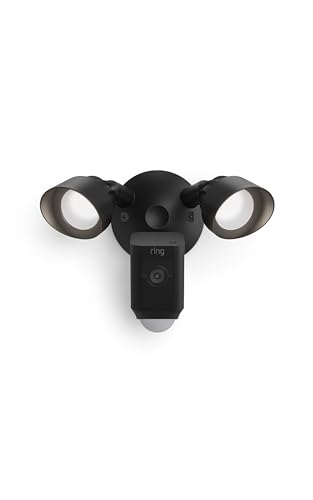
If you need a reliable, all-in-one security solution for your garage, the Ring Floodlight Cam Wired Plus (1080p HD) stands out with its powerful combination of video quality, motion detection, and built-in lighting. I rely on its 1080p HD video and Color Night Vision to clearly see activity, day or night. The motion-activated floodlights eliminate dark spots, while customizable motion zones help reduce false alerts. I get instant notifications on my phone and can talk to visitors or trigger the 105dB siren remotely. It’s hardwired, so it never loses power, and I can view live footage anytime through the Ring app. I save clips up to 180 days with a subscription, and I like that it works with Alexa for hands-free monitoring and alerts.
Best For: Homeowners and business owners seeking a dependable, hardwired outdoor security camera with integrated lighting, clear HD video, and smart alerts.
Pros:
- Offers 1080p HD video with Color Night Vision and motion-activated floodlights for reliable around-the-clock surveillance
- Delivers customizable motion zones, instant alerts, two-way talk, and a 105dB siren for enhanced security and remote interaction
- Supports long-term video storage up to 180 days with Ring subscription and integrates seamlessly with Alexa devices for hands-free control
Cons:
- Requires hardwired installation, which may necessitate professional help and is less ideal for renters
- Subscription fee needed for cloud storage and advanced features like extended video retention
- High brightness from floodlights may be intrusive to neighbors if not properly adjusted
2025 Upgraded 2K Wireless Security Camera

Though many garage cameras limit visibility after dark, the 2025 Upgraded 2K Wireless Security Camera delivers full-color night vision up to 8 meters using built-in LED spotlights and night color technology, making it ideal for those who need reliable around-the-clock monitoring. I appreciate its 2K UHD resolution, which offers sharper detail than standard 1080p, and the 5200 mAh battery lasts up to 6 months with light use. It supports both 2.4GHz and 5GHz Wi-Fi, works with Alexa, and includes two-way audio, motion alerts, and a built-in siren. I recommend using a 256GB SD card for local storage since cloud access requires a paid plan.
Best For: Homeowners seeking a reliable, high-resolution wireless security camera with full-color night vision and long battery life for both indoor and outdoor use.
Pros:
- Delivers 2K UHD video quality and full-color night vision up to 8 meters with built-in LED spotlights
- Long-lasting 5200 mAh battery supports up to 6 months of battery life under low usage
- Supports dual-band Wi-Fi, local SD card storage up to 256GB, and integrates with Alexa and smart home systems
Cons:
- Cloud storage requires a paid subscription for HD access, limiting free-tier usability
- No 5G cellular support, relying solely on 2.4GHz/5GHz Wi-Fi connectivity
- SD card not included, adding extra cost for full local storage functionality
Ring Outdoor Cam with Color Night Vision

The Ring Outdoor Cam with Color Night Vision stands out for users who prioritize clear low-light footage and flexible placement, especially when monitoring a garage that lacks nearby power outlets. I use its rechargeable battery and weather-resistant design to install it quickly without wiring. It connects to Wi-Fi and delivers Live View, motion alerts, and two-way talk through the Ring app. Color Night Vision gives me better detail at night than standard black-and-white cameras. I link it to my Alexa devices for voice alerts and streaming. A Ring Protect plan enables advanced features like event history and smart detection.
Best For: Homeowners and business operators seeking a wire-free, weather-resistant security camera with color night vision for flexible indoor or outdoor placement, especially in areas without easy access to power.
Pros:
- Rechargeable battery and weather-resistant design allow for easy, wire-free installation in hard-to-reach or outdoor locations
- Color Night Vision provides clearer, more detailed footage in low-light conditions compared to traditional black-and-white night vision
- Integrates seamlessly with Alexa devices for voice alerts, live streaming, and multi-camera monitoring through the Ring app
Cons:
- Requires a separate Ring Protect subscription to access advanced features like event history and AI-powered detection alerts
- Battery must be recharged periodically, which may be inconvenient for long-term surveillance without a power source nearby
- Ceiling mount requires an additional accessory purchase, increasing overall setup cost
Ring Spotlight Cam Plus (Newest Model)

I’ve found the Ring Spotlight Cam Plus (Newest Model) works best for homeowners who want reliable, round-the-clock visibility with responsive alerts and minimal installation hassle. It captures 1080p HD video with a wide-angle view, plus Color Night Vision for clear footage after dark. Motion-activated spotlights and a built-in siren deter intruders when activity is detected. Customizable motion zones reduce false alerts, focusing on people or packages. Two-way talk lets me speak remotely, and it works with Alexa for hands-free monitoring. The Quick Release Battery Pack allows flexible placement, while stored videos last up to 180 days with a Ring Home plan.
Best For: Homeowners seeking reliable, easy-to-install outdoor security with clear day-and-night video, customizable alerts, and smart home integration.
Pros:
- 1080p HD video with wide-angle view and Color Night Vision ensures clear visibility day and night
- Motion-activated spotlights and built-in siren enhance security and deterrence
- Customizable motion zones and package/person detection reduce false alerts
Cons:
- Requires a Ring Home subscription for video storage beyond short clips
- Battery-powered operation may require frequent recharging depending on usage
- Full feature access, including 180-day video retention, depends on paid subscription
Ring Indoor Cam, Home or business security in 1080p HD video, White

You’ll find the Ring Indoor Cam especially useful if you’re looking for reliable, clear video monitoring in a compact design that fits both home and business spaces. I rely on its 1080p HD video, Live View, and Color Night Vision for sharp day and night footage. Real-time motion alerts with customizable zones reduce false alarms, and Advanced Pre-Roll captures activity seconds before triggering-giving me better context. I appreciate the manual Privacy Cover; I can physically disable the lens and mic, then reactivate with a swivel. It’s plug-in powered, so I can move it easily. I mount mine on a shelf or wall using the swivel base for ideal angles. I use it with Alexa to stream video on my Echo Show and get audio alerts. While basic features are free, I subscribe to Ring Protect for AI-powered alerts, event history, and video review-about $4/month per device.
Best For: Homeowners and business operators seeking an affordable, easy-to-move indoor security camera with crisp video, customizable motion detection, and strong privacy controls.
Pros:
- Crisp 1080p HD video with Color Night Vision ensures clear day and night monitoring
- Manual Privacy Cover allows physical lens and microphone deactivation for enhanced privacy
- Seamless integration with Alexa devices for voice control, video streaming, and alerts
Cons:
- Requires a plug-in power source, limiting placement flexibility compared to battery-powered models
- Advanced features like AI-powered alerts and event history require a paid Ring Protect subscription
- Swivel mount, while adjustable, may feel less secure on uneven surfaces or with frequent adjustments
Wyze Cam OG 1080p Security Camera

A solid choice for budget-conscious homeowners needing reliable around-the-clock monitoring, the Wyze Cam OG 1080p Security Camera delivers clear video and smart alerts without requiring a high price tag. I appreciate its 1080p HD footage and color night vision, which provide sharp, detailed images day and night. It’s IP65-rated, so I can confidently use it indoors or out, though I need the separate outdoor adapter for weatherproof power. It connects to 2.4 GHz Wi-Fi only and works with Alexa and Google. I get instant motion and sound alerts, adjustable detection zones, two-way audio, and storage options-either via microSD card or cloud with a subscription.
Best For: Budget-conscious homeowners seeking reliable indoor and outdoor security monitoring with clear video and smart features.
Pros:
- Delivers sharp 1080p HD video with color night vision for detailed day and night footage
- IP65-rated for durable indoor/outdoor use, offering weather resistance
- Supports smart home integration with Alexa and Google Assistant, plus customizable motion alerts and two-way audio
Cons:
- Requires separate outdoor power adapter for outdoor deployment, adding to the cost
- Connects only to 2.4 GHz Wi-Fi networks, lacking 5 GHz compatibility
- Cloud storage requires a subscription; local storage needs a microSD card (both sold separately)
WESECUU 2K Bulb Security Camera (5G & 2.4GHz)
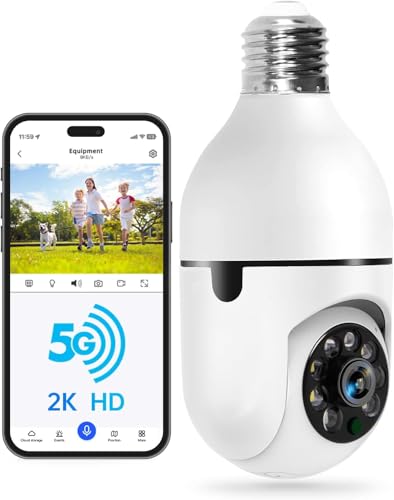
The WESECUU 2K Bulb Security Camera stands out for users seeking a discreet, all-in-one security solution that fits standard E27 light sockets and delivers reliable performance in diverse conditions. I use its 5G and 2.4GHz dual-band WiFi for stronger, more stable connections, especially outdoors. It provides 2K HD video, clearer than 1080P, with color night vision and infrared visibility up to 33 ft. I appreciate the 355-degree pan and 90-degree tilt, which eliminate blind spots. Motion alerts are accurate, especially in human detection mode. Two-way audio, an alarm, and bright light help deter intruders. I store footage locally on a micro SD card or in the cloud.
Best For: Homeowners seeking a discreet, versatile security camera that integrates into existing light sockets and offers strong outdoor coverage with high-resolution video and smart detection features.
Pros:
- Supports 5G and 2.4GHz dual-band WiFi for enhanced connectivity, stability, and extended outdoor range
- Delivers 2K HD video with color night vision and 33 ft infrared visibility for clear day and night monitoring
- Offers 355° pan and 90° tilt with human detection, two-way audio, and audible alarm for comprehensive security
Cons:
- Requires micro SD card (not included) or paid cloud subscription for video storage
- Image clarity may degrade in extreme weather conditions or complete darkness
- Setup depends on the EseeCloud app, which may pose challenges for less tech-savvy users
Factors to Consider When Choosing a Garage Camera
You’ll want to pick a garage camera that fits your space and setup, so check the video quality and resolution first-1080p is standard, but 2K or higher gives clearer details. Make sure it has a wide field of view, weather resistance, and a reliable power source, whether wired, battery, or solar. Look for smart integration with your existing systems, so you can get alerts and view footage easily from your phone or tablet.
Video Quality And Resolution
Sharp video quality guarantees you don’t miss critical details when monitoring your garage, and resolution is where it starts-opt for at least 1080p, though 2K delivers even better clarity for identifying faces, objects, or license plates. You’ll want crisp images, especially if you’re checking license plates or spotting tools left out. Cameras with HDR balance light and dark areas, so shadows or glare won’t hide key details. Night vision is essential, so pick models with infrared or color night vision to keep watch in total darkness. Aim for 30 fps frame rates-you’ll get smooth video that tracks movement clearly. While higher resolution improves detail, it also means larger video files, so plan your storage accordingly. Most reliable options sit between $80 and $150. Prioritize resolution, HDR, night vision, and frame rate together-you’ll get consistent, usable footage no matter the lighting.
Field Of View
While capturing every corner of your garage matters, starting with a camera’s field of view guarantees you get full coverage without gaps. Aim for a diagonal field of view between 130° and 160°, as this range effectively covers large or multi-car garages and extends visibility to driveways. Wide-angle lenses let you monitor more space in a single frame, reducing blind spots. Look for models with manually adjustable swivel mounts so you can fine-tune the angle for ideal sightlines. A 160° diagonal view often captures more than horizontal specs suggest, giving you a fuller picture. Pair a wide field of view with a high-resolution sensor to maintain edge-to-edge clarity. Don’t sacrifice image sharpness for width-balance both for reliable monitoring. Cameras with these specs deliver practical, consistent coverage, making them smart picks for most home setups.
Power Source Options
A wide field of view guarantees your garage is fully visible, but reliable operation depends on choosing the right power source. Wired cameras give you constant power and never need battery changes, making them ideal if you want a “set and forget” system. Battery-powered models offer more placement flexibility, especially where wiring is hard, but you’ll need to recharge or replace batteries every few weeks to six months, depending on use and weather. Solar-powered options cut down on charging needs if your garage gets regular sunlight. Some cameras support both battery and wired power, giving you backup during outages. Think about your garage’s layout and access to electricity. Dual-power models offer the most reliability, while solar setups reduce long-term maintenance. Choose based on convenience, access, and how often you want to maintain the system.
Weather Resistance
Most garage cameras face tough outdoor conditions, so choosing one with strong weather resistance is essential. Look for a minimum IP65 rating to block dust and withstand water jets, guaranteeing reliable operation in rain or snow. Pick a model rated for temperatures between -4°F and 122°F so it works year-round, even in extreme cold or heat. Choose cameras with sealed casings and corrosion-resistant materials-these prevent moisture and debris from damaging internal parts. Avoid units without proper ingress protection, as they often fail prematurely when exposed to the elements. Make sure the camera’s color night vision performs well in wet or cold weather, without glare or fogging that reduces visibility. A durable build doesn’t guarantee perfection, but it大幅 improves longevity and reliability. Prioritize tested weatherproofing over marketing claims to guarantee your system stays online in real-world conditions.
Smart Integration
When setting up a garage camera, choosing one that integrates smoothly with your smart home ecosystem makes monitoring and control far more convenient. You should pick a model that works with your existing smart platform so you can manage devices from one app. Make sure it supports Wi-Fi or Bluetooth for reliable connections to your hub and phone. Opt for cameras compatible with voice assistants like Alexa or Google Assistant so you can check feeds or get alerts hands-free. Look for models that sync with smart garage door controllers, letting you view live video and operate the door remotely in one system. Choose devices that receive over-the-air firmware updates through the app to stay secure and compatible with future upgrades. These features guarantee long-term performance and seamless automation across your home network.
Mounting Flexibility
For maximum coverage and convenience, pick a garage camera that offers flexible mounting options to suit your space. Choose models with magnetic bases for quick attachment to metal surfaces like beams or appliances, giving you versatile positioning. Look for cameras that support wall, ceiling, shelf, or swivel mounts so you can adjust the angle easily and cover more area. Make sure the setup allows tool-free installation when possible, since it simplifies placement and future adjustments. A wide field of view-ideally over 130°-ensures you capture more of your garage in one view. Check that the design works reliably in extreme temperatures, typically from -4°F to 122°F, so performance stays strong year-round. These features help you install the camera exactly where it’s needed, without hassle or blind spots.
Frequently Asked Questions
Can Garage Cameras Work in Extreme Temperatures?
Yes, garage cameras can work in extreme temperatures if built for it. You need models rated for your climate-check the specs. Most operate between -10°F and 140°F. Look for IP65 or higher weather resistance. Cameras with metal housings handle heat better. Cold slows battery-powered units, so plug-in is safer. Always install under eaves to reduce direct sun or snow exposure. Test performance seasonally to guarantee reliability.
Do These Cameras Require a Subscription for Basic Functions?
No, you don’t need a subscription for basic functions-most garage cameras let you view live footage, receive motion alerts, and record locally without paying monthly fees. Cloud storage and advanced features like person detection or extended video history do require a subscription. Check specs before buying: some brands charge for extras you might not need. Look for models with free local storage via SD cards to avoid ongoing costs.
Are Garage Cameras Vulnerable to Hacking?
Yes, garage cameras can be vulnerable to hacking if not properly secured. You expose them to risks when using weak passwords or unsecured networks. Manufacturers often provide encryption and two-factor authentication-use them. Check for regular firmware updates, as these patch security flaws. Avoid outdated models lacking support. Opt for cameras with local storage or end-to-end encryption to reduce exposure. Always change default settings and monitor connected devices to maintain control and protect your home data effectively.
How Long Do Garage Camera Batteries Last?
Your garage camera’s battery typically lasts 3 to 12 months, depending on usage and model. Frequent motion detection, cold temperatures, and video quality settings shorten battery life. Some models use rechargeable lithium batteries, while others rely on hardwiring for continuous power. Check for cameras with power-saving modes and weather-resistant designs. For longer runtime, choose models with solar panel compatibility or low-power consumption features. Always review manufacturer estimates under real-world conditions.
Can I Access the Camera Feed Offline?
No, you can’t access the camera feed offline unless it stores footage locally on a microSD card or connected hard drive. Most garage cameras rely on Wi-Fi and cloud storage, so you’ll need an internet connection to view live footage remotely. If offline access matters, pick a model with local storage-just know you’ll have to retrieve footage manually. Some cameras offer both options, giving you flexibility, but they often cost more and require setup effort.