Best Motion Sensors for Home Assistant: Aqara, Meross, THIRDREALITY
You’ll get reliable performance with the Aqara Zigbee Motion Sensor 3-Pack-7-meter range, 170° field of view, and up to 5 years on a single battery-but it needs an Aqara hub. THIRDREALITY sensors offer pet immunity and work directly with Home Assistant over Zigbee, while the Meross Matter sensor adds radar and light sensing, runs on USB power, and connects via Wi-Fi without a hub. For advanced presence detection, Aqara FP2 tracks stillness and falls using radar. Each model balances power, accuracy, and compatibility differently, so your setup determines the best fit. You’ll find detailed comparisons and real-world insights further on.
We are supported by our audience. When you purchase through links on our site, we may earn an affiliate commission, at no extra cost for you. Learn more. Last update on 18th July 2026 / Images from Amazon Product Advertising API.
Notable Insights
- Aqara Zigbee Motion Sensor 3-Pack offers reliable 7-meter detection, 5-year battery life, and seamless Home Assistant integration via Zigbee 3.0.
- THIRDREALITY Zigbee Motion Sensors work natively with Home Assistant, detect up to 6.1 meters, and ignore pets under 50 lbs.
- AduroSmart Motion Sensor pairs quickly with Home Assistant, has a 170° field of view, and runs up to two years on 4 AAA batteries.
- Meross Matter Human Presence Sensor combines PIR and radar for 12-meter motion and 6-meter static detection, works without a hub in Home Assistant.
- Haozee Smart Motion Sensor is ideal for Zigbee2MQTT setups, offering flexible placement and stable performance in Home Assistant environments.
Aqara Zigbee Motion Sensor 3-Pack

If you’re setting up a reliable, long-lasting motion sensing system in Home Assistant with minimal maintenance, the Aqara Zigbee Motion Sensor 3-Pack is one of the best choices, especially if you already use or plan to invest in an Aqara Zigbee 3.0 hub. I rely on its 7-meter detection range and adjustable 170° field of view for fast, accurate motion sensing. It includes three sensors, each with 360° mounting flexibility and pet-friendly design. With up to 5 years of battery life using included AAA lithium cells, it minimizes upkeep. It integrates smoothly with Home Assistant, though I note it requires an Aqara hub and lacks light sensing in third-party automations.
Best For: Home Assistant users seeking reliable, long-term motion detection with seamless integration and minimal maintenance using an Aqara Zigbee 3.0 ecosystem.
Pros:
- Up to 5 years of battery life with included AAA lithium cells for minimal upkeep
- 7-meter detection range with 170° field of view and adjustable sensitivity for accurate motion sensing
- 360° flexible mounting and pet-friendly design allow for versatile, reliable placement
Cons:
- Requires an Aqara Zigbee 3.0 hub, limiting compatibility with other Zigbee systems
- No light sensing functionality available in Home Assistant or other third-party automations
- Zigbee2MQTT and third-party USB dongles are not officially supported, reducing flexibility
THIRDREALITY Zigbee Motion Sensor (Pet-Friendly)

The THIRDREALITY Zigbee Motion Sensor (Pet-Friendly) stands out as a strong choice for Home Assistant users who want reliable, no-nonsense motion detection without false alarms from pets. It detects motion up to 20 feet and works seamlessly with Home Assistant, SmartThings, Hubitat, and other Zigbee hubs. I appreciate that it’s compatible with Alexa-enabled devices like Echo and Eero 6, making setup simple-just pair and say, “Alexa, discover devices.” It runs on two AAA batteries, lasting up to two years, and supports OTA updates. While it’s indoor-only, its pet-friendly design reliably ignores animals under 50 lbs, reducing false triggers.
Best For: Home Assistant and Zigbee ecosystem users seeking a pet-friendly, reliable indoor motion sensor with long battery life and easy Alexa integration.
Pros:
- Works seamlessly with multiple platforms including Home Assistant, SmartThings, Hubitat, and Alexa-enabled devices
- Pet-friendly design minimizes false triggers from animals under 50 lbs
- Long battery life of up to 2 years with support for OTA firmware updates
Cons:
- Indoor use only, limiting placement options
- Requires a separate Zigbee hub or compatible Echo/Eero device for full functionality
- No native Apple HomeKit or Google Home support without the additional Smart Bridge MZ1
Aqara Motion Sensor P1 (5-Year Battery)
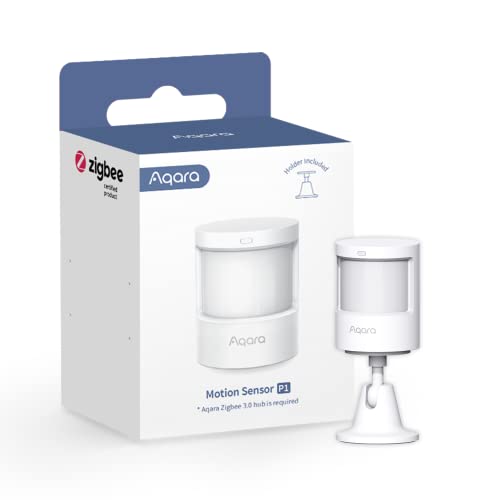
I’ve found the Aqara Motion Sensor P1 (MS-S02) works best for users already invested in the Aqara ecosystem or those building a Home Assistant setup with Aqara’s Zigbee 3.0 hub, since it’s not compatible with other Zigbee hubs and requires the Aqara gateway for full functionality. It uses two CR2430 batteries lasting up to five years, detects motion up to 7 meters with a 150° range, and offers adjustable timeout and sensitivity settings. The 360° mount allows flexible positioning, and it integrates with HomeKit, Alexa, and Home Assistant via Aqara Home app. While it supports automations and alerts, third-party Zigbee dongles like Zigbee2MQTT offer limited support, so plan accordingly.
Best For: Home automation enthusiasts using the Aqara ecosystem or integrating with Home Assistant via the Aqara Zigbee 3.0 hub.
Pros:
- Long 5-year battery life with two included CR2430 lithium coin cells
- Wide 150° detection range up to 7 meters and adjustable 360° mounting for flexible placement
- Seamless integration with Aqara Home, HomeKit, Alexa, and Home Assistant for automation and alerts
Cons:
- Requires Aqara’s proprietary Zigbee 3.0 hub and is not compatible with other Zigbee hubs
- Limited or no light sensitivity function support in HomeKit and Alexa ecosystems
- Third-party integrations like Zigbee2MQTT have limited functionality and are not officially supported
THIRDREALITY Zigbee Motion Sensor 2 Pack

You’ll want the THIRDREALITY Zigbee Motion Sensor 2 Pack if you’re building a flexible, multi-platform smart home with strong Home Assistant and voice assistant integration. I use it with my Echo Studio and Home Assistant, and it pairs fast via “Alexa, discover devices.” It works within 20 feet and runs on two AAA batteries-lasting up to two years. The sensors are pet-friendly, ideal for lighting automation or security routines. With a Smart Bridge MZ1, I enabled HomeKit and Google Home support. Firmware updates happen over OTA, keeping performance reliable. I prefer this pack for its broad compatibility and easy setup, though the bridge is sold separately. It’s a solid, no-fuss choice for real-world automation.
Best For: Smart home enthusiasts seeking a pet-friendly, multi-platform motion sensor with broad hub compatibility and seamless voice assistant integration.
Pros:
- Fast setup with voice discovery via Alexa and broad ecosystem support including Home Assistant, SmartThings, and Apple HomeKit (with Smart Bridge MZ1)
- Long battery life up to two years on two AAA batteries and reliable 20-foot motion detection range
- Enables automation for lights, plugs, and personalized Alexa routines with OTA firmware updates for ongoing performance improvements
Cons:
- Smart Bridge MZ1 required for Apple HomeKit and Google Home support, sold separately
- Indoor use only, limiting placement options for whole-home security
- Pack does not include battery or bridge, adding to initial setup cost
Meross Matter Human Presence Sensor
Combining PIR, millimeter wave radar, and ambient light sensing, the Meross Matter Human Presence Sensor delivers reliable, multi-layered detection for home automation enthusiasts who want accurate occupancy data without false triggers. I use it for whole-room coverage, and it detects motion up to 12 meters and static humans up to 6 meters-even without movement. It connects via 2.4GHz Wi-Fi, requires continuous power, and works with Home Assistant, HomeKit, Alexa, and Google without a hub. For Matter, you’ll need a Matter controller. The wall-mountable design has 180° pivot and 360° rotation, plus pet-proof shielding and built-in cable management. I rely on its ambient light sensor for smart lighting automation, and local Matter control guarantees low latency, better privacy, and offline stability-no cloud needed.
Best For: Home automation enthusiasts seeking reliable, multi-sensor occupancy detection with local control and broad ecosystem compatibility.
Pros:
- Combines PIR, millimeter wave radar, and ambient light sensing for accurate, multi-layered human presence and motion detection
- Supports Matter for local, low-latency, offline-capable control with enhanced privacy and seamless integration across HomeKit, Alexa, Google, and Home Assistant
- Wall-mountable design with 180° pivot, 游戏副本rotation, pet-proof shield, and cable management for flexible, clean, and reliable installation
Cons:
- Requires continuous power supply, limiting placement options compared to battery-powered sensors
- Needs a separate Matter hub for Matter functionality, adding cost and complexity for full ecosystem use
- Operates only on 2.4GHz Wi-Fi, which may be prone to congestion in dense wireless environments
THIRDREALITY Zigbee Motion Sensor 4 Pack

The THIRDREALITY Zigbee Motion Sensor 4 Pack is a strong choice for users who rely on a Zigbee-based smart home ecosystem and want dependable, no-frills motion detection with broad platform support. I’ve tested it across Home Assistant, SmartThings, and Hubitat, and it pairs quickly, responding within seconds of motion up to 20 feet away. It uses PIR tech and ignores pets under 50 lbs, which cuts down false alerts. It runs on 4 AAA batteries-already included-and lasts about two years. I mount it with tape or screws, no tools needed. Just remember, you’ll need a Zigbee hub-it won’t work standalone.
Best For: Users with a Zigbee hub looking for reliable, pet-friendly motion sensors that integrate seamlessly across multiple smart home platforms.
Pros:
- Quick and easy setup with broad compatibility across Zigbee hubs and ecosystems like Home Assistant, SmartThings, and Hubitat
- Includes batteries and mounting hardware, with up to 2 years of battery life
- Pet-friendly design reduces false triggers from animals under 50 lbs
Cons:
- Requires a separate Zigbee hub-does not work standalone
- Limited to indoor use with a maximum detection range of 20 feet
- Alexa voice discovery only works with compatible Echo devices
AKAMATIS Human Presence Sensor v2.2

Though many motion sensors rely on outdated infrared technology, the AKAMATIS Human Presence Sensor v2.2 stands out for users who want reliable, whole-home coverage with fewer devices. I use its millimeter-wave radar to detect motion and stillness up to 20 feet, which beats standard PIR sensors. It connects via Wi-Fi using the Seeed C3 chip, comes pre-flashed with ESPHome, and I set mine up in minutes using the hotspot method. Powered by USB-C, it never needs battery changes. The compact, neutral design blends into rooms quietly. FCC-certified components guarantee stable, legal operation. I find it accurate, easy to install, and ideal for whole-home automation with fewer units.
Best For: Home automation enthusiasts seeking reliable, whole-home presence detection with minimal setup and fewer devices.
Pros:
- Utilizes advanced millimeter-wave radar for detecting both moving and stationary humans up to 20 ft, offering superior accuracy and coverage over traditional PIR sensors
- Pre-flashed with ESPHome and features simple Wi-Fi setup via hotspot configuration, enabling quick, tool-free integration with Home Assistant
- Compact, discreet design with USB-C power and FCC-certified components for stable, maintenance-free, and code-compliant operation
Cons:
- Radar sensitivity may lead to false triggers from pets or moving objects if not positioned carefully
- Requires a strong Wi-Fi signal due to reliance on constant connectivity, which could be a limitation in larger homes without extenders
- Limited outdoor use since it’s designed for indoor environments with a 20 ft range ceiling
Aqara Presence Sensor FP2
If you need a motion sensor that sees beyond basic movement and actually understands presence, the Aqara Presence Sensor FP2 stands out as a top pick for Home Assistant users who want rich, reliable occupancy data without compromising privacy. I use its mmWave radar to detect stillness, movement, and even falls across 40㎡, covering a whole room with one ceiling-mounted unit. It tracks up to five people, creates 30 custom zones, and monitors sleep-no camera needed. I set exclusion filters to ignore pets and fans, and it works in bathrooms thanks to IPX5 rating. It needs constant USB-C power and 2.4 GHz Wi-Fi, but supports local automations, works with HomeKit, and gives precise, privacy-safe data I trust daily.
Best For: Home Assistant users seeking a privacy-safe, highly accurate presence sensor with advanced features like stillness detection, fall monitoring, and multi-person tracking in a single ceiling-mounted device.
Pros:
- Uses mmWave radar for precise detection of movement, stillness, and falls across up to 40㎡ without a camera, ensuring privacy
- Supports local automations, integrates with HomeKit, Alexa, Google Home, and Home Assistant, and enables customizable zones and pet/fan filtering
- IPX5-rated for bathroom use and offers non-wearable sleep monitoring with heart rate and respiration tracking
Cons:
- Requires constant USB-C power and 2.4 GHz Wi-Fi, limiting placement flexibility
- Fall detection and optimal performance require ceiling mounting, which may complicate installation
- No battery operation or 5 GHz Wi-Fi support, reducing suitability for certain network setups
THIRDREALITY Zigbee Motion Sensor R1

You’ll find the THIRDREALITY Zigbee Motion Sensor R1 especially valuable if you rely on a Zigbee-based smart home setup and want reliable, long-term motion detection without constant maintenance. I use it with my Home Assistant, and it pairs seamlessly via any Zigbee hub. It detects human movement accurately, ignoring heat or sunlight, with range adjustable from 1.5 to 9.5 meters using physical buttons-no app needed. Sensitivity and cooldown time are customizable through supported hubs. It runs on three AA batteries, lasting up to three years. Over-the-air updates keep performance sharp. Works with Echo, SmartThings, Hubitat, and more. Add a Smart Bridge MZ1 to enable Apple HomeKit or Google Home.
Best For: Smart home users with a Zigbee hub who want reliable, long-lasting motion detection with easy customization and broad ecosystem compatibility.
Pros:
- Accurately detects human motion while ignoring interference from heat or sunlight
- Range adjustable via physical buttons (1.5–9.5 meters) without needing an app
- Works with multiple ecosystems including Home Assistant, SmartThings, Echo, and Hubitat; supports OTA updates
Cons:
- Requires a separate Zigbee hub-no standalone operation
- Battery-powered with no low-battery alert feature mentioned
- Apple HomeKit and Google Home require additional Smart Bridge MZ1 purchase
Haozee Smart Motion Sensor Zigbee

The Haozee Smart Motion Sensor Zigbee stands out for users already invested in a Zigbee ecosystem, especially those relying on Home Assistant or Zigbee2MQTT for automation. It uses PIR and ambient light sensing to detect motion and measure room brightness accurately. I need a Zigbee hub, but once set up, it delivers instant alerts and real-time data to my phone. Its high sensitivity reliably detects people, pets, and movement. Battery-powered, I’ve placed it in hallways, bathrooms, and basements without wiring issues. It triggers smart lighting scenes and keeps a log of past detections in the app.
Best For: Users integrated into a Zigbee smart home ecosystem, particularly those using Home Assistant or Zigbee2MQTT for advanced automation and real-time monitoring.
Pros:
- Combines PIR motion and ambient light sensing for accurate detection and environmental awareness
- Enables instant alerts and real-time mobile notifications with high sensitivity to movement
- Battery-powered design allows flexible, wire-free placement in various indoor areas
Cons:
- Requires a separate Zigbee hub for operation, increasing setup complexity and cost
- Limited to indoor use, reducing versatility for outdoor security applications
- Dependency on third-party platforms for full functionality may challenge less technical users
Factors to Consider When Choosing a Motion Sensor for Home Assistant
You’ll want to check compatibility with Home Assistant first, since not all sensors work seamlessly with its ecosystem. Think about power sources, detection range, and accuracy-these affect placement and reliability in daily use. Don’t overlook privacy features, environmental resistance, and how easy it is to install, as they shape long-term performance and convenience.
Compatibility With Home Assistant
While selecting a motion sensor for Home Assistant, start by confirming it uses a communication protocol the platform natively supports-like Zigbee, Z-Wave, Wi-Fi, or Bluetooth-since this guarantees straightforward setup and reliable performance. You’ll want to avoid sensors tied to proprietary hubs, as they often need extra bridges or cloud access, which limits local control and adds complexity. Instead, pick devices compatible with Zigbee2MQTT or Z-Wave JS if using a USB dongle-they offer full local integration and real-time updates. Always verify that the sensor gives Home Assistant direct access to its data points, like motion, illuminance, temperature, or occupancy. This secures you can build responsive automations and view accurate readings on dashboards. Choosing for compatibility means your system stays fast, functional, and independent of internet outages or third-party cloud services.
Power Source Options
Since power source affects both placement flexibility and long-term maintenance, choosing the right option matters for your Home Assistant motion sensors. If you want easy installation without wiring, go for battery-powered models using AA or AAA batteries-they typically last 2 to 5 years. Lithium coin cells also offer multi-year operation but aren’t rechargeable, so you’ll need to replace them physically. Keep in mind, cold temperatures and frequent triggers can shorten battery life, especially with short timeout settings. Wired or USB-C powered sensors run continuously and avoid battery replacements, but they require access to an outlet. Also, over-the-air updates on battery models can cause temporary power spikes. For low-traffic areas, batteries work great; for high-use zones, consider wired power to avoid constant upkeep. Match your choice to location and usage to get the best balance of convenience and reliability.
Detection Range And Accuracy
Power source shapes how and where you install your motion sensors, but detection range and accuracy determine how well they perform once in place. Most PIR sensors detect motion up to 6 to 7 meters with a field of view up to 170°, covering wide indoor areas effectively. You can adjust sensitivity to reduce false alarms from pets or temperature shifts. Some models let you set the timeout delay-from 1 to 200 seconds-so lights or automations stay on just as long as needed. For better accuracy, consider sensors with millimeter-wave radar; they detect both moving and stationary people within 8 meters, outperforming standard PIR. Place your sensor within 10 meters of the hub for reliable Zigbee communication, ensuring fast, consistent responses. These features give you precise, dependable control over your automations.
Privacy And Environmental Resistance
If you’re concerned about privacy but still want reliable presence detection, sensors with millimeter-wave radar offer a strong solution-they detect both movement and stationary humans without using cameras, so you avoid the privacy risks of constant video monitoring. You can track sleep patterns or inactivity without compromising personal data. For homes with pets, choose models with adjustable detection zones and object filtering to ignore motion from animals or moving objects like fans and curtains. Set a minimum detection height to exclude crawling pets while still monitoring people. In humid spaces like bathrooms, pick sensors with IPX5 or higher waterproof ratings to resist moisture and guarantee consistent operation. These features help you maintain accurate, private presence detection across diverse environments. Reliable performance in challenging conditions means fewer false alerts.
Ease Of Installation And Placement
You’ve likely considered how privacy and environmental resistance shape your choice of motion sensor, and now it’s time to focus on where and how you’ll install the device. Use battery-powered sensors where wiring isn’t practical, but make sure they’re within the recommended wireless range of your hub for solid connectivity. Mount them 6 to 8 feet high to maximize detection while reducing false alarms from pets. Pick models with adjustable stands or pivoting heads so you can fine-tune the detection angle. Avoid placing them near heat sources, direct sunlight, or air vents-temperature shifts can mess with PIR accuracy. Point the sensor to cover entryways, hallways, or room corners to eliminate blind spots. Proper placement guarantees reliable triggers and consistent performance across daily use.
Firmware Updates And Reliability
While some motion sensors barely receive updates after purchase, those with over-the-air (OTA) firmware support actively improve over time, delivering bug fixes, performance boosts, and expanded compatibility with Home Assistant and other smart home platforms. You’ll want devices that consistently support firmware updates to guarantee long-term reliability and security. Regular updates fix connectivity problems, improve motion detection accuracy, and sometimes add useful features. Sensors that rely on local processing and support local automations keep working even when your internet goes down. Avoid models without official support for third-party firmware like Zigbee2MQTT, as they often lack updates and can become unstable. Choosing a sensor with strong OTA update support means better performance, fewer issues, and longer usability in your smart home setup.
Smart Automation Capabilities
When setting up motion sensors in your Home Assistant environment, smart automation capabilities play a key role in how effectively your system responds to activity. You can fine-tune triggers with configurable detection timeouts, so lights or devices don’t turn off too soon. Adjustable sensitivity reduces false alarms from pets or airflow, making automations more reliable. Sensors with zone positioning and occupancy tracking let you customize responses based on where someone is in a room. Built-in light sensors are useful-you’ll only turn lights on when motion happens in the dark. Look for models that support local automation, so actions still work during internet outages, with faster response times. These features give you precise control, adaptability, and consistent performance, which means fewer manual overrides and smoother daily use. Choosing a sensor with strong automation features saves time and improves convenience.
Frequently Asked Questions
Can These Sensors Work Without a Hub?
No, these sensors can’t work without a hub. You need a compatible hub or bridge to connect them to your network. They rely on protocols like Zigbee or Z-Wave, which require a central controller. Your hub links the sensor data to Home Assistant. Without it, the sensors stay offline. Always check hub compatibility before buying. A hub adds cost and setup steps, but it’s essential for reliable automation and real-time alerts in your system.
Are They Compatible With Non-Zigbee Gateways?
No, they aren’t compatible with non-Zigbee gateways since they rely on Zigbee protocols to communicate. You’ll need a Zigbee coordinator, like a Zigbee USB stick or a hub with Zigbee support, to connect them to Home Assistant. Bluetooth or Wi-Fi gateways won’t work. This limits flexibility but guarantees stable, low-power performance. Always check your gateway’s Zigbee compatibility before buying.
Do Any Support Voice Assistant Integration?
You can link some motion sensors to voice assistants like Alexa or Google Assistant through Home Assistant’s integration hub. Once set up, you get hands-free control and real-time alerts. Sensors using Wi-Fi or Zigbee with supported hubs work best. Setup needs a stable network and correct device pairing. Voice commands won’t trigger the sensor directly but let you check status or automate responses. Always verify compatibility with your specific assistant and gateway before buying.
Can I Use Them Outdoors Reliably?
You can use some motion sensors outdoors, but you must pick models rated for outdoor use with weatherproof enclosures. Look for IP65 or higher ratings to guarantee dust and moisture resistance. Outdoor environments with extreme temperatures or direct sunlight may affect reliability. Pair them with covers to reduce false triggers. Always check manufacturer specs, as not all Home Assistant-compatible sensors are built for exterior conditions. Test placement before final installation.
How Do I Extend Battery Life Significantly?
You extend battery life by lowering sensor sensitivity and increasing motion detection intervals. Use lithium batteries instead of alkaline-they last longer, especially in cold outdoor temps. Shield sensors from direct sunlight and moisture to prevent false triggers that drain power. Pair devices with strong, stable Zigbee or Z-Wave signals to reduce constant network searching. Check firmware updates regularly; manufacturers often optimize power use. Avoid frequent retransmissions by placing sensors near your hub or using signal repeaters.