Best Remote Security Cameras That Keep Your Home Safe 24/7
You can keep your home secure 24/7 with reliable remote cameras like the Kasa EC71 for indoor pan-tilt coverage or Blink Outdoor 4 for wireless, long-lasting battery use. Solar-powered 4G LTE models, such as SEHMUA and SOLIOM, work off-grid with strong 2K or 5MP video and color night vision. Most use 2.4GHz Wi-Fi or cellular data, require subscriptions for advanced alerts and cloud storage, and support local microSD backup. Choosing the right one depends on power access, network stability, and desired video quality-options vary in features, setup ease, and ongoing costs. Each model offers unique benefits depending on your environment and monitoring needs.
We are supported by our audience. When you purchase through links on our site, we may earn an affiliate commission, at no extra cost for you. Learn more. Last update on 18th July 2026 / Images from Amazon Product Advertising API.
Notable Insights
- Choose 2K or 5MP cameras for sharper video quality and clearer identification of people, vehicles, and packages up to 30 feet away.
- Opt for solar-powered 4G LTE cameras like SEHMUA for reliable 24/7 operation in remote areas without Wi-Fi or power outlets.
- Select models with AI-powered motion detection to reduce false alerts and accurately distinguish between people, pets, and vehicles.
- Ensure continuous monitoring with cameras supporting 24/7 live streaming and local or cloud storage for round-the-clock footage access.
- Use wireless or battery-powered options like Blink Outdoor 4 for fast setup, long battery life, and seamless integration with smart home systems.
Kasa 1080p Indoor Security Camera (EC71)

Who wouldn’t want to keep a close eye on their home with a camera that covers every corner of a room? I rely on the Kasa 1080p Indoor Security Camera (EC71) for full 360° horizontal and 113° vertical coverage, plus motion tracking that follows people or pets. It sends alerts for motion, people, or baby cries, and I appreciate how it distinguishes between pets and humans. With 2-way audio and 2.4GHz Wi-Fi, I stay connected remotely, and it works with Alexa and Google Home. Night vision reaches 30 feet, and 1080p video is sharp. I use a microSD card for local storage, though cloud backup is available with a subscription.
Best For: Homeowners and parents seeking a versatile indoor security camera with full room coverage, smart alerts, and two-way communication for monitoring people, pets, or babies.
Pros:
- Offers 360° horizontal and 113° vertical pan/tilt coverage with motion tracking and Patrol Mode for comprehensive room monitoring
- Delivers intelligent alerts that distinguish between people, pets, and baby cries, enhancing situational awareness
- Supports local microSD storage and cloud backup, works with Alexa and Google Home, and includes clear 1080p video with 30-foot night vision
Cons:
- Requires 2.4GHz Wi-Fi only, which may limit connectivity in dual-band network environments
- Cloud features like 30-day video history and Video Summary require a Kasa Care subscription
- MicroSD card not included, adding extra cost for local storage setup
Blink Outdoor 4 Wireless Security Camera (2-Pack)

The Blink Outdoor 4 Wireless Security Camera (2-Pack) is an excellent choice for homeowners seeking an easy-to-install, wire-free system with reliable performance and long battery life. I’ve found it delivers sharp 1080p video, clear two-way audio, and effective night vision. Setup takes minutes using the included Sync Module Core and AA lithium batteries, which last up to two years. Motion alerts are fast, with optional person detection through a subscription. Cloud storage includes a free 30-day trial; I recommend adding local backup via Sync Module XR or 2 with storage (sold separately). It works seamlessly with Alexa for hands-free monitoring.
Best For: Homeowners looking for an easy-to-install, wire-free security system with long battery life and solid smart home integration.
Pros:
- Delivers sharp 1080p video, clear two-way audio, and reliable infrared night vision
- Simple setup with no wiring and up to two-year battery life using included lithium batteries
- Fast motion alerts with optional person detection and seamless Alexa integration
Cons:
- Sync Module Core lacks local storage, requiring a subscription for cloud recording beyond the trial
- Person detection only available with a paid subscription plan
- Local backup requires additional hardware (Sync Module XR or 2 with separate storage)
SEHMUA Solar Security Camera 4G LTE

If you’re securing a remote property without reliable Wi-Fi-like a rural cabin, farm, or construction site-the SEHMUA Solar Security Camera 4G LTE stands out with its standalone 4G LTE connectivity and solar-powered operation. It uses a built-in EIOTCLUB SIM card, works on AT&T, T-Mobile, or Verizon networks, and requires no Wi-Fi. You’ll need 4G coverage and a subscription after the trial. The 10400mAh battery charges via a 6W solar panel, ensuring year-round power. It records in 2K with full-color night vision, supports 128GB local storage, and offers 30 days of free cloud storage. I get instant motion alerts and use two-way audio through the Ubox App.
Best For: Remote property owners without reliable Wi-Fi, such as those monitoring farms, rural cabins, or construction sites.
Pros:
- Operates on 4G LTE with a built-in SIM card, eliminating the need for Wi-Fi
- Solar-powered with a high-capacity battery for continuous, cordless operation
- Delivers 2K video with full-color night vision and supports two-way audio
Cons:
- Requires active 4G coverage and ongoing subscription after trial period
- No Wi-Fi option for network flexibility or backup connectivity
- Limited to specific U.S. carriers (AT&T, T-Mobile, Verizon)
Wireless Outdoor Security Camera 2K AI
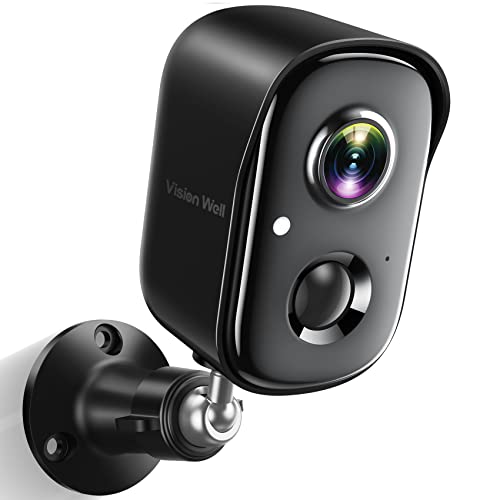
You’ll get reliable outdoor surveillance with the Wireless Outdoor Security Camera 2K AI if you need clear, detailed video and smart detection without running wires. I tested its 2K resolution, which captures sharp images up to 33 feet, plus color night vision and infrared for low light. It connects to 2.4GHz Wi-Fi only, so check your network. The AI detects people, vehicles, pets, and packages, reducing false alerts. I found the motion-triggered siren, spotlight, and app alerts effective. Two-way audio works smoothly via smartphone. It’s IP65-rated, battery-powered, and stores footage on microSD or cloud. Setup took minutes using the included mount and battery.
Best For: Homeowners seeking an easy-to-install, wire-free outdoor security camera with sharp 2K video, reliable AI-powered motion detection, and effective smart alerts.
Pros:
- Delivers clear 2K resolution video and color night vision up to 33 feet with effective infrared support
- AI-powered PIR motion detection accurately distinguishes people, vehicles, pets, and packages, minimizing false alarms
- Simple wireless setup with battery power, IP65 weather resistance, and flexible storage via microSD or cloud
Cons:
- Compatible only with 2.4GHz Wi-Fi networks, excluding 5GHz support
- Battery-powered operation requires periodic recharging or replacement
- MicroSD card not included, and maximum storage capped at 128GB
2K WiFi Pan/Tilt Security Camera

Choosing the K WiFi Pan/Tilt Security Camera means embracing thorough coverage without compromise, especially for those prioritizing full-room visibility in indoor spaces. I rely on its 2K FHD resolution for sharp, clear video and 24/7 live streaming via the app, though it only connects to 2.4G Wi-Fi and needs constant power through a Type-C cable. Its 355° horizontal and 90° vertical rotation delivers full 360° coverage, all controllable remotely. I use two-way audio to speak in real time, and I appreciate the one-click call feature. I store footage on a microSD card or cloud, with free 3-day cycle storage and advanced features for 30 days-after that, a subscription is required. I share access easily with family, making monitoring pets or babies more collaborative.
Best For: Homeowners seeking comprehensive indoor monitoring with high-quality video, remote pan/tilt control, and easy family sharing for pet, baby, or security tracking.
Pros:
- 2K FHD resolution and 355° horizontal, 90° vertical smart rotation ensure crisp video and full 360° room coverage
- Two-way audio with one-click call enables real-time interaction with family or pets
- Flexible dual storage with free 3-day cloud cycle and microSD support up to 128GB
Cons:
- Wi-Fi connectivity limited to 2.4G only, excluding 5G compatibility
- Requires continuous power via Type-C cable, limiting placement options
- Advanced cloud features require a subscription after the 30-day trial period
Blink Outdoor 4 Security Camera 3-Pack

The Blink Outdoor 4 Security Camera 3-Pack stands out as a top choice for homeowners seeking an easy-to-install, wire-free system that delivers reliable outdoor monitoring without requiring a constant power source. I appreciate that it includes three cameras, a Sync Module Core, and long-lasting AA Energizer lithium batteries that can last up to two years. With 1080p HD video, infrared night vision, and two-way audio, I can monitor and respond to activity in real time using the Blink app. The dual-zone motion detection with person recognition helps reduce false alerts, and while cloud storage comes with a free 30-day trial, I can add local storage using a compatible Sync Module and MicroSD or USB drive. It’s also Alexa-compatible, letting me control the system with my voice.
Best For: Homeowners looking for an easy-to-install, wire-free outdoor security system with long battery life and flexible storage options.
Pros:
- Includes three weather-resistant cameras with 1080p HD video, night vision, and two-way audio for comprehensive coverage
- Up to two-year battery life with included AA Energizer lithium batteries and quick setup for hassle-free installation
- Dual-zone motion detection with person recognition and Alexa compatibility for smarter monitoring and voice control
Cons:
- Advanced motion detection and cloud storage require a subscription after the 30-day free trial
- Local storage requires purchasing additional hardware like Sync Module XR or Sync Module 2
- No color night vision or 24/7 continuous recording without additional subscription and equipment
Tapo 1080P Indoor Security Camera (C201)

While compact and designed for indoor use, the Tapo 1080P Indoor Security Camera (C201) delivers full-room coverage with its 360° horizontal pan and 114° vertical tilt, making it a strong choice if you need reliable monitoring for small to medium-sized rooms like nurseries or pet areas. I get sharp 1080P video and clear night vision up to 30 feet, plus motion, person, and baby cry detection-all with free push alerts. Two-way audio and a built-in siren help me respond remotely, and it connects via 2.4 GHz Wi-Fi. I use a microSD card for local storage-up to 512 GB-and Tapo Care offers optional cloud perks like 30-day history and smarter alerts.
Best For: Homeowners seeking an affordable, easy-to-use indoor security camera with full-room coverage and reliable smart detection features for monitoring nurseries, pets, or common areas.
Pros:
- 360° horizontal pan and 114° vertical tilt enable comprehensive full-room monitoring
- 1080P Full HD video with night vision up to 30 feet and free motion, person, and baby crying detection alerts
- Local storage support up to 512 GB via microSD card and optional Tapo Care cloud features for enhanced security
Cons:
- Connects only to 2.4 GHz Wi-Fi, which may limit performance in congested networks
- Cloud storage and advanced features require a Tapo Care subscription
- microSD card not included and compatibility must be verified separately
4G LTE Solar Security Camera with Color Night Vision

If you’re securing a remote property like a farm, ranch, or construction site with no access to power or Wi-Fi, the 4G LTE Solar Security Camera with Color Night Vision is your strongest option. I rely on its solar panel and rechargeable battery to run continuously without wiring. It connects automatically to 4G networks using a built-in SIM card, works with major U.S. carriers, and streams 2K HD video to my phone. The camera pans 355° and tilts 100°, covers large areas, detects motion with PIR sensors, sends instant alerts, and deters intruders with a built-in alarm. Color night vision and IR capture clear footage in low light, and the IP65-rated build withstands tough weather. I use local storage on a memory card or optional cloud backup. A 7-day free data trial starts immediately, but ongoing use requires a subscription for unlimited data through the UBox app.
Best For: Remote property owners like farmers, ranchers, and construction site managers who need a power-independent, Wi-Fi-free security solution with reliable 4G connectivity and color night vision.
Pros:
- Solar-powered with a rechargeable battery and 6W solar panel for continuous, off-grid operation
- Connects automatically to 4G networks via built-in SIM card and supports 2K HD live streaming to smartphones
- Offers 355° pan and 100° tilt for full panoramic coverage, PIR motion detection, instant alerts, and a built-in alarm for intruder deterrence
Cons:
- Requires a subscription for unlimited data through the UBox app after the 7-day free trial expires
- Memory card for local storage not included, adding extra cost for full functionality
- Dependent on 4G network strength, which may limit performance in areas with poor cellular coverage
SOLIOM 5MP Solar Security Camera (4-Pack)

You’ll want the SOLIOM 5MP Solar Security Camera (4-Pack) if you need a reliable, subscription-free system with solar-powered convenience and strong local storage. I appreciate its 5MP video quality and Magnifier Zoom, which delivers clear details up to 30 ft away while tracking moving subjects. It stores all footage encrypted on the included 32GB Soliom Base-no cloud fees, and recordings stay private. The cameras offer 360° motion tracking and sync across multiple units for full-property coverage. Solar panels charge efficiently, even in low light, and the 10 ft cable allows flexible placement. Dual-band Wi-Fi guarantees stable connectivity, and setup is simple: just connect the base to your router and let the cameras pair automatically.
Best For: Homeowners seeking a reliable, solar-powered security system with strong local storage and no subscription fees.
Pros:
- 5MP Ultra HD video with Magnifier Zoom provides clear, detailed footage up to 30 ft away with real-time subject tracking
- Local encrypted storage on included 32GB Soliom Base eliminates monthly fees and keeps data private
- Solar-powered operation with dual-band Wi-Fi and automatic camera pairing ensures easy, flexible, and stable setup
Cons:
- 32GB storage may fill quickly with 5MP footage, potentially requiring frequent management despite loop recording
- Limited advanced smart features like person detection or AI analytics compared to cloud-dependent systems
- Dependence on Soliom Base unit creates a single point of failure for the entire camera network
Tapo 1080P Indoor Security Camera

The Tapo 1080P Indoor Security Camera stands out as a solid choice for homeowners seeking reliable, no-cost local storage and clear video performance without a mandatory subscription. I get sharp 1080P video and night vision up to 30 feet, which works well in low light. It detects motion, people, and even baby cries, sending instant alerts while ignoring pets. Two-way audio lets me talk through the app, and the built-in siren deters intruders. I use a microSD card for free local storage-no fees-though cloud backup is optional. It connects via 2.4GHz Wi-Fi and works with Alexa and Google for hands-free viewing.
Best For: Homeowners seeking an affordable, subscription-free indoor security camera with reliable motion detection, clear 1080P video, and smart integration for pet and baby monitoring.
Pros:
- Offers sharp 1080P video quality and effective night vision up to 30 feet for clear indoor monitoring
- Provides free local storage via microSD card (up to 512GB) with no mandatory subscription fees
- Supports 2.4GHz Wi-Fi, Alexa, and Google Assistant compatibility for seamless smart home integration
Cons:
- Requires 2.4GHz Wi-Fi only, limiting connectivity options for dual-band router users
- Cloud storage requires a separate Tapo Cares subscription for remote backup and extended features
- Night vision range is limited to 30 feet, which may not cover larger rooms effectively
Factors to Consider When Choosing a Remote Security Camera
You’ll want to check the connectivity options, like Wi-Fi or cellular, so your camera stays online even if your home network drops. Think about power source too-wired cameras run constantly, but battery-powered ones offer more placement freedom and often include solar charging. Look closely at video resolution, storage methods, and motion detection features, since they directly impact how clearly you can see, save, and respond to activity.
Connectivity Options
A strong connection keeps your remote security camera working reliably, so choosing the right type of connectivity matters. Most wireless cameras use 2.4 GHz Wi-Fi, which offers better range but can get crowded and slow. Some models support both 2.4 GHz and 5 GHz bands, giving you more flexibility and improved performance. If you lack Wi-Fi, cellular-connected cameras with 4G LTE can work, but they need a SIM card and a monthly data plan. For better stability, systems with a sync module link to your router via Ethernet and communicate wirelessly with cameras, reducing network strain. Keep in mind, Wi-Fi cameras must be close enough to the router for solid signal strength, especially for smooth 1080p or 2K streaming. And if your camera relies on cloud storage, consistent internet access is essential for backups and remote viewing.
Power Source
Just as a stable connection keeps your camera online, the right power source guarantees it stays active when you need it most. If you’re installing a camera far from outlets, battery-powered models are ideal-they can last months to years on a single charge, depending on usage. Cameras with higher-resolution video, pan/tilt, or two-way audio drain power faster, so check energy specs before deciding. For long-term use in sunny areas, solar-powered options recharge automatically and cut down on battery swaps. You’ll still need a battery, but the solar panel keeps it topped off. Hardwired cameras run nonstop but require nearby outlets and often professional installation. Wireless models with replaceable or rechargeable batteries let you swap quickly, minimizing downtime. Weigh how often you want to maintain the system against how critical constant operation is. Choose based on location, features, and your willingness to recharge or replace.
Video Resolution
Picture clarity starts with resolution. You’ll want at least 1080p, but stepping up to 2K (1440p) or 5MP gives you noticeably sharper images. Higher resolution means you can zoom in digitally and still identify faces, license plates, or clothing details. It improves both live viewing and playback, making evidence more reliable. But there’s a trade-off: sharper video takes up more bandwidth and storage space, which could slow down your system or increase cloud costs. Cameras with 5MP or higher deliver fine textures clearly, which matters for critical areas like entrances or driveways. Still, make sure your internet plan and recording setup can handle the demand. Balance detail with performance-going too high without the infrastructure can hurt more than help. Aim for 2K as a sweet spot between quality and efficiency.
Storage Methods
Your choice of storage method directly impacts both convenience and long-term cost. You can store footage locally using microSD cards, with some cameras supporting up to 512GB-great for avoiding monthly fees. Encrypted local storage via a base unit offers added security, keeping your data offline and private. Cloud storage usually requires a subscription after a free trial, often providing benefits like 30-day video history and activity snapshots accessible from anywhere. If you want both reliability and flexibility, hybrid storage lets you save to a microSD card and the cloud simultaneously, giving you backup and easy remote access. Continuous recording needs steady power and large capacity, while event-triggered recording saves space by capturing clips only when motion or sound occurs. Consider your data needs, budget, and privacy preferences when choosing.
Motion Detection
While not all cameras detect motion the same way, understanding how different systems work can help you choose one that fits your home’s needs. Most cameras use PIR sensors to detect heat changes from moving people or animals. For fewer false alarms, pick models that combine PIR with AI to tell humans, pets, and vehicles apart. Dual-zone motion detection helps by splitting the view into areas, so alerts are faster and more accurate. You should also choose cameras with adjustable sensitivity and custom detection zones-this lets you ignore motion from trees or streets. Real-time push notifications alert you instantly, even when you’re not watching live. These features reduce noise and improve reliability. Look for AI-powered options if you want smarter alerts, though they may cost more. Balance features with your budget and security priorities.
Frequently Asked Questions
Can These Cameras Work Without Wi-Fi?
No, most remote security cameras can’t work without Wi-Fi, since they rely on it to send video, receive commands, and connect to your phone or cloud storage. Some models offer limited local storage via SD cards, so you’ll still record footage if the internet drops. But you won’t get real-time alerts or remote access without a connection. For reliable monitoring, a stable Wi-Fi network is essential. Consider backup options like cellular or battery-powered cameras if connectivity’s a concern.
Are There Monthly Fees for Cloud Storage?
Yes, you’ll usually pay monthly fees for cloud storage with most remote security cameras. Costs range from $3 to $15 per month, depending on video quality, retention period, and number of cameras. Some brands offer free basic plans with limited features, but reliable access to recordings typically requires a paid subscription. You can avoid fees by using local storage via SD cards or a hard drive, though that lacks remote access and backup protection.
How Do I Prevent False Motion Alerts?
You reduce false motion alerts by adjusting your camera’s sensitivity settings to ignore small movements like leaves or shadows. Position the camera to avoid facing windows or busy streets, and use motion zones to limit detection to key areas. Choose models with AI detection that distinguishes people from animals or vehicles. Regularly clean the lens and update firmware to maintain accuracy. These steps cut unnecessary alerts by up to 70%.
Can I Access Footage From a Tablet?
Yes, you can access footage from a tablet if the camera system has a compatible app. Most reputable brands offer free apps for iOS and Android, letting you view live streams or recorded clips securely. You’ll need a stable internet connection and account login. Check app reviews for performance insights, and make sure your tablet runs the required OS version to avoid compatibility issues.
Do These Cameras Have Two-Way Audio?
Yes, most remote security cameras have two-way audio, so you can speak and listen through the device in real time. You’ll use the camera’s built-in microphone and speaker with your tablet or phone app to communicate. This feature helps you respond to deliveries, deter intruders, or check in on family. Some models offer noise cancellation and full-duplex audio, but background noise can interfere. Always test audio quality during setup and consider privacy settings to prevent unauthorized access.