Best Smart Locks for Sliding Glass Doors That Boost Security
You’ll boost your sliding glass door security with models like the JNZCH or Anweller 2085, both using AES-256 encryption, double-hook bolts, and tamper alarms after five failed attempts. These locks fit doors 22–120 mm thick, offer fingerprint access in under 0.2 seconds, and support app control, temporary codes, and up to 300 users. Most run 6–8 months on 4 AAs, with USB emergency power. Choose based on frame width, installation preferences, and connectivity needs-options vary by price and features, starting around $200. More details follow for smarter comparisons.
We are supported by our audience. When you purchase through links on our site, we may earn an affiliate commission, at no extra cost for you. Learn more. Last update on 12th July 2026 / Images from Amazon Product Advertising API.
Notable Insights
- Choose smart locks with double-hook steel bolts for enhanced resistance against forced entry on sliding glass doors.
- Opt for models with AES-256 encryption and tamper alarms to ensure robust digital and physical security.
- Select locks supporting multiple access methods like fingerprint, app, and temporary PINs for flexible yet secure entry.
- Ensure compatibility with door thickness (22–120 mm) and minimum frame width (up to 45 mm) for proper installation.
- Prioritize IP65-rated, weather-resistant locks with anti-spoofing tech and 16,000+ lock cycle durability for long-term security.
JNZCH Smart Sliding Door Lock (Black)
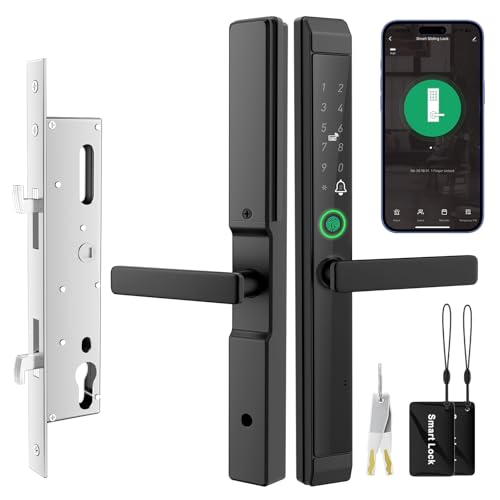
If you’re looking for a smart lock that balances strong security with flexible access options for sliding glass doors, the JNZCH Smart Sliding Door Lock (Black) stands out as a solid choice. I rely on its built-in security chip and anti-peep PIN code entry to block hacking and shoulder surfing. It supports one-time and temporary codes, plus automatic relocking. I activate it via fingerprint, IC card, app, PIN, or mechanical key-ideal for emergencies. Using the TUYA app on 2.4 GHz Wi-Fi, I monitor access logs and grant permissions remotely. It fits doors 30–55 mm thick, runs up to 6 months on 4 AA batteries, and includes a USB-C port for emergency power.
Best For: Homeowners and renters seeking a secure, versatile smart lock solution for sliding glass or slim patio doors with remote access and multiple entry options.
Pros:
- Offers multiple unlocking methods including fingerprint, app, PIN, IC card, and mechanical key for flexibility and emergency access
- Enhanced security features like anti-peep PIN, one-time codes, automatic relocking, and a built-in security chip
- Remote management via TUYA app with 2.4 GHz Wi-Fi for real-time monitoring, access logs, and temporary access sharing
Cons:
- Requires 2.4 GHz Wi-Fi (not compatible with 5 GHz networks), which may limit connectivity for some users
- Batteries not included, and long-term battery life depends on usage frequency
- Installation limited to mortise-type sliding doors within 30–55 mm thickness, excluding thicker or non-sliding doors
eLinkSmart Sliding Door Smart Lock

The eLinkSmart Sliding Door Smart Lock stands out for users who prioritize quick, tool-free installation and broad compatibility with various door thicknesses, making it an ideal choice for homeowners seeking a reliable smart lock without the hassle of drilling or complex setup. I appreciate its support for multiple access methods, including fingerprint, NFC cards, passwords, the Tuya app, and physical keys. It lets me create temporary or one-time codes for guests. The build is durable, with a waterproof, ultra-slim aluminum design and a double-hook steel mechanism. It fits doors from 22–110mm thick, installs in minutes, and comes with a 30-day refund and 180-day replacement policy.
Best For: Homeowners seeking a hassle-free, drill-free smart lock upgrade for sliding doors with wide compatibility and multiple access options.
Pros:
- Tool-free, quick installation with no drilling required, fitting most single-cylinder sliding doors
- Supports diverse unlocking methods including fingerprint, NFC, app control, and temporary access codes
- Durable, waterproof aluminum design with a reinforced double-hook steel mechanism for security
Cons:
- Requires a minimum door frame width of 35mm, which may limit use on thinner frames
- Limited to Tuya App ecosystem, potentially reducing compatibility with other smart home platforms
- Physical key override may be less convenient compared to traditional keyed locks due to slim design
eLinkSmart Slim Sliding Door Smart Lock

I’ve found the eLinkSmart Slim Sliding Door Smart Lock works best for homeowners with standard single-cylinder sliding glass doors who want a secure, no-drill upgrade - especially if they value multiple access methods and temporary entry options. It supports fingerprint, NFC cards, passwords, the Tuya app, and physical keys, plus one-time or time-limited codes for guests. The lock fits door thicknesses from 22 to 110mm and installs in 10–15 minutes without drilling. Its full steel, double-hook design is durable, and the aluminum keypad resists weather. It works on left or right-opening doors. You get a 30-day refund and 180-day exchange policy, with direct support available.
Best For: Homeowners with standard single-cylinder sliding glass doors seeking a secure, no-drill smart lock with multiple access options and guest entry features.
Pros:
- Supports multiple unlocking methods including fingerprint, NFC, password, app control, and physical keys
- Easy no-drill installation in 10–15 minutes, compatible with left or right-opening doors
- Durable full steel double-hook construction with weather-resistant aluminum keypad
Cons:
- Limited to sliding glass doors with frame width of at least 40mm (1.57 inches)
- Requires Tuya App, which may raise privacy or long-term platform reliability concerns
- Only compatible with single-cylinder door mechanisms, not suitable for all door types
Sliding Door Smart Lock with Fingerprint & App

You’ll find this sliding door smart lock ideal if you want fast, secure access with minimal effort-especially when juggling groceries or letting in guests. I appreciate its fingerprint scanner, which opens in 0.2 seconds using AI-powered recognition, and I trust its AES-256 encryption and anti-peep tech. It supports six access methods, holds up to 300 users, and lets me send temporary codes via the Tuya app. I can monitor entries, enable remote access, or trigger alarms after failed attempts. It runs 8 months on four AAA batteries, offers Type-C emergency charging, fits most doors, and comes with solid warranty and support.
Best For: Busy households, rental property managers, and tech-savvy users who want secure, keyless access with multiple user options and remote control.
Pros:
- Supports six unlocking methods including fingerprint, app, and temporary codes, ideal for families and guest access
- Fast 0.2-second AI-powered fingerprint recognition with military-grade AES-256 encryption for high security
- Long 8-month battery life with emergency Type-C charging and comprehensive app monitoring and alerts
Cons:
- Wi-Fi dependency for remote access may be a limitation during outages
- No included batteries, requiring immediate purchase for setup
- May not fit all sliding door frames despite wide compatibility range
Anweller Smart Sliding Door Lock (2085)
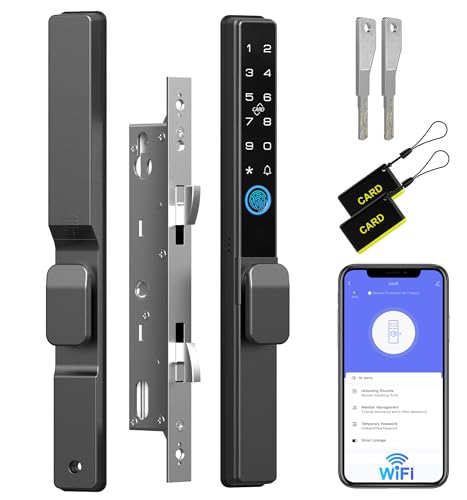
If you need a reliable smart lock for a sliding glass door and value multiple access options, the Anweller Smart Sliding Door Lock (2085) stands out with its five methods of access-fingerprint, passcode, WiFi-enabled mobile app, RFID card, and physical key-making it ideal for households with varying user preferences. It fits doors 22mm to 120mm thick and needs frames at least 41mm wide, so check your setup first. After five failed attempts, it locks out for 90 seconds and triggers a tamper alarm. The battery lasts up to 8 months, warns when low, and can be jumped with a power bank. It’s backed by a 12-month warranty and free lifetime support, with replacement or refund if issues arise.
Best For: Homeowners seeking a versatile and secure smart sliding door lock with multiple access options and long battery life.
Pros:
- Offers five unlocking methods including fingerprint, passcode, app control, RFID card, and physical key for flexible access
- Features strong security with auto-lockout after failed attempts and built-in tamper alarm
- Long battery life up to 8 months with low-battery warning and emergency power bank support
Cons:
- Requires door frames to be at least 41mm wide, limiting compatibility with narrower frames
- WiFi app control may depend on stable network connection for remote access
- No mention of auto-locking feature, which some users may expect in a smart lock
Eseesmart Sliding Door Smart Lock with Handle

The Eseesmart Sliding Door Smart Lock with Handle stands out for users who need a durable, high-capacity smart lock compatible with a wide range of sliding glass and patio doors. I’ve found it supports five access methods-fingerprint, passcode, app, RFID card, and key-making it flexible for families or businesses. It holds up to 300 users, fits door thicknesses from 22mm to 120mm, and works on left or right-opening doors thanks to its reversible handle. With an IP65 rating, it resists dust and water, operates in extreme temperatures, and withstands heavy use. I appreciate the 8-month battery life, emergency power bank charging, and 24-month warranty backed by solid support.
Best For: Homeowners, property managers, or business operators seeking a durable, high-capacity smart lock for sliding glass or patio doors with multiple access options and strong environmental resistance.
Pros:
- Supports up to 300 users with five unlocking methods including fingerprint, passcode, app, RFID card, and physical key for flexible access control
- Wide installation compatibility with door thicknesses from 22mm to 120mm and reversible handle for left or right-opening doors
- Robust IP65 rating, extreme temperature tolerance (-13°F to 149°F), and long 8-month battery life with emergency power bank charging
Cons:
- No mention of auto-lock feature, which may be expected for high-end smart locks
- App connectivity reliability depends on smartphone OS compatibility and Bluetooth range
- Physical backup key requires careful storage to prevent security risks
Sliding Door Smart Lock with Handle
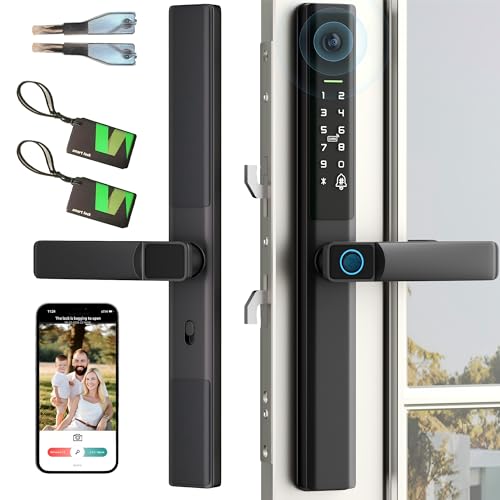
A top-tier choice for securing sliding glass and patio doors, this smart lock with integrated handle stands out for users prioritizing both physical durability and flexible access. It fits doors 22–120mm thick and requires a minimum 45mm frame width, with reversible handle options for left or right setups-just confirm your mortise compatibility first. You can open it via fingerprint, PIN, app, RFID card, or key, supporting up to 300 users. It’s built tough, with an IP65 rating, works in extreme temperatures (-12°F to 148°F), and lasts over 16,000 cycles. Battery life exceeds 8 months, includes low-power alerts, and supports emergency charging. I get lifetime support, a 1-year warranty, and a 6-month replacement option-solid backup for long-term use.
Best For: Homeowners and property managers seeking a durable, multi-access smart lock for sliding glass or patio doors with support for high-traffic user environments.
Pros:
- Supports five access methods including fingerprint, PIN, app, RFID, and key, accommodating up to 300 users
- Highly durable with IP65 weather resistance, extreme temperature tolerance, and 16,000+ lock cycle rating
- Long battery life exceeding 8 months with low-power alerts and emergency power bank charging support
Cons:
- Requires minimum 45mm frame width and compatible mortise, limiting fit for some door types
- Wi-Fi remote access may depend on stable network and app performance
- No mention of encryption or cybersecurity features for app and wireless communication
Dhiedas Sliding Door Smart Lock

You’ll find the Dhiedas Sliding Door Smart Lock ideal if you manage rented spaces or frequently grant temporary access, since it supports remote access control and one-time PINs without requiring WiFi or a hub. I use it on my patio door, and it fits doors 22–120mm thick with a frame of at least 45mm. It holds 300 users, including 9 admins, and supports fingerprint, passcode, RFID, and Bluetooth via app. I appreciate the one-touch open and backup keys. The 4 AAA batteries last about 8 months, and the USB port helps during low-power emergencies. After five wrong attempts, it locks out for 90 seconds and triggers an alarm. It’s backed by a 12-month warranty and lifetime support.
Best For: Renters, Airbnb hosts, and residential users who need secure, keyless access with remote control and temporary entry options for sliding doors.
Pros:
- Supports multiple access methods including fingerprint, RFID, passcode, app control, and mechanical keys for reliable entry
- Enables remote unlocking and one-time PIN generation without requiring WiFi or a hub, ideal for guest access
- Fits a wide range of door thicknesses (22–120mm) and includes security features like tamper alarm and 90-second lockout after failed attempts
Cons:
- Requires 4 AAA batteries (not included) with replacement needed approximately every 8 months
- USB port is for emergency power boost only, not for charging the internal batteries
- Limited to Bluetooth-only app connectivity, which may restrict remote access range compared to WiFi-enabled models
Anweller Sliding Door Lock with Fingerprint & App
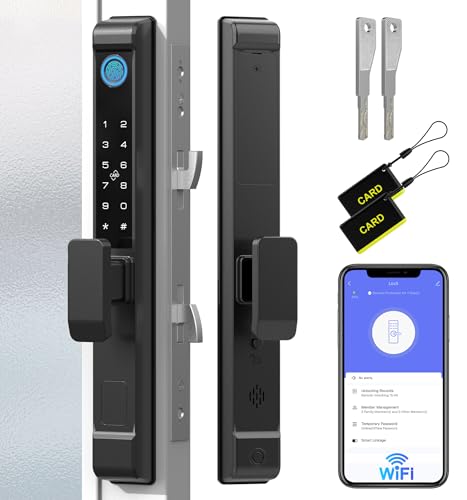
Fingerprints activate this lock in seconds-no fumbling with keys or codes-making the Anweller D208F a solid pick for homeowners prioritizing quick, keyless access without sacrificing security on sliding glass or patio doors. I appreciate its multiple access options: app control, passcode, RFID card, or mechanical key. It connects via Wi-Fi and works with iOS and Android, though it’s not directly tied to major smart home platforms. The double-hook mortise boosts strength, and the tamper alarm deters break-ins. After five wrong attempts, it locks out for 90 seconds. It fits doors 22–120mm thick and runs up to 8 months on four AAA batteries, with a low-battery warning and emergency power bank support. I recommend checking mortise compatibility before buying. It costs around $200, comes with a 12-month warranty, and includes free lifetime support. The 3.9-star rating from 44 reviews suggests decent performance, though some users report setup challenges.
Best For: Homeowners seeking secure, keyless access to sliding glass or patio doors with multiple unlocking options and smart app control.
Pros:
- Fast fingerprint and app-based access with Wi-Fi connectivity for remote control on iOS and Android devices
- Enhanced security with double-hook mortise, tamper alarm, and automatic lockout after five failed attempts
- Long battery life of up to 8 months, low-battery alerts, and emergency power bank support
Cons:
- Not directly compatible with major smart home platforms like Alexa or Google Home
- Some users report setup difficulties, especially verifying mortise compatibility
- Higher price point around $200 with batteries not included
Sliding Door Smart Lock with Fingerprint & App

This smart lock stands out for households and property managers who prioritize secure, flexible access control. I rely on its six access methods-fingerprint, passcode, app, RFID card, key, and one-time code-supporting up to 300 users, ideal for families or rentals. The fingerprint sensor works in 0.2 seconds and blocks fake attempts with AES-256 encryption. I monitor access logs in real time via the app and get alerts for failed entries or tampering. It lasts up to 8 months on four AAA batteries, with Type-C emergency charging. I can install it myself on most sliding doors and back it with a 12-month warranty and free support.
Best For: Families, rental property managers, and tech-savvy homeowners seeking secure, flexible access control with multi-user support and remote monitoring.
Pros:
- Supports six unlocking methods including fingerprint, app, and one-time codes, accommodating up to 300 users
- Fast 0.2-second biometric recognition with robust AES-256 encryption and anti-tampering alarms
- Long battery life up to 8 months with emergency Type-C charging and DIY installation for most sliding doors
Cons:
- Requires Wi-Fi and the Tuya app for remote access, which may raise privacy or compatibility concerns
- No built-in doorbell or camera for visual verification of visitors
- Physical key backup may be less convenient on sliding doors with limited exterior access
Factors to Consider When Choosing a Smart Lock for a Sliding Glass Door
You’ll want to check if the smart lock fits your sliding door’s thickness, since not all models work with every track or frame. Make sure you understand the installation steps-some need tools and drilling, while others use adhesive mounts or adjustable brackets. Look at battery life, security sensors, and whether you can lock or monitor the door from your phone, since these features affect both convenience and protection.
Door Thickness Compatibility
When selecting a smart lock for your sliding glass door, checking door thickness compatibility is essential to guarantee a secure and functional fit. Most models support doors between 22mm and 120mm thick, covering standard aluminum and glass constructions. If your door is on the slimmer side, around 22mm, look for locks specifically rated for narrow profiles. You’ll also need a frame width of at least 35mm to 45mm for proper mounting-measure yours before buying. Many smart locks include adjustable spindles and extra mounting parts, so you can fine-tune the fit across different thicknesses. Just as important: make sure the mortise design matches your door’s existing cut-out, or you might face extra work or poor performance. Always confirm these specs before purchase to avoid delays, returns, or weak security. Matching your door’s exact dimensions ensures smooth operation and reliable protection.
Installation Requirements
Matching your door’s measurements to the lock’s specifications sets the stage for a successful installation. You’ll need to confirm your door’s thickness falls within the lock’s supported range, usually 22mm to 120mm. Check that your door frame is wide enough-most models require at least 35mm to 45mm-to securely hold the locking mechanism. Look closely at the existing mortise lock cutout; if the smart lock doesn’t match its size or placement, you may face complex modifications. Decide if you want a no-drill model, since some locks install without tools and make DIY setup easier. Drilling may be necessary for others, so consider your comfort with power tools. Pick a model made specifically for sliding glass doors, with reversible handles that work whether your door opens left or right. This guarantees smooth operation and proper fit.
Power And Battery Life
A reliable smart lock for your sliding glass door depends on consistent power, and most models run on four AA or AAA batteries, delivering six to eight months of battery life under typical use. You’ll get low-battery alerts via app or sound when levels drop below 20%, so you can replace them on time. Some models offer emergency power through USB-C or micro-USB ports, letting you temporarily charge with a power bank to open the door if batteries die. Battery life varies based on how often you use it, wireless connectivity, and temperature extremes. Energy-efficient designs help stretch usage up to eight months. While most locks use standard batteries, checking power requirements upfront helps avoid unexpected maintenance. Choose models with clear alerts and backup power if you want reliable access without frequent changes.
Security Features
Though convenience matters, security should drive your smart lock choice for a sliding glass door, and several key features guarantee your home stays protected. You should pick a lock with anti-peep PIN entry, letting you press random digits before or after your code to stop onlookers from spotting it. Choose models that offer one-time or temporary passwords with time limits, so guests or workers can enter safely without getting permanent access. Look for built-in tamper alarms that trigger after five wrong attempts and disable the system for 90 seconds to block break-in tries. Always go for locks using AES-256 encryption to keep app communication safe from hackers. Also, select models with double hook mortise designs-they physically resist forced entry better and strengthen your door’s lock. These features work together to keep your home truly secure.
Remote Access Options
How often are you away from home but still need to let someone in? With remote access, you can open your sliding glass door from anywhere using a mobile app connected to a 2.4 GHz Wi-Fi network. You can also generate temporary or one-time codes, setting access as short as five minutes or for specific times. Some models let you open via keypad commands like “9 + #”, working without Wi-Fi or a gateway. Real-time monitoring sends instant alerts with entry details-user, method, and timestamp-so you always know who’s coming and going. You can add or remove users remotely, check battery levels, and get low-power warnings. These features give you full control, even when you’re not onsite. Look for strong app support and reliable connectivity to make remote management seamless and secure.
Frequently Asked Questions
Can Smart Sliding Door Locks Work During a Power Outage?
Yes, you can rely on most smart sliding door locks during a power outage because they run on batteries. You’ll keep access as long as the batteries aren’t dead, typically lasting 6–12 months. Many models alert you when power is low, so you can replace them in time. Some also offer emergency key overrides or USB backup power. Check the specs, since performance varies-opt for locks with physical backup options to stay secure when the grid fails.
Are These Locks Compatible With All Sliding Glass Door Brands?
No, you can’t assume these locks work with every sliding glass door brand. Fit depends on track width, material, and locking mechanism type. Most work with common vinyl or aluminum models, but you’ll need to check specs carefully. Measure your door’s rail and latch setup before buying. Some brands offer adjustable mounts, which help. Always confirm compatibility with the manufacturer to avoid installation issues and guarantee reliable security performance across different door designs and sizes.
Do Smart Locks Require a Hub for Phone Connectivity?
You don’t always need a hub for phone connectivity-many smart locks use Wi-Fi or Bluetooth directly. Bluetooth models connect to your phone within range, while Wi-Fi locks allow remote access without a hub. Some systems, like those using Z-Wave or Zigbee, do require a hub for full functionality and integration with voice assistants. Check the lock’s specs: hub-based options offer broader smart home compatibility but add cost and setup steps.
Can I Still Use a Key With These Smart Locks?
Yes, you can still use a key with most smart locks. Many models include a physical keyway for backup access, especially useful during power outages or tech failures. Look for smart locks with ANSI Grade 1 or 2 certification, which guarantees reliable mechanical operation. Some designs offer key override, while others rely solely on electronic entry. Check product specs carefully-hybrid options give you both convenience and peace of mind without sacrificing security or accessibility.
How Do I Reset a Smart Lock to Factory Settings?
You reset a smart lock to factory settings by pressing and holding the reset button, usually near the battery compartment, for 10–15 seconds. You’ll see a flash or hear a beep, signaling the reset. You’ll lose all user codes and Wi-Fi connections, so you’ll need to set it up again from scratch. You should consult your model’s manual because steps vary slightly. You’ll want to do this only if troubleshooting fails or moving to a new home.